用 jQuery Ajax 呼叫 WCF 服務:GET、POST、PUT、DELETE 一次學會
編輯:JQuery特效代碼
WCF 服務搭配 RESTful 路由之後,可以用標準的 HTTP 動詞對應 CRUD 操作,而 jQuery 的 $.ajax() 只要換 type 就能對應過去。以下四段程式說明各自的語意。
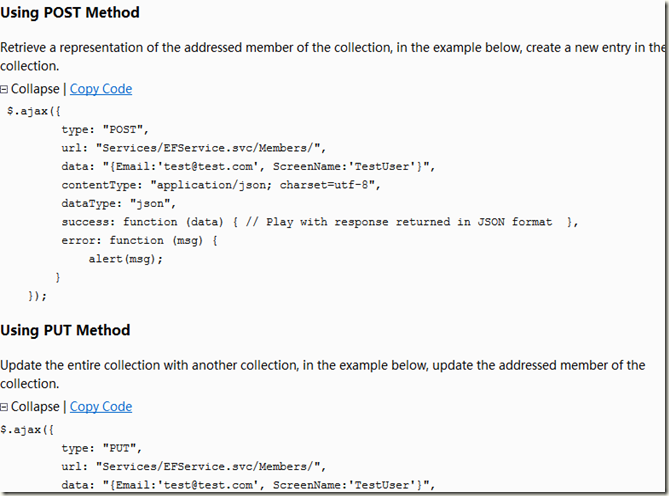
POST:新增
Retrieve a representation of the addressed member of the collection,在此例中是於集合中新增一筆。
$.ajax({
    type: "POST",
    url: "Services/EFService.svc/Members/",
    data: "{Email:'test@test.com', ScreenName:'TestUser'}",
    contentType: "application/json; charset=utf-8",
    dataType: "json",
    success: function (data) { /* 處理 JSON 回應 */ },
    error: function (msg) { alert(msg); }
});
PUT:更新
Update the entire collection with another collection,在此例中是更新被定址的那一筆成員。
$.ajax({
    type: "PUT",
    url: "Services/EFService.svc/Members/",
    data: "{Email:'test@test.com', ScreenName:'TestUser'}",
    contentType: "application/json; charset=utf-8",
    dataType: "json",
    success: function (data) { /* 處理 JSON 回應 */ },
    error: function (msg) { alert(msg); }
});
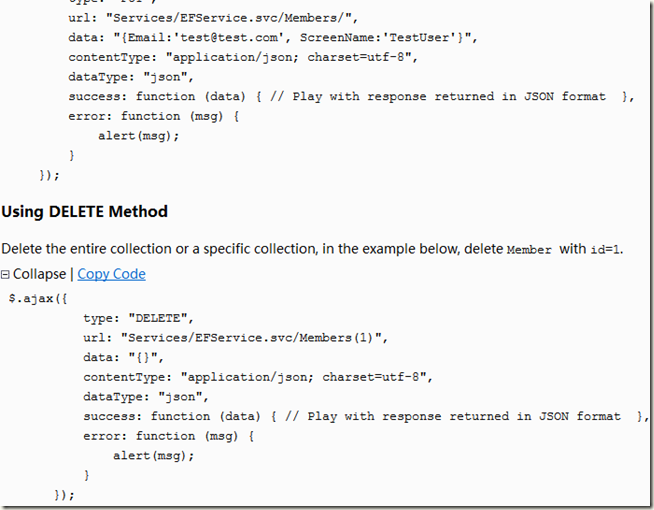
DELETE:刪除
刪除整個集合或集合中的某一筆,此例刪除 id=1 的成員。
$.ajax({
    type: "DELETE",
    url: "Services/EFService.svc/Members(1)",
    data: "{}",
    contentType: "application/json; charset=utf-8",
    dataType: "json",
    success: function (data) { /* 處理 JSON 回應 */ },
    error: function (msg) { alert(msg); }
});
GET:查詢
把 type 換成 GET,並在網址上帶參數即可取得集合或單筆資料,這也是四者中最單純的一種。
實作要點
四段程式共同的關鍵是 contentType: "application/json; charset=utf-8":WCF 的 WebHttpBinding 需要明確收到 JSON 才能正確序列化,少了它經常會出現 400 錯誤。另外,若要讓 PUT/DELETE 真正被接受,服務端記得在 web.config 中打開 webHttp 的 httpHelpPageEnabled 與 PUT/DELETE 的 WebInvoke 設定,並確認 IIS 的 WebDAV 模組沒有把這些動詞攔下來。