jquery.artwl.thickbox.js:簡單好用的 jQuery 彈出層插件
編輯:JQuery特效代碼
本文介紹一款輕巧易用的 jQuery 彈出層插件 jquery.artwl.thickbox.js。它把 JS 與 CSS 封裝在同一個檔案中,做到一行程式碼即可調用,使用起來非常方便。
完整示例
<!DOCTYPE html>
<html>
<head>
<meta http-equiv="Content-Type" content="text/html; charset=utf-8"/>
<title>彈出層插件:jquery.artwl.thickbox.js</title>
<script src="/js_lib/jQuery-1.7.1.js" type="text/javascript"></script>
<script type="text/javascript">
/* File Created: 三月 1, 2012 Author:artwl blog:https://www.poluoluo.com */
;(function ($) {
$.extend({
artwl_bind: function (options) {
options=$.extend({
showbtnid:"",
title:"",
content:""
},options);
var mask = '<div id="artwl_mask"></div>';
var boxcontain = '<div id="artwl_boxcontain">\
<a id="artwl_close" href="javascript:void(0);" title="Close"></a>\
<div id="artwl_showbox">\
<div id="artwl_title">\
<h2>\
Title</h2>\
</div>\
<div id="artwl_message">\
Content<br />\
</div>\
</div>\
</div>';
var cssCode = 'html, body, h1, h2, h3, h4, h5{margin: 0px;padding: 0px;}\
#artwl_mask{background-color: #000;position: absolute;top: 0px;left: 0px;width: 100%;height: 100%;opacity: 0.5;filter: alpha(opacity=50);display: none;}\
#artwl_boxcontain{margin: 0 auto;position: absolute;z-index: 2;line-height: 28px;display: none;}\
#artwl_showbox{padding: 10px;background: #FFF;border-radius: 5px;margin: 20px;min-width:300px;min-height:200px;}\
#artwl_title{position: relative;height: 27px;border-bottom: 1px solid #999;}\
#artwl_close{position: absolute;cursor: pointer;outline: none;top: 0;right: 0;z-index: 4;width: 42px;height: 42px;overflow: hidden;background-image: url(/upload/201203/20120301220903376.png);_background: none;}\
#artwl_message{padding: 10px 0px;overflow: hidden;line-height: 19px;}';
if ($("#artwl_mask").length == 0) {
$("body").append(mask + boxcontain);
$("head").append("<style type='text/css'>" + cssCode + "</style>");
if(options.title!=""){
$("#artwl_title").html(options.title);
}
if(options.content!=""){
$("#artwl_message").html(options.content);
}
}
$("#"+options.showbtnid).click(function () {
var height = $("#artwl_boxcontain").height();
var width = $("#artwl_boxcontain").width();
$("#artwl_mask").show();
$("#artwl_boxcontain").css("top", ($(window).height() - height) / 2).css("left", ($(window).width() - width) / 2).show();
if ($.browser.msie && $.browser.version.substr(0, 1) < 7) {
width = $(window).width() > 600 ? 600 : $(window).width() - 40;
$("#artwl_boxcontain").css("width", width + "px").css("top", ($(window).height() - height) / 2).css("left", ($(window).width() - width) / 2).show();
$("#artwl_mask").css("width", $(window).width() + "px").css("height", $(window).height() + "px").css("background", "#888");
$("#artwl_close").css("top", "30px").css("right", "30px").css("font-size", "20px").text("關閉");
}
});
$("#artwl_close").click(function () {
$("#artwl_mask").hide();
$("#artwl_boxcontain").hide();
});
},
artwl_close:function(options){
options=$.extend({
callback:null
},options);
$("#artwl_mask").hide();
$("#artwl_boxcontain").hide();
if(options.callback!=null){
options.callback();
}
}
});
})(jQuery);
$(function () {
$.artwl_bind({ showbtnid: "btn_show", title: "From Cnblogs Artwl", content: $("#Content").html() });
});
function test() {
alert("Before close");
$.artwl_close({ callback: other });
}
function other() {
alert("After close");
}
</script>
</head>
<body>
<h3>彈出層插件jquery.artwl.thickbox.js(https://www.poluoluo.com)</h3>
<input type="button" value="Click Me" id="btn_show" />
<span id="Content" style="display:none;">
<a href="https://www.poluoluo.com">Artwl</a><br />
<input type="button" onclick="test()" value="Test"/>
</span>
</body>
</html>
插件原理
所有彈出層的原理都大同小異:用一個全螢幕半透明 DIV 做遮罩,再在其上顯示一個承載內容的層,其餘就是 CSS 的運用。本插件把 JS 與 CSS 封裝在同一個檔案中,因此做到一行程式碼調用。
調用方式
引入此 JS 檔後,在頁面載入方法中呼叫即可:
$.artwl_bind({ showbtnid: "btn_show", title: "From Cnblogs Artwl", content: $("#Content").html() });
三個參數分別是:觸發事件的元素 ID、彈出層標題、彈出層內容。若需要調整樣式,可直接修改插件內的 CSS 程式碼。
IE6 相容處理
由於 IE6 不支援透明度,插件對此做了特殊處理。IE6 下的顯示效果:
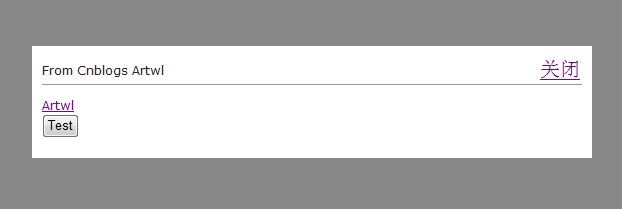
IE6
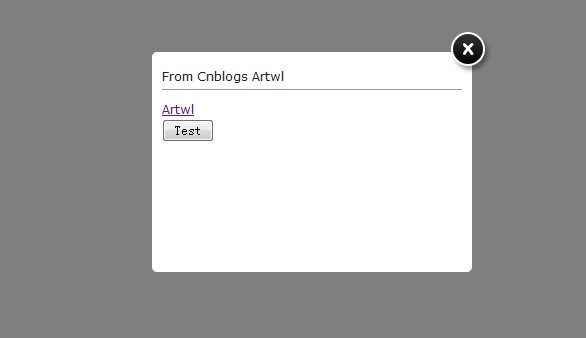
其他瀏覽器
- 上一篇文章: jQuery AJAX 調用後台方法與 Web 服務的實作分享
- 下一篇文章: jQuery 表單插件 Form.js 官方功能詳解