ASP.NET jQuery 實例 7:用 jQuery 取得 DropDownList 的 Text 與 Value
編輯:JQuery特效代碼
在 ASP.NET 中搭配 jQuery 操作伺服器控制項時,最常踩到的坑就是「用 $(this).text() 拿到的不是我選的那一項」。本文示範正確的取法。
界面程式碼
<form id="form1" runat="server">
<div align="center">
<fieldset style="width: 400px; height: 80px;">
<p>
選擇顏色:
</p>
<asp:DropDownList ID="ddlColor" runat="server">
<asp:ListItem Text="--- 請選擇 ---" Value=""></asp:ListItem>
<asp:ListItem Text="紅色" Value="1"></asp:ListItem>
<asp:ListItem Text="黃色" Value="2"></asp:ListItem>
<asp:ListItem Text="藍色" Value="3"></asp:ListItem>
</asp:DropDownList>
</fieldset>
</div>
<br />
<div align="center" id="message">
</div>
</form>
腳本草稿
<script src="Scripts/jquery-1.4.1-vsdoc.js" type="text/javascript"></script>
<script type="text/javascript">
$(document).ready(function () {
// 綁定 keyup 和 change 事件
$("#<%=ddlColor.ClientID %>").bind("keyup change", function () {
if ($(this).val() != "") {
// 這裡需要注意,$(this).text() 獲取的是整個集合的 text 屬性內容,
// 所以需要再過濾下,把選中的項取出來
$("#message").text("Text: " + $(this).find(":selected").text() + "Value: " + $(this).val());
}
else {
$("#message").text("");
}
});
});
</script>
重點說明
- 取 Value:直接用
$(this).val()即可,它回傳的是目前選中選項的 value。 - 取 Text:必須先
find(":selected")篩出選中的那一個 option,再取.text()。直接對下拉選單本身呼叫.text()會把全部選項文字串在一起。 - ClientID:因為 ASP.NET 會改寫控制項的實際 id,所以選擇器裡要用
<%=ddlColor.ClientID %>輸出真正的 id。 - 同時綁定 keyup 與 change:
bind()支援以空白分隔一次掛多個事件,鍵盤操作與滑鼠選擇都能即時回應。
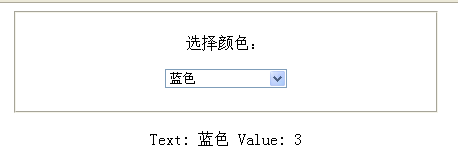
選擇一種顏色後的顯示結果:
- 上一篇文章: jQuery 表單驗證外掛 formValidator 改進版:樣式解耦與效能優化實錄
- 下一篇文章: ASP.NET jQuery 實例 8:動態為 DropDownList 追加清單內容