ASP.NET jQuery 實例 10:動態修改 HyperLink 的 URL 與 bind/live 的差別
編輯:JQuery特效代碼
本文示範如何用 RadioButtonList 的選擇結果,即時改變 HyperLink 控制項要跳轉的網址,並順帶釐清 bind() 與 live() 的適用範圍。
1. 界面程式碼
<form id="form1" runat="server">
<div align="left">
<fieldset style="width: 300px; height: 200px;">
<table cellpadding="0" cellspacing="0" border="0">
<tr>
<td style="width: 10px">
</td>
<td>
<p>
更新網址:</p>
<asp:RadioButtonList ID="rblUrl" runat="server">
<asp:ListItem Text="新浪" Value="https://www.sina.com.cn"></asp:ListItem>
<asp:ListItem Text="百度" Value="https://www.baidu.com"></asp:ListItem>
<asp:ListItem Text="網易" Value="https://www.163.com"></asp:ListItem>
</asp:RadioButtonList>
<br />
<asp:HyperLink ID="hyperLink" runat="server">點擊這兒</asp:HyperLink>
</td>
</tr>
</table>
</fieldset>
</div>
</form>
要知道的是,RadioButtonList 最終會被渲染成一個 <table>,而每個成員則是 <input type="radio" />。因此我們可以用 radio 的 change 事件來完成這件事。
2. 腳本草稿
<head runat="server">
<title>Recipe10</title>
<script src="Scripts/jquery.js" type="text/javascript"></script>
<script type="text/javascript">
$(document).ready(function () {
$("input[type=radio]").bind("change", function () {
$("#<%=hyperLink.ClientID %>").attr("href", $(this).val());
});
});
</script>
</head>
核心邏輯只有一行:.attr("href", $(this).val()),把選中 radio 的 value 寫進連結的 href 屬性。
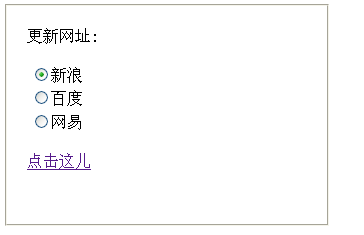
3. 實作效果
4. 另一種綁定寫法
$("input=[type=radio]").live("change", function(){
$("a").attr("href", $(this).val());
});
5. live() 與 bind() 的差異
live() 可以把事件附加到「現在存在」以及「將來才出現」的頁面元素上;bind() 則只能附加到已經載入完成的元素上。
也就是說,bind() 適合處理靜態元素,而 live() 同時涵蓋靜態與動態產生的元素。舉例來說,若你的 radio 是透過 AJAX 回應後才插入 DOM 的,用 bind() 就會綁定失敗,此時必須改用 live()(在較新版本的 jQuery 中則建議改用 on() 並搭配事件委派)。
補充一個小細節:上面第二種寫法中的 "input=[type=radio]" 屬性選擇器語法並不標準,正確寫法應為 "input[type=radio]"。
- 上一篇文章: ASP.NET jQuery 實例 9:用 HyperLink 控制項實作返回頂部
- 下一篇文章: ASP.NET jQuery 實例 11:用 jQuery Validation 外掛實作登入頁驗證