jQuery 版本迭代很快,同一件事在不同版本裡的推薦寫法並不相同。以下程式碼以 jQuery 1.4 以上版本為基準整理,涵蓋單選、下拉與多選三類控件的常見操作。
一、RadioButton 單選按鈕

取得選中值(三種寫法皆可):
$('input:radio:checked').val();
$("input[type='radio']:checked").val();
$("input[name='rd']:checked").val();
設定選中狀態:第一個、最後一個、依索引、依 value 各有對應寫法。
$('input:radio:first').attr('checked', 'checked');
$('input:radio:last').attr('checked', 'true');
$('input:radio').eq(索引值).attr('checked', 'true'); // 索引值 = 0,1,2...
$("input:radio[value='rd2']").attr('checked','true');
其中 attr("checked",'checked')、attr("checked",'true')、attr("checked", true) 三者效果等價。
刪除與走訪:
$("input:radio[value='rd2']").remove();
$("input:radio").eq(2).remove(); // 刪除第 3 個
$('input:radio').each(function(index, domEle){ /* 寫入程式碼 */ });
二、DropDownList 下拉選單
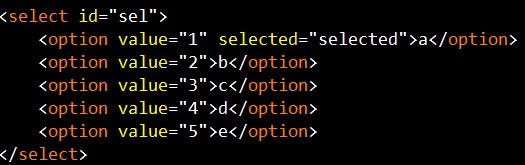
取值:value 用 val(),文字用 text()。
$('select#sel option:selected').val();
$('select#sel').find('option:selected').text();
索引與長度:
$('select#sel').get(0).selectedIndex; // 當前索引
$('select#sel')[0].options.length; // 選項總數
設定選中項:
$('select#sel option:first').attr('selected','true');
$('select#sel')[0].selectedIndex = 索引值;
$("select#sel option[value='4']").attr('selected', 'true');
刪除與新增:
$("select#sel option[value='3']").remove();
$("select#sel option:first").remove();
$("select#sel").append("<option value='6'>f</option>"); // 尾端新增
$("select#sel").prepend("<option value='0'>0</option>"); // 頭端新增
$('select#sel option').each(function (index, domEle) { /* 走訪 */ });
三、CheckBox 多選框

取得多個選中項:
$('input:checkbox').each(function() {
if ($(this).attr('checked') == true) { alert($(this).val()); }
});
批量勾選:slice() 一次選取一段範圍,全選則對全部元素設 checked,取消全選則設為 false。
$('input:checkbox').slice(0,2).attr('checked','true'); // 同時選中第 1、2 個
$('input:checkbox').each(function() { $(this).attr('checked', true); });
$('input:checkbox').each(function () { $(this).attr('checked', false); });
checked、selected、disabled 這類「動態屬性」應改用 prop() 而非 attr(),否則在只讀/可讀狀態切換上會出現預期外的行為。新專案建議直接寫成 $(x).prop('checked', true)。