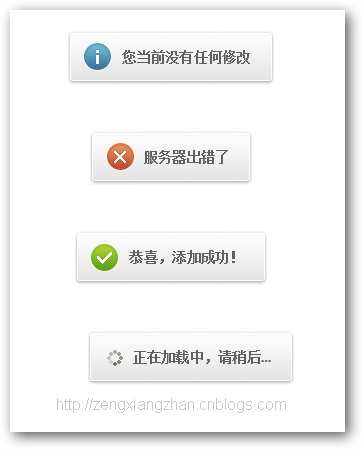
騰訊 UED 這款提示組件的優雅之處在於「不打斷」:訊息浮現在畫面中央上方,幾秒後自動淡去,既傳達了結果,又不佔用使用者注意力。以下拆解它的完整實作。
一、視覺:一張精靈圖搞定所有狀態
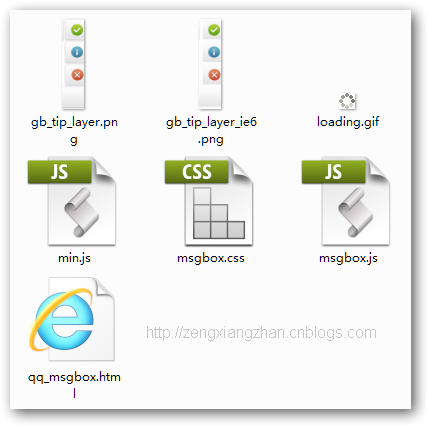
成功、失敗、警告、清除、載入五種圖示全部排在同一張背景圖上,用 background-position 切換。這是雪碧圖(CSS Sprite)的標準用法,只發一次請求就能應付所有狀態:
.zeng_msgbox_layer,
.zeng_msgbox_layer .gtl_ico_succ,
.zeng_msgbox_layer .gtl_ico_fail,
.zeng_msgbox_layer .gtl_ico_hits,
.zeng_msgbox_layer .gtl_ico_clear,
.zeng_msgbox_layer .gtl_end {
display:inline-block; height:54px; line-height:54px; font-weight:bold;
font-size:14px; color:#606060;
background-image:url("gb_tip_layer.png");
_background-image:url("gb_tip_layer_ie6.png");
background-repeat:no-repeat;
}
.zeng_msgbox_layer_wrap {
width:100%; position:fixed; _position:absolute;
top:46%; left:0; text-align:center; z-index:65533;
}
.zeng_msgbox_layer {
background-position:0 -161px; background-repeat:repeat-x;
padding:0 18px 0 9px; margin:0 auto; position:relative;
}
.zeng_msgbox_layer .gtl_ico_succ { background-position:-6px 0; left:-45px; top:0; width:45px; position:absolute; }
.zeng_msgbox_layer .gtl_ico_fail { background-position:-6px -108px; left:-45px; top:0; width:45px; position:absolute; }
.zeng_msgbox_layer .gtl_ico_hits { background-position:-6px -54px; left:-45px; top:0; width:45px; position:absolute; }
.zeng_msgbox_layer .gtl_end { background-position:0 0; position:absolute; right:-6px; top:0; width:6px; }
幾個細節:外層 wrap 用 position:fixed 搭配 text-align:center 讓提示永遠水平置中,並用 _position:absolute 這種底線前綴 hack 為 IE6 降級;z-index:65533 確保它壓在絕大多數彈窗之上。
二、跨瀏覽器工具函式
組件先鋪了一層薄薄的 DOM 與樣式工具。getStyle/setStyle 是重點,裡面處理了大量相容性細節:
getStyle: function(el, property) {
var w3cMode = document.defaultView && document.defaultView.getComputedStyle,
computed = !w3cMode ? null : document.defaultView.getComputedStyle(el, ''),
value = "";
switch (property) {
case "float": property = w3cMode ? "cssFloat" : "styleFloat"; break;
case "opacity":
if (!w3cMode) {
var val = 100;
try { val = el.filters['DXImageTransform.Microsoft.Alpha'].opacity; } catch (e) {}
return val / 100;
} else { return parseFloat((computed || el.style)[property]); }
case "backgroundPositionX":
if (w3cMode) { property = "backgroundPosition"; return ((computed || el.style)[property]).split(" ")[0]; }
}
return w3cMode ? (computed || el.style)[property] : (el.currentStyle[property] || el.style[property]);
}
setStyle 則反向處理:float 要分流成 cssFloat/styleFloat,opacity 在舊 IE 要轉成 filter: alpha(opacity=xx),數值型的值自動補 px(z-index、font-weight、line-height 等例外則不補)。此外還有 getScrollTop 與 getClientHeight 用 Math.max 與 compatMode 判斷來抹平 quirks mode 的差異。
三、字串格式化
模板替換用一個簡短的 format 完成,避免長字串拼接:
ZENG.string.format = function(str) {
var args = Array.prototype.slice.call(arguments), v;
str = String(args.shift());
if (args.length == 1 && typeof (args[0]) == 'object') { args = args[0]; }
return str.replace(/\{([\d\w\.]+)\}/g, function(m, n) {
v = ZENG.object.route(args, n);
return v === undefined ? m : v;
});
};
四、顯示與隱藏
show 依 type 決定圖示 class,把訊息填進模板後交給 _setPosition 定位並啟動計時器:
ZENG.msgbox.show = function(msgHtml, type, timeout, opts) {
var _s = ZENG.msgbox,
template = '<span class="zeng_msgbox_layer" style="display:none;z-index:10000;" id="mode_tips_v2"><span class="gtl_ico_{type}"></span>{loadIcon}{msgHtml}<span class="gtl_end"></span></span>',
loading = '<img src="' + (opts.customIcon || _s.loadingAnimationPath) + '" alt="" />',
typeClass = [0, 0, 0, 0, "succ", "fail", "clear"], mBox, tips;
mBox = ZENG.dom.get("q_Msgbox") || ZENG.dom.createElementIn("div", document.body, false, {className: "zeng_msgbox_layer_wrap"});
mBox.innerHTML = ZENG.string.format(template, {type: typeClass[type] || "hits", msgHtml: msgHtml || "", loadIcon: type == 6 ? loading : ""});
_s._setPosition(mBox, timeout, opts.topPosition);
};
_setPosition 負責垂直定位,並順便處理 IE6 的絕對定位偏移:
var bt = ZENG.dom.getScrollTop(), ch = ZENG.dom.getClientHeight(), t = Math.floor(ch / 2) - 40;
ZENG.dom.setStyle(tips, "top", ((document.compatMode == "BackCompat" || ZENG.userAgent.ie < 7) ? bt : 0) + ((typeof (topPosition) == "number") ? topPosition : t) + "px");
clearTimeout(_s._timer);
tips.firstChild.style.display = "";
timeout && (_s._timer = setTimeout(_s.hide, timeout));
隱藏則是 hide → _hide,先清 timer 再把整個 wrap 設為 display:none。先 clearTimeout 再重設這個順序很重要,否則連續觸發時舊的計時器會提早把新提示關掉。
五、呼叫方式
ZENG.msgbox.show("設置成功!", 4, 2000);
ZENG.msgbox.show("服務器繁忙,請稍後再試。", 1, 2000);
ZENG.msgbox.show("數據拉取失敗", 5, 2000);
ZENG.msgbox.show(" 正在加載中,請稍後...", 6, 8000);
四個參數分別是:訊息 HTML、型別(1 一般/4 成功/5 失敗/6 載入中)、顯示毫秒數、以及選用的設定物件(可指定 topPosition 或 customIcon)。載入型別會顯示轉圈圖,且 timeout 通常給得比一般提示長。