jQuery 的 $.post 與 $.ajax 呼叫 WCF ajax service 時的注意事項
編輯:JQuery特效代碼
以下示範以 $.post 與 $.ajax 兩種方式呼叫 WCF ajax service 的差異:
$.post('<%=this.AppPath %>DataService/InventoryUIService.svc/Rename',
odata,
function (result) {
$dialogProcessing.dialog("close");
if (result.Success) {
alert("Success");
}
else {
var msg = "Your submit fauiler, Detail message is:" + result.ErrorMessage;
window.alert(msg);
}
},
"json");

$.ajax({
url: '<%=this.AppPath %>DataService/InventoryUIService.svc/Rename',
type: 'POST',
contentType: 'application/json',
dataType: 'json',
data: odata,
success: function (result) {
if (result.Success) {
alert("Success");
}
else {
var msg = "Your submit fauiler, Detail message is:" + result.ErrorMessage;
window.alert(msg);
}
},
error: function (jqXHR, textStatus, errorThrown) {
var msg = "Your submit throw a error, \r\nError message is:" + $(jqXHR.responseText).text();
window.alert(msg);
}
});
以下為 TCP Trace 的擷圖。
$.post:
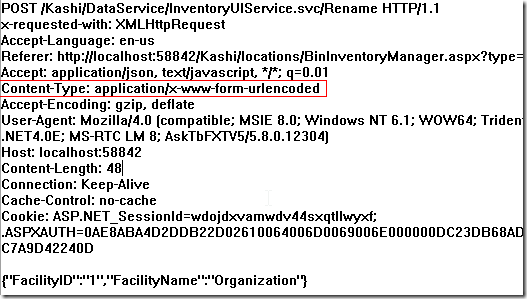
$.ajax:
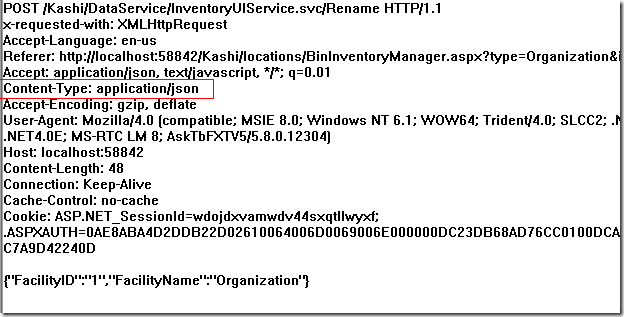
從擷圖可以感覺到,$.post 似乎是用來提交表單的;而若要与 WCF ajax service 溝通,就必須改用 $.ajax 並明確指定 Content-Type 為 application/json。
後來查到的相關資料:https://stackoverflow.com/questions/2845459/jquery-how-to-make-post-use-contenttype-application-json
以上皆為個人理解所寫,若有疏漏之處,歡迎指正。
- 上一篇文章: 用 jQuery 實現簡易拖拽排序效果的完整代碼
- 下一篇文章: 用 jQuery 實現拖拽元素到指定區域內的效果