zShowBox:純 jQuery 手寫的圖片放大燈箱(含相容性處理)
編輯:JQuery特效代碼
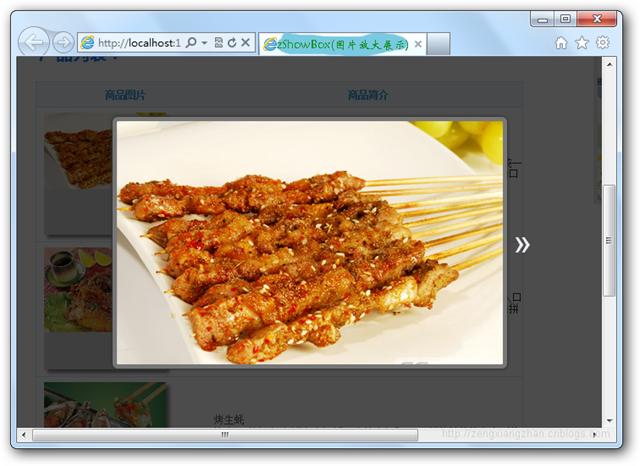
這是一個不依賴任何外掛的圖片放大展示腳本。原理很直覺:掃描指定容器內所有指向圖片檔的連結,替它們掛上統一的 class,點擊後在頁面頂層疊一層半透明遮罩與一張大圖,再補上左右翻頁與縮放適配。
zShowBox.js
/*
* zShowBox(圖片放大展示)
*/
function zShowBox(domChunk) {
// 為容器內每個圖片連結加上 class="zshowbox",並依序編號
var zcounter = 0;
$(domChunk + ' a').each(function () {
var a_href = $(this)[0].href.toLowerCase();
var file_type = a_href.substring(a_href.lastIndexOf('.'));
if (file_type == '.jpeg' || file_type == '.jpg' || file_type == '.png'
|| file_type == '.gif' || file_type == '.bmp') {
$(this).addClass('zshowbox').attr('id', 'zsb-' + zcounter);
zcounter++;
}
});
$(domChunk + ' a.zshowbox').click(function () {
var current = $(this).attr('id').split('zsb-')[1],
pagesize = zsb_getPageSize(),
zsb_img_url = $(this).attr('href'),
css_zsb_bg = 'z-index:9999;overflow:hidden;position:fixed;left:0;top:0;'
+ 'width:100%;height:100%;background:#000 url(' + loadingimg
+ ') no-repeat center center;',
css_zsb = 'z-index:99999;position:fixed;left:50%;top:50%;',
css_zsb_img = 'display:none;border:5px solid #777;border-radius:6px;'
+ '-moz-border-radius:6px;-webkit-border-radius:6px;'
+ 'box-shadow:1px 1px 5px #333,-1px -1px 5px #333;'
+ '-moz-box-shadow:1px 1px 5px #333,-1px -1px 5px #333;'
+ '-webkit-box-shadow:1px 1px 5px #333,-1px -1px 5px #333;',
css_zsb_p_n = 'display:none;cursor:pointer;position:absolute;top:50%;'
+ 'line-height:80px;margin:-40px 0 0 0;color:#eee;'
+ 'text-shadow:1px 3px 5px #000;font-size:40px;'
+ 'font-family:Arial,Tahoma;';
// 不支援 position:fixed 的舊 IE 直接放棄,避免版面爆掉
if (typeof document.body.style.maxHeight === "undefined") {
alert('IE6 太老舊了……');
return false;
} else {
$('body').append(
'<div id="zsb_bg" style="' + css_zsb_bg + '"></div>'
+ '<div id="zsb" style="' + css_zsb + '">'
+ '<img id="zsb_img" style="' + css_zsb_img + '" />'
+ '<p id="zsb_prev" style="left:-30px;' + css_zsb_p_n + '">«</p>'
+ '<p id="zsb_next" style="right:-30px;' + css_zsb_p_n + '">»</p>'
+ '</div>'
);
$('#zsb_bg').fadeTo(600, 0.7);
zsh_img('#zsb_img', zsb_img_url, pagesize, current, zcounter);
// 上一張 / 下一張
$('#zsb_prev,#zsb_next').click(function () {
if ($(this).attr('id') == 'zsb_prev') current--; else current++;
$(this).parent().prev().css("background-image", 'url(' + loadingimg + ')');
$('#zsb').find('img').remove().end()
.append('<img id="zsb_img" style="' + css_zsb_img + '" />');
zsb_img_url = $('#zsb-' + current).attr('href');
zsh_img('#zsb_img', zsb_img_url, pagesize, current, zcounter);
return false;
});
// 點遮罩或圖片關閉
$('#zsb_bg,#zsb_img').click(function () {
$('#zsb_bg,#zsb_img').unbind('click');
$('#zsb_bg,#zsb').fadeOut(400, function () { $(this).remove(); });
return false;
});
}
return false;
});
}尺寸計算:zsh_img()
圖片載入完成後,先取得視窗可用寬高(各留 100px 邊距),再等比縮放到不超出範圍為止,最後用負的 margin 把圖片推回畫面正中央。
function zsh_img(img_id, zsb_img_url, pagesize, current, zcounter) {
    $('#zsb_prev,#zsb_next').hide();

    // IE 下 ajax 會快取,導致 load 事件不觸發,加個隨機數強制重新載入
    $(img_id).attr('src', zsb_img_url + '?t=' + Math.random()).load(function () {
        var img_w, img_h;
        var x = pagesize[0] - 100, y = pagesize[1] - 100;

        // imgReady:圖片檔頭就緒即可取尺寸,比等整張圖下載完快得多
        imgReady(zsb_img_url, function () {
            img_w = this.width; img_h = this.height;
        });

        if (img_w > x) {
            img_h = img_h * (x / img_w); img_w = x;
            if (img_h > y) { img_w = img_w * (y / img_h); img_h = y; }
        } else if (img_h > y) {
            img_w = img_w * (y / img_h); img_h = y;
            if (img_w > x) { img_h = img_h * (x / img_w); img_w = x; }
        }

        var marginleft = -(img_w / 2 + 5) + 'px',
            margintop = -(img_h / 2 + 5) + 'px';
        img_w = img_w + 'px'; img_h = img_h + 'px';

        $(this).css({ "width": img_w, "height": img_h }).fadeIn(600)
            .parent().css({ "margin-left": marginleft, "margin-top": margintop })
            .prev().css("background-image", "none");

        if (current > 0) { $('#zsb_prev').show(); }
        if (current < zcounter - 1) { $('#zsb_next').show(); }
    });
}

function zsb_getPageSize() {
    var de = document.documentElement;
    var w = window.innerWidth || self.innerWidth
        || (de && de.clientWidth) || document.body.clientWidth;
    var h = window.innerHeight || self.innerHeight
        || (de && de.clientHeight) || document.body.clientHeight;
    return [w, h];
}

// 依 zshowbox.js 自身路徑推導 loading 圖的位置
var loadingimg = (function loadingimg() {
    var i = 0, got = -1, url,
        len = document.getElementsByTagName('script').length;
    while (i <= len && got == -1) {
        url = document.getElementsByTagName('script')[i].src;
        got = url.indexOf('/zshowbox.js');
        i++;
    }
    return url.replace('/zshowbox.js', '/zshowbox-loading.gif');
})();
imgReady:只讀檔頭就拿到寬高
傳統做法要等 onload 才知道圖片多大,大圖使用者得盯著空白等。imgReady 用輪詢檢查 Image 物件的寬高,一旦有值就代表檔頭已解析完成,可以立刻回呼,體感快很多。
/**
 * 圖片檔頭資料就緒事件 —— 更快取得圖片尺寸
 * @param {String}   url   圖片路徑
 * @param {Function} ready 尺寸就緒
 * @param {Function} load  載入完畢(可選)
 * @param {Function} error 載入失敗(可選)
 */
var imgReady = (function () {
    var list = [], intervalId = null,
        tick = function () {
            var i = 0;
            for (; i < list.length; i++) {
                list[i].end ? list.splice(i--, 1) : list[i]();
            }
            !list.length && stop();
        },
        stop = function () {
            clearInterval(intervalId);
            intervalId = null;
        };
    return function (url, ready, load, error) {
        var onready, width, height, newWidth, newHeight,
            img = new Image();
        img.src = url;

        // 已命中快取,直接回呼
        if (img.complete) {
            ready.call(img);
            load && load.call(img);
            return;
        }

        width = img.width; height = img.height;

        img.onerror = function () {
            error && error.call(img);
            onready.end = true;
            img = img.onload = img.onerror = null;
        };

        onready = function () {
            newWidth = img.width; newHeight = img.height;
            if (newWidth !== width || newHeight !== height
                || newWidth * newHeight > 1024) {
                ready.call(img);
                onready.end = true;
            }
        };
        onready();

        img.onload = function () {
            // onload 有時會比輪詢快,這裡補一次檢查確保 ready 優先
            !onready.end && onready();
            load && load.call(img);
            // IE 的 gif 動畫會反覆觸發 onload,清空即可
            img = img.onload = img.onerror = null;
        };

        if (!onready.end) {
            list.push(onready);
            // 全域只保留一個計時器,降低瀏覽器負擔
            if (intervalId === null) intervalId = setInterval(tick, 40);
        }
    };
})();
呼叫方式
zShowBox('.gridlist');只要容器選擇器對,裡面的圖片連結就會自動具備放大能力,不需要一張張手動綁定。
載入動畫圖示:
原始打包下載地址請見原頁面。