用 jQuery 做簡潔動態的頂部訊息提示條
編輯:JQuery特效代碼
簡單、好看、有動畫、體驗好——這是這個提示條的設計目標。它固定在頁面頂端滑出,幾秒後自動收起;若是錯誤類型的訊息,則多一個關閉按鈕讓使用者手動處理。
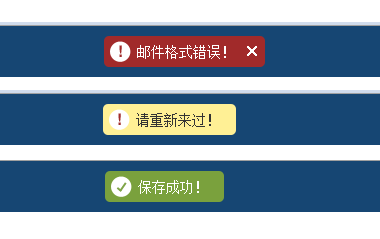
本範例基於 jQuery 1.6.2。
HTML 結構
<div id="message-dock">
  <div id="message-sleeve" class="group">
    <p>
      <span class="sprite message-icon"></span>
      <span id="message-text"></span>
      <a class="dismiss"></a>
    </p>
  </div>
</div>
呼叫方式
<script type="text/javascript" src="sysmsg.js"></script>
<script type="text/javascript">
ZENG.SysMsg.show('郵件格式錯誤!', "error");
ZENG.SysMsg.show('請重新來過!', "alert");
ZENG.SysMsg.show('保存成功!');          // 不傳 type 即為 success
</script>
JavaScript
/*!
 * jQuery JavaScript SysMsg v1.0
 * jQuery.sysmsg.js
 * Date: 2011-08-01
 */
if (!window.ZENG) var ZENG = {};

ZENG.add = function(d, f) {
  var j;
  if ($.isFunction(f.init)) {
    j = f.init;
    delete f.init;
    $.extend(true, j.prototype, f);
    this[d] = j;
  } else {
    this[d] = f;
  }
};

ZENG.add("SysMsg", function() {
  function d(u, D, v) {                  // 顯示訊息
    D || (D = "success");
    v = v || D == "error";               // error 類型不自動關閉
    if (o) {                             // 已有訊息在顯示 → 排隊
      h.push(function() { d(u, D) });
      f();                               // 先把目前的收起來
    } else {
      m.html(u);
      i.removeClass().addClass(D).show().animate({ top: 0 }, 200, function() {
        v || j();                        // 非 error 才設定自動關閉
      });
      o = 1;
    }
  }
  function f() {                         // 收起
    i.animate({ top: "-50px" }, 200, function() {
      i.hide();
      o = 0;
      h.length && h.shift()();           // 播放下一則排隊訊息
    });
  }
  function j() {                         // 延遲自動關閉
    setTimeout(function() { f() }, 2000);
  }

  var o, h = [],
      i = $("#message-dock"),
      m = i.find("#message-text");

  $(".dismiss", "#message-dock").live("click", function(u) {
    f();
    u.preventDefault();
  });

  return { show: d };
}());
值得欣賞的兩個設計:佇列機制(h 陣列)讓連續觸發的多則訊息不會互相覆蓋,而是依序播放;ZENG.add 則是一個輕量的 namespace 封裝器,用 $.extend 把方法掛到建構函式的 prototype 上。
CSS 樣式
.group { display: block; }
.group:after {
  clear: both; content: "."; display: block; height: 0; visibility: hidden;
}
.group { min-height: 1%; }
* html .group { height: 1%; }         /* IE6 clearfix hack */

html, body, div, p {
  background: none repeat scroll 0 0 transparent;
  border: 0 none; font-size: 100%; margin: 0; outline: 0 none;
  vertical-align: baseline;
}
body {
  color: #444; font-family: "Helvetica Neue", Helvetica, Arial, sans-serif;
  font-size: 75%; line-height: 1;
}

#message-dock {
  background-color: #164673; color: #FFF; line-height: 1.75em;
  padding: 10px; position: fixed; top: -60px; width: 100%; z-index: 9999;
}
#message-dock a { color: #FFF; font-weight: bold; text-decoration: underline; }
#message-dock p { border-radius: 5px; float: left; padding: 5px 6px; }
#message-dock .dismiss {
  background: url("msg.png") repeat scroll -67px -180px #A12A2A;
  border-radius: 0 5px 5px 0; display: none; float: left; height: 21px;
  padding-left: 10px; text-indent: -999999px; width: 20px; cursor: pointer;
}
.sprite {
  background: url("msg.png") no-repeat scroll 0 0 transparent;
  display: inline-block; vertical-align: top;
}
#message-sleeve { margin: 0 auto; max-width: 1200px; min-width: 1000px; }
.fixed #message-sleeve { width: 1000px; }
#message-text { float: left; font-size: 1.16667em; padding: 0 10px 0 0; }

.success p { background-color: #7AA13D; }
.alert   p { background-color: #FFF095; color: #333; }
.alert   a { color: #333 !important; }
.error   p { background-color: #A12A2A; padding-right: 0 !important; }
.error #message-text { padding-right: 0; }
.error .dismiss { display: block !important; }
.error .message-icon, .alert .message-icon { background-position: 0 -249px; }
.message-icon {
  background-position: -21px -249px; float: left; height: 21px;
  margin-right: 6px; position: relative; width: 21px;
}
用之前建議調整的四件事
把 .live() 換成 .on()。$(".dismiss", "#message-dock").live(...) 這個寫法有兩個問題:live() 在 jQuery 1.9 已移除;而且 live 會忽略第二個 context 參數,實際上是掛在 document 上。改寫成 $("#message-dock").on("click", ".dismiss", ...) 才是正確且高效的做法。
用 .text() 取代 .html()。訊息內容若可能來自使用者或後端錯誤訊息,直接插入 HTML 等於開了 XSS 的門。m.html(u) 應改為 m.text(u)。
加上 role 屬性。在 #message-dock 上補 role="status" aria-live="polite"(error 時改為 role="alert"),螢幕閱讀器才會主動播報,否則對輔具使用者而言等於沒有提示。
那個全域 reset 太激進。html, body, div, p { ... margin:0; font-size:100% } 會影響整站的排版基準。建議把樣式收斂在 #message-dock 的後代選擇器內,避免與既有樣式打架。
完整檔案請見附件。
- 上一篇文章: 用 jQuery 把 table 中的數字替換成視覺化進度條
- 下一篇文章: 用 jQuery 做仿搜尋引擎的關鍵字高亮