用 jQuery 實作左右穿梭框:後台權限分配的經典互動
編輯:JQuery特效代碼
後台常見的權限配置介面就是這種左右兩欄的穿梭框:左邊是待選項,右邊是已選項,兩邊都支援多選,靠雙擊或按鈕把項目搬來搬去。
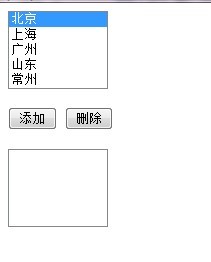
要達成的效果:
1、雙擊左欄任一項目,加入右欄。
2、雙擊右欄任一項目,移回左欄。
3、也可以用「添加」「刪除」按鈕完成同樣的事。
HTML
<form name="form1" method="post" action="">
<select id="select1" size="5" multiple style="width:100px " >
<option value="111">北京</option>
<option value="222">上海</option>
<option value="333">廣州</option>
<option value="333">山東</option>
<option value="333">常州</option>
</select><br/><br/>
<input type="button" id="button1" value="添加">
<input type="button" id="button2" value="刪除"><br/><br/>
<select id="select2" size="5" multiple style="width:100px " >

</select>
</form>
jQuery
<script src="js/jquery-1.6.js"></script>
<script type="text/javascript">
$(document).ready(function(){
$("#select1").dblclick(function () { $("#select1 :selected").appendTo($("#select2")); });
$("#select2").dblclick(function () { $("#select2 :selected").appendTo($("#select1")); });
$("#button1").click(function () { $("#select1 option:selected").appendTo($("#select2")); });
$("#button2").click(function () { $("#select2 option:selected").appendTo($("#select1")); });
})
</script>
核心邏輯只有一句 appendTo():把選中的 option 直接搬到目標 select 底下,DOM 節點會被移動而非複製,因此左右兩邊不會出現重複項目。表單送出時,瀏覽器只會提交 name 有定義的 select,記得在送出前把右欄的 name 補上,或用 JS 同步一次選中狀態。