實作jQuery文字框高亮提示插件
編輯:JQuery特效代碼
表單送出失敗或需要把使用者目光拉到某個欄位時,讓輸入框短暫閃一下高亮色是很有效的提示手法。這裡把它包成一個可 reuse 的 jQuery 插件,只要呼叫 $('#txtBox').highlight() 就能用。
jquery-highlight.js
/*
description:TextBox HighLight
author:Allen Liu
*/
(function($) {
$.fn.highlight = function(options) {
var defaultOpt = {
lightColor: 'yellow', /* 高亮時的顏色 */
lightTime: 1000, /* 高亮時長 (單位:毫秒) */
isFocus: true /* 是否獲取焦點 */
};

options = $.extend(defaultOpt, options);
return this.each(function() {
var sender = $(this);
if (sender.attr('light') == undefined) {
var _bgColor = sender.css('background-color');
sender.css({ 'background-color': options.lightColor });
if (options.isFocus) {
sender.focus();
}

sender.attr('light', true);
window.setTimeout(function() {
sender.removeAttr('light');
sender.css({ 'background-color': _bgColor });
}, options.lightTime);
}
});
}
})(jQuery);
HTML
<input type="text" id="txtBox" />
<input type="password" id="txtPwd" />
<input type="button" id="btnHighLight" value="highlight" />
呼叫方式
<script src="Scripts/jquery-1.5.1.min.js" type="text/javascript"></script>
<script src="Scripts/jquery-highlight.js" type="text/javascript"></script>
<script type="text/javascript">
$(document).ready(function() {
$('#btnHighLight').click(function() {
$('#txtBox').highlight({lightColor:'red', lightTime: 1000 });
$('#txtPwd').highlight({ lightTime: 1000 });
});
});
</script>
幾個設計上的巧思:插件進入時先記下元素原本的 background-color,動畫結束後還原,不會破壞既有樣式;用一個暫時的 light 屬性當作「正在閃」的旗標,避免連續點擊時疊加多個計時器導致顏色錯亂;return this.each(...) 則保留了 jQuery 的鏈式呼叫特性,可以接著串其他方法。
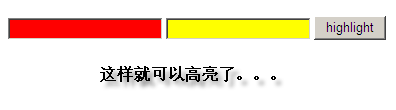
效果如下:
- 上一篇文章: jQuery 1.5.1中以元素ID取得物件時的行為筆記
- 下一篇文章: 8個超實用的jQuery學習網站,建議收藏
熱門推薦
jquery.AutoComplete.js 中文版:支援 Firefox 中文輸入的修正要點
jQuery實現Enter鍵切換焦點
jQuery ajax 的同步與非同步:以及「正在處理請稍等」提示為何失效
jQuery 內容過濾選擇器實戰::contains、:empty、:has、:parent
自製一款以 jQuery 為基礎的智能提示插件
jQuery 數據緩存用法完整解析
jQuery 獲取內容與屬性的方法:text()、html()、val() 與 attr()
jQuery 類別選擇器實戰:用 .className 精準選取元素
jQuery學習筆記:元素的相對定位與常用選擇器彙整