先看整體效果圖:
圖一:
圖二: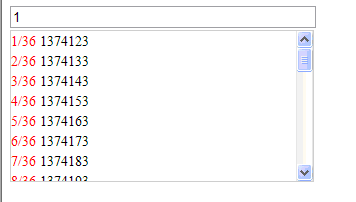
圖三: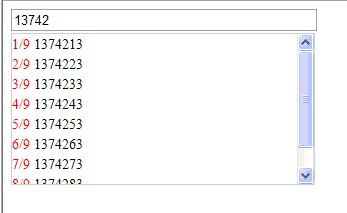
圖四: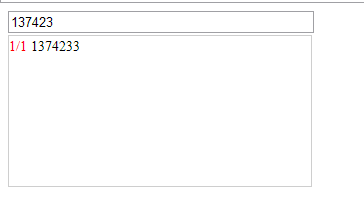
大致效果如上,接下來直接看源碼。
頁面 Default.aspx
<%@ Page Language="C#" AutoEventWireup="true" CodeBehind="Default.aspx.cs" Inherits="autoSearch._Default" %>
<!DOCTYPE html PUBLIC "-//W3C//DTD XHTML 1.0 Transitional//EN" "https://www.w3.org/TR/xhtml1/DTD/xhtml1-transitional.dtd">
<html xmlns="https://www.w3.org/1999/xhtml" >
<head runat="server">
<title></title>
<link href="autoSearchText.css" type="text/css" rel="Stylesheet" />
<script src="jquery-1.5.1.min.js" type="text/javascript"></script>
<script src="jquery.autoSearchText.js" type="text/javascript"></script>
<script type="text/javascript">
$(document).ready(function() {
$('#autoSearchText').autoSearchText({ width: 300, itemHeight: 150,minChar:1, datafn: getData, fn: alertMsg });
});
function alertMsg(vl){
alert('你將要搜索的關鍵字是: '+vl);
}
/*加載數據*/
function getData(val) {
var arrData = new Array();
if (val != "") {
$.ajax({
type: "post",
async: false, //控制同步
url: "getData.ashx",
data: "param=" + val,
dataType: "json",
cache: false,
success: function(data) {
for (var i = 0; i < data.length; i++) {
if (val == data[i].Code.substring(0, val.length))
arrData.push(data[i].Code);
}
},
Error: function(err) {
alert(err);
}
});
}
return arrData;
}
</script>
</head>
<body>
<form id="form1" runat="server">
<div>
<input id="autoSearchText" type="text" value="請輸入編碼" enableviewstate="false"/>
<br />
<input id="Text1" type="text" style=" display:none;"/>
</div>
</form>
</body>
</html>
CSS
.autoSearchText{
border:solid 1px #CFCFCF;
height:20px;
color:Gray;
}
.menu_v{
margin:0;
padding:0;
line-height:20px;
font-size:12px;
list-style-type:none;
}
.menu_v li{
margin:0;
padding:0;
line-height:20px;
font-size:14px;
list-style-type:none;
float:none;
}
.menu_v li span{
color:Red;
}
#autoSearchItem{
border:solid 1px #CFCFCF;
visibility:hidden;
position:absolute;
background-color:white;
overflow-y:auto;
}
JS(autoSearchText 插件)
(function($) {
var itemIndex = 0;
$.fn.autoSearchText = function(options) {
//以下為該插件的屬性及其默認值
var deafult = {
width: 200, //文本框寬
itemHeight: 150, //下拉框高
minChar: 1, //最小字符數(從第幾個開始搜索)
datafn: null, //加載數據函數
fn: null //選擇項後觸發的回調函數
};
var textDefault = $(this).val();
var ops = $.extend(deafult, options);
$(this).width(ops.width);
var autoSearchItem = '<div id="autoSearchItem"><ul class="menu_v"></ul></div>';
$(this).after(autoSearchItem);
$('#autoSearchItem').width(ops.width + 2);
$('#autoSearchItem').height(ops.itemHeight);
$(this).focus(function() {
if ($(this).val() == textDefault) {
$(this).val('');
$(this).css('color', 'black');
}
});
var itemCount = $('li').length;
/*鼠標按下鍵時,顯示下拉框,並支持上下鍵選擇、回車確認*/
$(this).bind('keyup', function(e) {
if ($(this).val().length >= ops.minChar) {
var position = $(this).position();
$('#autoSearchItem').css({ 'visibility': 'visible', 'left': position.left, 'top': position.top + 24 });
var data = ops.datafn($(this).val());
initItem($(this), data);
var itemCount = $('li').length;
switch (e.keyCode) {
case 38: //上
if (itemIndex > 1) { itemIndex--; }
$('li:nth-child(' + itemIndex + ')').css({ 'background': 'blue', 'color': 'white' });
$(this).val($('li:nth-child(' + itemIndex + ')').find('font').text());
break;
case 40: //下
if (itemIndex < itemCount) { itemIndex++; }
$('li:nth-child(' + itemIndex + ')').css({ 'background': 'blue', 'color': 'white' });
$(this).val($('li:nth-child(' + itemIndex + ')').find('font').text());
break;
case 13: //Enter
if (itemIndex > 0 && itemIndex <= itemCount) {
$(this).val($('li:nth-child(' + itemIndex + ')').find('font').text());
$('#autoSearchItem').css('visibility', 'hidden');
ops.fn($(this).val());
}
break;
}
}
});
/*點擊空白處隱藏下拉框*/
$(document).click(function() {
$('#autoSearchItem').css('visibility', 'hidden');
});
};
/*初始化下拉框數據,鼠標移過每項時改變背景色並賦值給輸入框*/
function initItem(obj, data) {
var str = "";
if (data.length == 0) {
$('#autoSearchItem ul').html('<div style="text-align:center;color:red;">無符合數據</div>');
}
else {
for (var i = 1; i <= data.length; i++) {
str += "<li><span>" + i + "/" + data.length + "</span>\r<font>" + data[i - 1] + "</font></li>";
}
$('#autoSearchItem ul').html(str);
}
$('li').each(function() {
$(this).bind('click', function() {
obj.val($(this).find('font').text());
$('#autoSearchItem').css('visibility', 'hidden');
});
});
$('li').each(function() {
$(this).hover(
function() {
$('li:nth-child(' + itemIndex + ')').css({ 'background': 'white', 'color': 'black' });
itemIndex = $('li').index($(this)[0]) + 1;
$(this).css({ 'background': 'blue', 'color': 'white' });
obj.val($('li:nth-child(' + itemIndex + ')').find('font').text());
},
function() {
$(this).css({ 'background': 'white', 'color': 'black' });
}
);
});
};
})(jQuery);
getdata.ashx
using System;
using System.Web;
using System.Web.Services;
namespace table
{
[WebService(Namespace = "https://tempuri.org/")]
[WebServiceBinding(ConformsTo = WsiProfiles.BasicProfile1_1)]
public class getData : IHttpHandler
{
public void ProcessRequest(HttpContext context)
{
context.Response.Clear();
string value = GetResult();
context.Response.Write(value);
context.Response.End();
}
private string GetResult()
{
// 這裡返回一組 JSON 數據,每項形如 {"id":"1","Code":"1374123"}
string result = @"[{""id"":""1"",""Code"":""1374123""},{""id"":""2"",""Code"":""1374133""}, ...]";
return result;
}
public bool IsReusable
{
get
{
return false;
}
}
}
}
整個效果的實現要點:autoSearchText 插件在用戶鍵入達到 minChar 個字符時,調用 datafn 異步拉取數據並渲染下拉列表;支持鼠標劃過高亮、上下鍵(38/40)切換、回車(13)確認並觸發回調;點擊頁面空白處自動隱藏下拉框。數據來源 getData.ashx 返回 JSON,前端再做前綴匹配過濾,即可還原百度搜索框那樣順手的自動完成體驗。
- 上一篇文章: 用 jQuery 監控頁面數據是否發生改變
- 下一篇文章: 30 個最佳 jQuery Lightbox 效果插件分享