模擬 jQuery Ajax 伺服器端與客戶端通訊的完整範例
編輯:JQuery特效代碼
本文以「帳號可用性即時檢查」為例,完整示範 jQuery 與後端 Servlet 之間的往返:前端送出使用者輸入的字串,後端判斷後回傳訊息,前端即時顯示結果。
功能規格
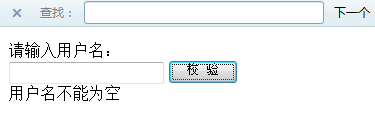
- 使用者名稱為空時,提示「用戶名不能為空」。
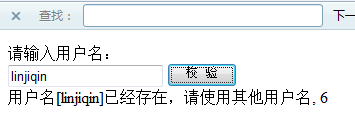
- 名稱已存在時,提示「用戶名[xxxxxx]已經存在,請使用其他用戶名」,並附上一個流水號。
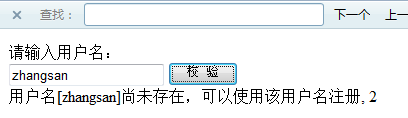
- 名稱不存在時,提示「用戶名[xxxxxx]尚未存在,可以使用該用戶名注冊」,同樣附流水號。
執行結果如下:
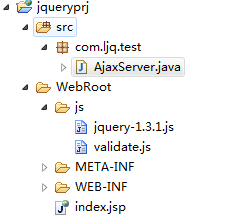
目錄結構:
伺服器端 AjaxServer
package com.ljq.test;

import java.io.IOException;
import java.io.PrintWriter;
import java.net.URLDecoder;
import javax.servlet.ServletException;
import javax.servlet.http.HttpServlet;
import javax.servlet.http.HttpServletRequest;
import javax.servlet.http.HttpServletResponse;

@SuppressWarnings("serial")
public class AjaxServer extends HttpServlet {
  @Override
  protected void doGet(HttpServletRequest request, HttpServletResponse response)
      throws ServletException, IOException {
    try {
      response.setContentType("text/html;charset=utf-8");   // 設定 utf-8 編碼
      PrintWriter out = response.getWriter();

      // 以 session 累計請求次數,用來驗證回應確實每次都不同
      Integer total = (Integer) request.getSession().getAttribute("total");
      int temp = (total == null) ? 1 : total.intValue() + 1;
      request.getSession().setAttribute("total", temp);

      // 1. 取參數並解碼
      String param = request.getParameter("name");
      String name  = URLDecoder.decode(param, "UTF-8");

      // 2. 檢查參數是否有效
      if (param == null || param.length() == 0) {
        out.println("用戶名不能為空");
      } else {
        // 3. 校驗操作
        if (name.equals("linjiqin")) {
          // 4. 回傳結果
          out.println("用戶名[" + name + "]已經存在,請使用其他用戶名, " + temp);
        } else {
          out.println("用戶名[" + name + "]尚未存在,可以使用該用戶名注冊, " + temp);
        }
      }
    } catch (Exception e) {
      e.printStackTrace();
    }
  }

  @Override
  protected void doPost(HttpServletRequest request, HttpServletResponse response)
      throws ServletException, IOException {
    doGet(request, response);
  }
}
這裡有個刻意的小設計:用 session 記住請求次數並附在回應訊息後面。這樣一來,每次回應的文字都不一樣,就能順便驗證瀏覽器沒有快取這件事——如果數字一直是 1,就代表請求被快取}}{{了。
web.xml 設定
<?xml version="1.0" encoding="UTF-8"?>
<web-app version="2.4" xmlns="https://java.sun.com/xml/ns/j2ee"
  xmlns:xsi="https://www.w3.org/2001/XMLSchema-instance"
  xsi:schemaLocation="https://java.sun.com/xml/ns/j2ee
  https://java.sun.com/xml/ns/j2ee/web-app_2_4.xsd">
  <servlet>
    <servlet-name>AjaxServer</servlet-name>
    <servlet-class>com.ljq.test.AjaxServer</servlet-class>
  </servlet>
  <servlet-mapping>
    <servlet-name>AjaxServer</servlet-name>
    <url-pattern>/servlet/ajaxServer</url-pattern>
  </servlet-mapping>
  <welcome-file-list>
    <welcome-file>index.jsp</welcome-file>
  </welcome-file-list>
</web-app>
index.jsp
<%@ page language="java" import="java.util.*" pageEncoding="UTF-8"%>
<%
String path = request.getContextPath();
String basePath = request.getScheme() + "://" + request.getServerName()
  + ":" + request.getServerPort() + path + "/";
%>
<!DOCTYPE HTML PUBLIC "-//W3C//DTD HTML 4.01 Transitional//EN">
<html>
<head>
  <base href="<%=basePath%>">
  <title>My JSP 'index.jsp' starting page</title>
  <meta http-equiv="pragma" content="no-cache">
  <meta http-equiv="cache-control" content="no-cache">
  <meta http-equiv="expires" content="0">
  <script type="text/javascript" src="<%=request.getContextPath()%>/js/jquery-1.3.1.js"></script>
  <script type="text/javascript" src="<%=request.getContextPath()%>/js/validate.js"></script>
</head>
<body>
  請輸入用戶名:<br/>
  <input id="userName"/>
  <input type="button" value=" 校 驗 " onclick="verify();"/>
  <div id="result"></div>
</body>
</html>
validate.js
function verify() {
  // 解決中文亂碼的兩種方法:
  // 方法一:頁面端 encodeURI 一次,伺服器端 new String(name.getBytes("iso8859-1"), "UTF-8")
  // 方法二:頁面端 encodeURI 兩次,伺服器端 URLDecoder.decode(name, "UTF-8")
  var url = "servlet/ajaxServer?name=" + encodeURI(encodeURI($("#userName").val()));

  // 注意:url 前不要加 "/",否則會失去 web app 的 context path 而無法訪問
  // var url = "/servlet/ajaxServer?name=" + ...   // 錯誤寫法

  url = convertURL(url);

  $.get(url, null, function(data) {
    $("#result").html(data);
  });
}

// 為 url 加上時間戳,騙過瀏覽器不讀快取
function convertURL(url) {
  var timstamp = (new Date()).valueOf();
  if (url.indexOf("?") >= 0) {
    url = url + "&t=" + timstamp;
  } else {
    url = url + "?t=" + timstamp;
  }
  return url;
}
三個實務細節
中文亂碼的處理。這裡用的是「前端 encodeURI 兩次 + 後端 URLDecoder.decode」的做法。相對於修改伺服器全域設定,這種在呼叫點處理的方式影響範圍小,也不必為個別頁面調整編碼。
URL 前不要加斜線。註解中特別標出了這個錯誤寫法。以 /servlet/ajaxServer 開頭的路徑會被視為「從伺服器根目錄開始」,而非「從目前的 web application 根目錄開始」。若你的應用部署在 https://host/myapp/,加斜線就會打到 https://host/servlet/ajaxServer,自然找不到。正確做法是用 <%=request.getContextPath()%> 動態帶入 context path。
時間戳防快取。GET 請求很容易被瀏覽器快取,導致後端永遠回傳同一份結果。加上 ?t=時間戳 讓每次 URL 都不同,是最簡單可靠的做法。此外也可以在 AJAX 設定中加上 cache: false,效果相同但語意更清楚。
範例中把伺服器回傳的字串直接用 .html() 塞入頁面。若字串可能包含使用者輸入的內容,應改用 .text() 或先做 HTML 轉义,否則會有 XSS 風險——這點在實際專案中務必注意。
- 上一篇文章: 原來 jQuery 的 load() 可以一層層載入下去
- 下一篇文章: jQuery 動態表格外掛:新增刪除、統計彙總與計算欄位