用 jQuery 自動合併表格中相同內容的儲存格
編輯:JQuery特效代碼
做報表或列表頁時,常遇到「同一欄的相鄰儲存格內容相同就合併成一格」的需求。常見做法是在 table 裡再嵌 table,但這會增加 DOM 深度、拖慢載入;改用純 DIV 又要寫一大堆 CSS 才能對齊。折衷方案是保留一個 table,用 jQuery 動態處理 rowspan。
封裝成小插件
<script type="text/javascript">
jQuery.fn.rowspan = function(colIdx) {   // 封裝的 jQuery 小插件
    return this.each(function(){
        var that;
        $('tr', this).each(function(row) {
            $('td:eq(' + colIdx + ')', this).filter(':visible').each(function(col) {
                if (that != null && $(this).html() == $(that).html()) {
                    rowspan = $(that).attr("rowSpan");
                    if (rowspan == undefined) {
                        $(that).attr("rowSpan", 1);
                        rowspan = $(that).attr("rowSpan");
                    }
                    rowspan = Number(rowspan) + 1;
                    $(that).attr("rowSpan", rowspan);
                    $(this).hide();          // 內容相同則隱藏,由上格合併
                } else {
                    that = this;             // 內容不同,更新比較基準
                }
            });
        });
    });
}

$(function() {
    $("#table1").rowspan(0);   // 參數是列索引,從 0 開始
    $("#table1").rowspan(2);   // 有相同內容的列就傳對應的索引
});
</script>
表格本體
<body>
<table id="table1" border="1" cellpadding="5" cellspacing="0" width="300px">
<tr>
    <td>1</td><td>2</td><td>3</td><td>4</td>
</tr>
<tr>
    <td>1</td><td>f</td><td>3</td><td>s</td>
</tr>
</table>
</body>
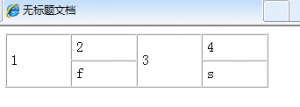
IE 下的呈現:
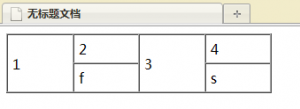
Firefox 下的呈現:
原理與改進空間
核心邏輯是「逐列掃描指定索引的 td,與前一筆比較;相同就把上一格的 rowSpan 加一並隱藏自己」。用 filter(':visible') 是為了避開已被合併隱藏的儲存格,避免重複計算。
這份代碼有個可以強化的地方:目前用 hide() 而非真正移除節點,DOM 裡仍留著被合併的 td。若表格很大,改用 remove() 會更省資源。另外 rowspan 變數未用 var 宣告,會變成全域變數,在多處呼叫時可能互相干擾,實務上建議補上宣告。