AeroWindow:仿 Windows Aero 玻璃質感的 jQuery 彈出視窗插件
編輯:JQuery特效代碼
在眾多 jQuery Dialog 類插件中,AeroWindow 算是外觀最有個性的一款——它把 Windows 7 那種 Aero 玻璃質感搬到了網頁上。
效果預覽
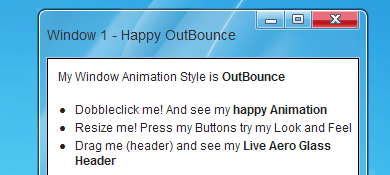
主要特點
· 獨特的反光效果:視窗移動時,標題欄會出現流光反射
· 完整的視窗按鈕:最小化、還原、最大化與關閉
· 雙擊標題欄可在最大化與還原之間切換
· 作用中的視窗會自動突出顯示
· 可調整視窗大小(resize)
· 支援滑鼠拖曳移動
· 提供大量設定選項
可設定的選項
視窗標題、起始位置的 X / Y 座標、視窗尺寸、最小尺寸限制、開啟時的初始狀態(最小化/最大化/正常)、開啟動畫(內建 30 種效果),以及可用的回呼函式、滑鼠事件與 JavaScript 呼叫。
瀏覽器相容性
Internet Explorer 6 / 7 / 8、Firefox 3、Google Chrome 4、Apple Safari 4、Opera 10。
最簡單的呼叫方式
$('#YourContainerDiv').AeroWindow({
    WindowTitle: 'My first very cool Aero Window for Web',
});
自訂設定範例
$('#YourContainerDiv').AeroWindow({
    WindowTitle: 'My first cool Aero Window for Web',
    WindowPositionTop: 'center',
    WindowPositionLeft: 'center',
    WindowWidth: 600,
    WindowHeight: 400,
    WindowMinWidth: 100,
    WindowMinHeight: 100,
    WindowAnimationSpeed: 500,
    WindowAnimation: 'easeOutCubic', //視窗開啟時的動畫效果
    WindowResizable: true,
    WindowDraggable: true,
    WindowMinimize: true,
    WindowMaximize: false,
    WindowClosable: true
});
這個版本基於 jQuery 1.4.2,包含所有必要檔案與示範頁面。
一個實際整合的例子
以下示範如何用 AeroWindow 承載一個 iframe,點擊連結時把內容載入視窗中:
//javascript 腳本
$(document).ready(function() {
    $('#profilactic a').click(function() {
        var go = $(this);
        $('#mywindows').attr('src', go.attr('href'))
        go.attr('href', 'javascript:void(0);');
        $('#Firefoxapp').AeroWindow({
            WindowTitle: '向晚的' + go.attr('class'),
            WindowPositionTop: 'center',
            WindowPositionLeft: 'center',
            WindowWidth: 1000,
            WindowHeight: 500,
            WindowAnimation: 'easeOutCubic'
        });
        $('html,body').animate({ scrollTop: '0px' }, 300);
        return false;
    });
});

//彈出視窗容器
<DIV id=Firefoxapp style="DISPLAY: none">
<iframe style="border-right-width: 0px; border-top-width: 0px; border-bottom-width: 0px; border-left-width: 0px" id="mywindows" height="99.5%" src="" frameborder="0" width="100%"></iframe>
<DIV id=iframeHelper></DIV>
</DIV>
這個寫法的巧妙之處在於把 href 即時改成 javascript:void(0),讓同一個連結點第二次時不會真的跳頁;而 iframe 的 src 則在點擊當下才被填入,屬於典型的懶載入處理。需要的朋友可以參考看看。