jQuery 對話框插件 jquery.alerts 的使用介紹
編輯:JQuery特效代碼
原生的 alert、confirm、prompt 樣式無法客製,這是長久以來的痛點。jquery.alerts 就是拿來取代它們的輕量方案。
引入檔案
<!-- Dependencies -->
<script src="/path/to/jquery.js" type="text/javascript"></script>
<script src="/path/to/jquery.ui.draggable.js" type="text/javascript"></script>
<!-- Core files -->
<script src="/path/to/jquery.alerts.js" type="text/javascript"></script>
<link href="/path/to/jquery.alerts.css" rel="stylesheet" type="text/css" media="screen" />
其中 draggable 是用來讓對話框可以拖曳的,不需要這個功能就不必引用。以 jQuery 1.4.2 環境為例:
<script src="Scripts/jquery-1.4.2.min.js" type="text/javascript"></script>
<script src="Scripts/jquery-ui-1.8.5.custom.min.js" type="text/javascript"></script>
<script src="Scripts/jquery.alerts.js" type="text/javascript"></script>
<link href="Content/Style/jquery.alerts.css" rel="stylesheet" type="text/css" />
三個主要方法
· jAlert(message, [title, callback]) 建立一個警告框
· jConfirm(message, [title, callback]) 建立一個確認框,支援回呼
· jPrompt(message, [value, title, callback]) 建立一個讓使用者輸入值的提示框,支援回呼
完整範例
<%@ Page Language="C#" AutoEventWireup="true" CodeBehind="Defualt.aspx.cs" Inherits="WebApplication6.Defualt" %>
<!DOCTYPE html PUBLIC "-//W3C//DTD XHTML 1.0 Transitional//EN" "https://www.w3.org/TR/xhtml1/DTD/xhtml1-transitional.dtd">
<html xmlns="https://www.w3.org/1999/xhtml">
<head id="Head1" runat="server">
<title></title>
<script src="Scripts/jquery-1.4.2.min.js" type="text/javascript"></script>
<script src="Scripts/jquery-ui-1.8.5.custom.min.js" type="text/javascript"></script>
<script src="Scripts/jquery.alerts.js" type="text/javascript"></script>
<link href="Content/Style/jquery.alerts.css" rel="stylesheet" type="text/css" />
<script type="text/javascript">
$(document).ready(function () {
    $("#btnAlert").click(function () {
        jAlert('Pushed the alert button', 'Alert Dialog');
    });
    $("#btnPrompt").click(function () {
        jPrompt('Type some value:', '', 'Prompt Dialog', function (typedValue) {
            if (typedValue) {
                jAlert('You typed the following ' + typedValue);
            }
        });
    });
});
</script>
</head>
<body>
<form id="form1" runat="server">
<div>
<input type="button" value="Alert Me" id="btnAlert" />
<input type="button" value="Prompt Me" id="btnPrompt" />
</div>
</form>
</body>
</html>
回呼函式的價值
這裡最值得留意的是 jPrompt 的用法:使用者輸入的值會透過回呼函式傳回來,因此可以接著做下一步處理。上面範例就示範了「先讓使用者輸入,再把他輸入的內容用 jAlert 顯示出來」這樣的串接。原生 prompt 是回傳值,而這裡改成了非同步式的回呼,寫法風格不同但更靈活。
另外,callback 參數在 jConfirm 中的意義是「使用者按了哪一個鈕」,實務上通常用來判斷是否繼續執行後續動作,這也是取代原生 confirm 最常見的用法。
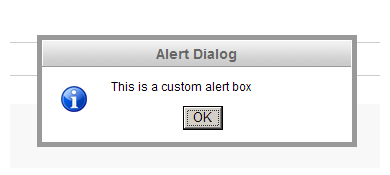
實際的 alert 外觀如下:
- 上一篇文章: 從零開始學 jQuery(二)萬能的選擇器
- 下一篇文章: 用 jQuery 打造一個可重複使用的分頁控件 simplePage