jquery.simple.tree 插件:輕巧且相容性佳的無限層級樹
編輯:JQuery特效代碼
先來看看實際效果,無論是點選節點還是拖曳節點都相當順手:
選擇: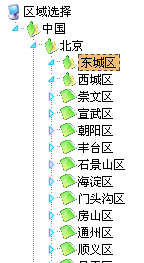
拖拽: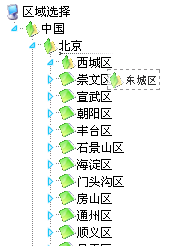
jquery.simple.tree 的官網(https://news.kg/wp-content/uploads/tree/,目前似乎已無法開啟)雖然連線不穩,但由於操作簡單直觀,仍不失為一個好用的選擇。
為什麼選擇它
先前介紹過 jQuery EasyUI 的 Tree 插件,雖然簡單易用,但實測下來仍有幾個痛點:
- 在 IE8 下 AJAX 載入有相容性問題。
- 若異步回傳資料較慢,可能導致載入失敗。
- 我們往往只需要 Tree 這項功能,整體體積卻稍嫌龐大。
因此我們真正需要的是:相容性佳、支援異步、體積小、專職专用的元件。simple.tree 恰好滿足這些條件。
開始使用
使用時需載入三個檔案:CSS、jQuery 主程式,以及插件本身的 JS。接著定義 Tree 的初始化設定,最後寫出根節點的 HTML 結構即可。前台程式碼如下:
<link rel="stylesheet" href="/js/simpletree/jquery.simple.tree.css" />
<script src="/js/jquery1.4.2.min.js"></script>
<script src="/js/simpletree/jquery.simple.tree.js"></script>
<script>
var simpleTreeCollection;
$(document).ready(function(){
  simpleTreeCollection = $('.simpleTree').simpleTree({
    autoclose: true,
    afterClick: function(node){
      alert("您選擇了:" + $('span:first',node).text());
    },
    afterDblClick: function(node){ /* 雙擊事件 */ },
    afterMove: function(destination, source, pos){ /* 拖拽事件 */ },
    afterAjax: function(){ /* 載入完成 */ },
    animate: true
  });
});
</script>

<ul class="simpleTree">
  <li class="root"><span>區域選擇</span>
    <ul>
      <li id="root0" class="open"><span>中國</span>
        <ul class="ajax">
          <li id='0'>{url:/common/GetGroupHtmlByPid.ashx?pid=0}</li>
        </ul>
      </li>
    </ul>
  </li>
</ul>
後台需回傳對應的 HTML 節點字串,做法是以 ashx 一般處理常式接收 pid 參數,查詢子節點後組出 <ul><li> 結構,並在每個節點內嵌一段 {url:...} 以便插件繼續異步載入下一層。
優缺點總結
優點:體積小、相容性高、支援異步、可拖曳,特別適合後台維護無限分類的場景。
缺點:若希望在初始化時就載入異步內容,需要手動改動幾行程式碼。
插件原始下載位址為 https://plugins.jquery.com/project/SimpleTree,作者也提供了改寫後的版本,主要更動了兩行程式,讓首次初始化即可載入異步資料。希望這篇筆記能拋磚引玉,對你有所幫助。
- 上一篇文章: 六個值得收藏的 jQuery Tab 選項卡插件
- 下一篇文章: 徹底搞懂 jQuery 中 this 與 $(this) 的差別