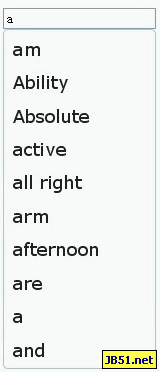
jQuery UI AutoComplete 實作備忘:後端 ashx 回傳 JSON 的完整配置
編輯:JQuery特效代碼
jQuery UI 內建的 autocomplete 取代了老牌的 bassistance 外掛,介面更統一,資料來源也更彈性。本文記錄一次以 ashx 提供資料的完整實作。
頁面端
<link href="../css/jquery.ui.all.css" rel="stylesheet" type="text/css" />

<script type="text/javascript" src="https://ajax.googleapis.com/ajax/libs/jquery/1.4/jquery.min.js"></script>
<!-- 解決下拉列表框被遮蓋的問題 -->
<script type="text/javascript" src="../js/jQui/jquery.bgiframe-2.1.1.js"></script>
<script type="text/javascript" src="../js/jQui/jquery.ui.core.js"></script>
<script type="text/javascript" src="../js/jQui/jquery.ui.widget.js"></script>
<script type="text/javascript" src="../js/jQui/jquery.ui.mouse.js"></script>
<script type="text/javascript" src="../js/jQui/jquery.ui.autocomplete.js"></script>

<script language="javascript" type="text/javascript">
$(function () {
    $("#txtTest").autocomplete({
        minLength: 1,
        source: function (request, response) {
            $.ajax({
                url: "../ajax/GetAllWords.ashx",
                dataType: "json",
                data: request,
                success: function (data) {
                    response(data);
                }
            });
        }
    });
});
</script>

<input id="txtTest" type="text" />
幾個重點:minLength 控制至少輸入幾個字才觸發;source 指定為函數時可完全自訂請求行為;取得資料後必須呼叫 response(data),autocomplete 才會渲染候選列表。另外,jQuery UI 會自動把參數名 term 帶進 request 中,後端要照這個名字取值。
後端一般處理常式
<%@ WebHandler Language="C#" Class="GetAllWords" %>
using System;
using System.Web;

public class GetAllWords : IHttpHandler
{
    public void ProcessRequest(HttpContext context)
    {
        if (context.Request.QueryString["term"] != null
            && context.Request.QueryString["term"] != "")
        {
            context.Response.Clear();
            context.Response.Charset = "utf-8";
            context.Response.Buffer = true;
            context.Response.ContentEncoding = System.Text.Encoding.UTF8;
            context.Response.ContentType = "text/plain";
            context.Response.Write(GetLikeUserName(context.Request.QueryString["term"]));
            context.Response.Flush();
            context.Response.Close();
            context.Response.End();
        }
    }

    /// <summary>
    /// 拼接 json
    /// </summary>
    /// <param name="key">關鍵詞</param>
    private String GetLikeUserName(string key)
    {
        jhg.BLL.web_wordManager wordManager = new jhg.BLL.web_wordManager();
        // 搜索,返回 10 個關鍵詞
        string[] listWord = wordManager.GetSearchWord(key, 10);

        System.Text.StringBuilder sbstr = new System.Text.StringBuilder("[");
        int ct = listWord.Length;
        for (int i = 0; i < ct; i++)
        {
            sbstr.Append("\"" + listWord[i] + "\"");
            if (i == ct - 1) sbstr.Append("]");
            else sbstr.Append(",");
        }
        return sbstr.ToString();
    }

    public bool IsReusable { get { return false; } }
}
回傳格式就是最簡單的字串陣列,例如 ["蘋果","蘋果醋","香蕉"]。
這裡有兩點值得改進:字串拼接 JSON 應改用 System.Web.Script.Serialization.JavaScriptSerializer 或 Json.NET,避免關鍵字含引號時產生非法 JSON;資料庫查詢應使用參數化,以免 SQL 注入。另外,Response.ContentType 建議直接設為 application/json,語意更準確。
一個樣式陷阱
檔案 jquery.ui.autocomplete.css 中有一條規則:
.ui-autocomplete { position: absolute; cursor: default; }
若你的頁面有其他定位上下文干擾,把 position: absolute; 拿掉即可解決位置跑掉的問題。
如果候選項需要顯示更多資訊
回傳純字串陣列時只能顯示文字。若要顯示圖標或次要說明,可改回傳物件陣列並使用 _renderItem 自訂渲染:
$("#txtTest").autocomplete({
    source: "../ajax/GetAllWords.ashx",
    minLength: 1
}).data("autocomplete")._renderItem = function (ul, item) {
    return $("<li></li>")
        .data("item.autocomplete", item)
        .append("<a>" + item.label + "<br><small>" + item.value + "</small></a>")
        .appendTo(ul);
};
效果如下圖: