學會了插件開發的基本思路後,自己也動手搗鼓出了這麼一個小東西。
先看看效果:
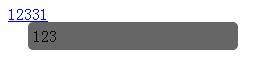
完整代碼如下:
<!DOCTYPE html PUBLIC "-//W3C//DTD XHTML 1.0 Transitional//EN" "https://www.w3.org/TR/xhtml1/DTD/xhtml1-transitional.dtd">
<html xmlns="https://www.w3.org/1999/xhtml">
<head>
<title>無標題頁</title>
<style type="text/css">
#conBox{ position:absolute; width:200px;padding:5px;display:none;background:#666;z-index:999;border-radius:5px;}
</style>
<script src="https://ajax.googleapis.com/ajax/libs/jquery/1.4.2/jquery.min.js" type="text/javascript"></script>
</head>
<body>
<span class="ll" title="123">你好</span>
<a title="123" href="#">四大發送</a>
<a title="123" class="ll" href="#">1的爽膚水</a>
<div></div>
<script language="javascript" type="text/javascript">
$(function(){
//插件主題
$.fn.extend({
showTitle:function(){
$('<div id="conBox"></div>').appendTo('body');
var d=$("#conBox");
this.bind({
mouseover:function(){
if(!$("#conBox")){
$('<div id="conBox"></div>').appendTo('body');
}else{
d=$("#conBox");
}
var of=$(this).offset();
var title=$(this).attr("title");
d.css({top:of.top+$(this).height()+"px",left:$(this).width()/2+of.left+"px"}).text($(this).attr("title"));
d.fadeIn();
},
mouseout:function(){
d.fadeOut();
}
});
}
});
$(".ll").showTitle();
});
</script>
</body>
</html>
核心思路很直白:滑入時讀取元素的 title 屬性,動態創建一個提示框並定位到元素下方,用 fadeIn 淡入;滑出時則用 fadeOut 淡出,如此便實現了一個輕量的 title 提示效果。
- 上一篇文章: 基於 jQuery 的氣泡提示效果完整實現
- 下一篇文章: 用 jQuery 解析 URL 參數並高亮當前菜單