用 jQuery 打造 URL 參數驅動的查詢表單元件
編輯:JQuery特效代碼
這個範例示範如何用 JavaScript 讀取並改寫網址參數,讓查詢條件可以被書籤、被分享;後端只要解析 URL 上的參數就能組出查詢語句。
準備工作
- jQuery 類庫(示範使用 1.3.2)
Tool.js:通用工具函式(字串格式化、日期驗證、URL 參數解析等)Search.js:查詢元件本體- 一個 htm 練習頁
htm 頁面
<!DOCTYPE html PUBLIC "-//W3C//DTD XHTML 1.0 Transitional//EN" "https://www.w3.org/TR/xhtml1/DTD/xhtml1-transitional.dtd">
<html xmlns="https://www.w3.org/1999/xhtml">
<head>
<title></title>
<style type="text/css">
.initCss { color: #666666 }
</style>
<script type="text/javascript" src="JS/jquery.js"></script>
<script type="text/javascript" src="JS/Tool.js"></script>
<script type="text/javascript" src="JS/Search.js"></script>
<script type="text/javascript">
$(function() {
    var search = new Search('initCss');
    search._UrlHtmlIdAry['other']    = '#dropOther';
    search._UrlParmAry['other']      = 'other';
    search._UrlHtmlIdAry['otherTxt'] = '#txtOther';
    search._UrlParmAry['otherTxt']   = 'otherTxt';
    search.InitBind();
    search.SearchApply('#searchBut', 'search.htm');
});
function Other() {
    $('#txtOther').css('color', 'red');
}
</script>
</head>
<body>
<div>時間:<input id="txtDate" type="text" /></div>
<div>開始時間:<input id="txtDateBegin" type="text" /></div>
<div>結束時間:<input id="txtDateEnd" type="text" /></div>
<div>查詢1:
  <select id="dropWay">
    <option value="">全部</option>
    <option value="1">部分一</option>
    <option value="2">部分二</option>
  </select>
</div>
<div>查詢2:
  <select id="dropOther">
    <option value="">Other</option>
    <option value="1">Other1</option>
    <option value="2">Other2</option>
  </select>
</div>
<div>查詢:<input id="txtQuery" type="text" /></div>
<div>查詢其它:<input type="text" id="txtOther" /></div>
<div>僅查詢自己的數據:<input type="checkbox" id="cbShowMe" /></div>
<div><input type="button" id="searchBut" value="查詢" /></div>
</body>
</html>
Search.js 的設計約定
- 依賴 jQuery 與 Tool.js 兩個腳本。
- 預設的 id 與 URL 參數對應表放在
_UrlHtmlIdAry與_UrlParmAry中;新增欄位時,key 以#開頭並補上對應的參數名稱。 - 命名慣例:文字框 id 含
txt(查詢框需含query)、日期 id 含date(起訖再含begin/end)、核取方塊含cb、下拉選單含drop。如此 JavaScript 才能集中處理。 - 建構時傳入的 CSS class,用來在欄位「尚未填值」時呈現提示樣式。
- 日期框空白時顯示
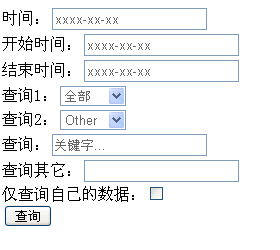
xxxx-xx-xx,查詢框顯示關鍵字...,一旦使用者輸入就移除該樣式。
實際操作與觀察
載入頁面後可以看到各欄位的初始提示狀態:
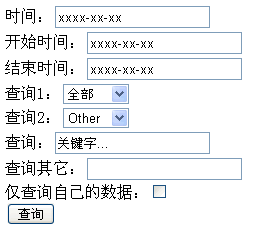
把 var search = new Search('initCss'); 改成 var search = new Search(); 再重新整理,提示文字與下拉選單的字型顏色就會恢復成一般樣式:
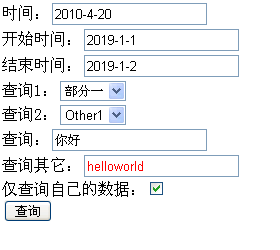
隨意操作後按下查詢,或直接拜訪 https://localhost:1406/search.htm?way=1&query=%u4F60%u597D&date=2010-4-20&me=t&bdate=2019-1-1&edate=2019-1-2&other=1&otherTxt=helloworld,頁面會依 URL 內容自動回填:
若把 other 與 otherTxt 的四行對應設定移除,重新整理後這兩個欄位就不會被回填,因為對應表裡沒有值:
search._UrlHtmlIdAry['other']    = '#dropOther';
search._UrlParmAry['other']      = 'other';
search._UrlHtmlIdAry['otherTxt'] = '#txtOther';
search._UrlParmAry['otherTxt']   = 'otherTxt';
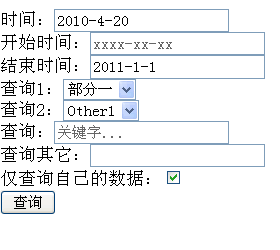
把 search.InitBind(Other); 改成 search.InitBind();,查詢其它的字型會變黑而非紅色——因為 InitBind() 接受一個函式參數,可在不改動原方法的情況下擴充行為:
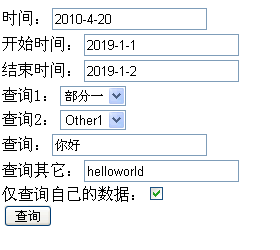
SearchApply() 的第一個參數是「# + 按鈕 id」(同時會幫按鈕掛上 Enter 鍵事件),第二個參數是導向的網址。
Tool.js
// 工具類
function Tool() {
    // 字符串替換格式化 ('a{0}c{1}','b','d') => abcd
    this.FormatStr = function(str, ary) {
        for (var a in ary) { str = str.replace('{' + a + '}', ary[a]); }
        return str;
    };
    // 字符串不為空
    this.IsNoNullOrEmpty = function(str) {
        if (typeof (str) == "undefined" || str == null || str == '' || str == 'undefined') return false;
        return true;
    };
    // 取得 URL 參數
    this.GetUrlParms = function() {
        var args = new Object();
        var query = location.search.substring(1);
        var pairs = query.split("&");
        for (var i = 0; i < pairs.length; i++) {
            var pos = pairs[i].indexOf('=');
            if (pos == -1) continue;
            var argname = pairs[i].substring(0, pos);
            var value = pairs[i].substring(pos + 1);
            args[argname] = unescape(value);
        }
        return args;
    };
    // 尋找字串位置,isCase = true 表示忽略大小寫
    this.FindStr = function(str, findStr, isCase) {
        if (typeof (findStr) == 'number') return str.indexOf(findStr);
        var re = new RegExp(findStr, isCase ? 'i' : '');
        var r = str.match(re);
        return r == null ? -1 : r.index;
    };
    this.IsFindStr = function(str, findStr, isCase) {
        return this.FindStr(str, findStr, isCase) > 0 ? true : false;
    };
    // 驗證短日期 2010-2-2
    this.IsShortTime = function(str) {
        var r = str.match(/^(\d{1,4})(-|\/)(\d{1,2})\2(\d{1,2})$/);
        if (r == null) return false;
        var d = new Date(r[1], r[3] - 1, r[4]);
        return (d.getFullYear() == r[1] && (d.getMonth() + 1) == r[3] && d.getDate() == r[4]);
    };
}
Search.js
function Search(initCss) {
    this._Tool = new Tool();
    this._UrlParmAry = { way: 'way', query: 'query', date: 'date', me: 'me', bdate: "bdate", edate: "edate" };
    this._UrlHtmlIdAry = { way: '#dropWay', query: '#txtQuery', date: '#txtDate', me: '#cbShowMe', bdate: "#txtDateBegin", edate: "#txtDateEnd" };
    this._DateInitStr = 'xxxx-xx-xx';
    this._QueryInitStr = '關鍵字...';
    this._Args = this._Tool.GetUrlParms();

    this.InitBind = function(fnOther) {
        for (var arg in this._Args) {
            $(this._UrlHtmlIdAry[arg]).attr('checked', true);
            $(this._UrlHtmlIdAry[arg]).val(unescape(this._Args[arg]));
        }
        this.InitCssInfo(fnOther);
    };

    this.SearchApply = function(searchId, gotoUrl) {
        var searchObj = this;
        $(searchId).click(function() {
            window.location.href = gotoUrl + searchObj.GetUrlParms();
        });
        $(document).keydown(function(event) {
            if (event.which == 13) { $(searchId).focus().click(); }
        });
    };

    this.GetUrlParms = function() {
        var parms = '?';
        var isFirst = true;
        for (var parm in this._UrlParmAry) {
            htmlId  = this._UrlHtmlIdAry[parm];
            htmlVal = escape($(htmlId).val());

            if (this._Tool.IsFindStr(htmlId, 'date', true)) {
                if (this._Tool.IsNoNullOrEmpty(htmlVal) && htmlVal != this._DateInitStr && this._Tool.IsShortTime(htmlVal)) {
                    if (isFirst != true) parms += "&";
                    parms += parm + '=' + htmlVal; isFirst = false;
                }
            }
            else if (this._Tool.IsFindStr(htmlId, 'query', true)) {
                if (this._Tool.IsNoNullOrEmpty(htmlVal) && unescape(htmlVal) != this._QueryInitStr) {
                    if (isFirst != true) parms += "&";
                    parms += parm + '=' + htmlVal; isFirst = false;
                }
            }
            else if (this._Tool.IsFindStr(htmlId, 'drop', true)) {
                if (this._Tool.IsNoNullOrEmpty(htmlVal)) {
                    if (isFirst != true) parms += "&";
                    parms += parm + '=' + htmlVal; isFirst = false;
                }
            }
            else if (this._Tool.IsFindStr(htmlId, 'cb', true)) {
                if ($(htmlId).attr('checked')) {
                    if (isFirst != true) parms += "&";
                    parms += parm + '=t'; isFirst = false;
                }
            }
            else if (this._Tool.IsFindStr(htmlId, 'txt', true)) {
                if (this._Tool.IsNoNullOrEmpty(htmlVal)) {
                    if (isFirst != true) parms += "&";
                    parms += parm + '=' + htmlVal; isFirst = false;
                }
            }
        }
        if (parms == '?') parms = '';
        return parms;
    };

    this.InitCssInfo = function(fnOther) {
        var htmlId, urlParm;
        for (var arg in this._UrlHtmlIdAry) {
            urlParm = this._UrlParmAry[arg];
            htmlId  = this._UrlHtmlIdAry[arg];

            if (this._Tool.IsFindStr(htmlId, 'date', true)) {
                // 相容 Firefox:重新整理後舊值仍會被帶入
                if ($(htmlId).val() == this._DateInitStr) $(htmlId).val('');
                if ($(htmlId).val() == '') {
                    $(htmlId).val(this._DateInitStr).addClass(initCss);
                }
                this.TimeTxTEvent(htmlId);
            }
            else if (this._Tool.IsFindStr(htmlId, 'query', true)) {
                if ($(htmlId).val() == this._QueryInitStr) $(htmlId).val('');
                if ($(htmlId).val() == '') {
                    $(htmlId).val(this._QueryInitStr).addClass(initCss);
                }
                this.QueryTxTEvent(htmlId);
            }
            else if (this._Tool.IsFindStr(htmlId, 'drop', true)) {
                dropCss(htmlId);
                this.DropEvent(htmlId);
            }
        }
        if (typeof (fnOther) == 'function') { setTimeout(fnOther, 0); }
    };

    this.QueryTxTEvent = function(htmlId) {
        var searchObj = this;
        $(htmlId).blur(function() {
            $(this).removeClass(initCss);
            if ($(this).val() == '') { $(this).val(searchObj._QueryInitStr).addClass(initCss); }
        });
        $(htmlId).focus(function() {
            if ($(this).val() == searchObj._QueryInitStr) { $(this).val('').removeClass(initCss); }
        });
    };

    this.TimeTxTEvent = function(htmlId) {
        var searchObj = this;
        $(htmlId).blur(function() {
            if (searchObj._Tool.IsShortTime($(this).val())) {
                // 格式正確,無需處理
            }
            else if ($(this).val() != '') {
                alert('請正確輸入日期格式,如:2010-1-1');
            }
            if ($(this).val() == '') { $(this).val(searchObj._DateInitStr).addClass(initCss); }
            else { $(this).removeClass(initCss); }
        });
        $(htmlId).focus(function() {
            if ($(this).val() == searchObj._DateInitStr) { $(this).val('').removeClass(initCss); }
        });
    };

    this.DropEvent = function(htmlId) {
        $(htmlId).change(function() { dropCss(htmlId); });
    };

    // 不同瀏覽器對 select 的字型顏色處理不同
    function dropCss(htmlId) {
        if ($(htmlId).val() != '') {
            $(htmlId).removeClass(initCss);
            $(htmlId + ' option:first').addClass(initCss);
        }
        else {
            $(htmlId).addClass(initCss);
            var count = 0;
            $(htmlId + ' option').each(function() {
                if (count > 0) $(this).css('color', 'black');
                count++;
            });
        }
    }
}
小結
把「欄位 → URL 參數」的對應抽成設定表,再依 id 命名慣例分派處理邏輯,這個 Search 類就能用很少的程式碼支撐整個查詢區。若你要在自己的專案裡沿用,建議把命名慣例改成用宣告式設定(例如 data 屬性),可讀性會更好。
熱門推薦
用 jQuery 攔截 Enter 鍵切換焦點
jQuery event 物件屬性與方法完整整理
jQuery slideshow 切換到別的分頁後動畫失效?問題追蹤與解法
用 jQuery 的 $.event.fix 統一處理跨瀏覽器事件物件
EasyUI Combobox 實作多選下拉框並以逗號串接選值
jQuery 的 $ 被別的函式庫搶走了?用 noConflict() 解決名稱衝突
解決 jQuery 取得 background-color 的跨瀏覽器格式差異
jQuery Mobile 動態產生 listView 並刷新的兩種寫法
jQuery + HttpHandler + XML 實作省縣市三級連動