jQuery 學習筆記(一):ajax、get、load 三種前端取值實作
編輯:JQuery特效代碼
基本資訊
- 官方網站:www.jquery.com
- jQuery 是 JavaScript 的函式庫,封裝了大量常用 API,讓 JavaScript 開發更省力。
- 中文 API 參考手冊:https://jquery-api-zh-cn.googlecode.com/svn/trunk/index.html
範例成品
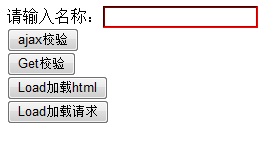
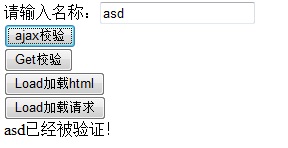
涵蓋的四個技術點
- 用
$("#UserName")取得 id 為 UserName 的 jQuery 物件。 - 分別以
$.ajax、$.get、load三種方式向後端取資料。 - 用
removeClass/addClass動態切換樣式。 encodeURI(username)將字串轉碼避免中文亂碼;後端以System.Web.HttpUtility.UrlDecode(str, encoding)還原。
前端 html
<!DOCTYPE html PUBLIC "-//W3C//DTD XHTML 1.0 Transitional//EN" "https://www.w3.org/TR/xhtml1/DTD/xhtml1-transitional.dtd">
<html xmlns="https://www.w3.org/1999/xhtml">
<head runat="server">
<title></title>
<script type="text/jscript" src="jquery-1.4.2.min.js"></script>
<style type="text/css">
.newStyle1 {
    border-top-style: 1;
    border-right-style: 1;
    border-bottom-style: 1;
    border-left-style: 1;
    border-color: #FF0000;
}
</style>
<script language="javascript" type="text/javascript">
$(document).ready(function() {

    // ajax 校驗
    $("#Btn_ajax").click(function() {
        var username = $("#UserName").val();
        $.ajax({
            type: "GET",
            url: "jquerydemo1.aspx?m=" + encodeURI(username),
            success: function(callbackmsg) {
                $("#usertext").html(callbackmsg);
            }
        });
    });

    // get 校驗
    $("#Btn_Get").click(function() {
        var username = $("#UserName").val();
        $.get("jquerydemo1.aspx?m=" + encodeURI(username), null, function(callbackmsg) {
            $("#usertext").html(callbackmsg);
        });
    });

    // load 載入靜態 html
    $("#Btn_Loadhtml").click(function() {
        $("#usertext").load("HTMLPage1.htm", null, function(callbackmsg) {
            $("#usertext").html(callbackmsg);
        });
    });

    // load 載入請求結果
    $("#Btn_Loadquest").click(function() {
        var username = $("#UserName").val();
        $("#usertext").load("jquerydemo1.aspx?m=" + encodeURI(username), null, function(callbackmsg) {
            $("#usertext").html(callbackmsg);
        });
    });

    // 輸入框有值就移除提示樣式
    $("#UserName").keyup(function() {
        if ($(this).val() != "") { $(this).removeClass("newStyle1"); }
        else { $(this).addClass("newStyle1"); }
    });
});
</script>
</head>
<body>
<form id="form1" runat="server">
<div>
  請輸入名稱:<input id="UserName" type="text" class="newStyle1" />
  <br />
  <input id="Btn_ajax" type="button" value="ajax校驗" /><br />
  <input id="Btn_Get" type="button" value="Get校驗" /><br />
  <input id="Btn_Loadhtml" type="button" value="Load加載html" /><br />
  <input id="Btn_Loadquest" type="button" value="Load加載請求" /><br />
  <div id="usertext"></div>
</div>
</form>
</body>
</html>
伺服器端程式碼
protected void Page_Load(object sender, EventArgs e)
{
    if (HttpContext.Current.Request.QueryString["m"] != null)
    {
        // 以 GB2312 解碼請求資料
        string method = System.Web.HttpUtility.UrlDecode(
            HttpContext.Current.Request.QueryString["m"],
            Encoding.GetEncoding("GB2312"));

        HttpContext.Current.Response.Write(method + "已經被驗證!");
        Response.End();
    }
}
三種寫法該怎麼選
$.ajax():最完整,可指定 method、dataType、error 與 timeout,適合正式環境。$.get():$.ajax()的語法糖,適合簡單的 GET 取值。$('#id').load():直接把回應塞進元素,但它預設只適用於同網域,且回呼參數其實是回應文字而非 jQuery 物件;範例中再呼叫.html(callbackmsg)是多餘的。
另外,把中文值直接串進查詢字串並非好習慣,建議改用 $.get(url, { m: username }, cb) 讓 jQuery 處理編碼;編碼方式也應與後端一致(現多為 UTF-8,而非範例中的 GB2312)。