用 jquery pagination 外掛實作無刷新分頁
編輯:JQuery特效代碼
本文示範如何以 jQuery 的 pagination 外掛搭配 Ajax,做出一個不刷新頁面的分頁列表:後端只需負責「給我第 n 頁的資料」,前端負責把資料填進表格並重繪分頁列。
一、引入所需檔案
<script src="common/jquery.js" type="text/javascript"></script>
<script src="common/jquery.pagination.js" type="text/javascript"></script>
<link href="common/tablesorter.css" rel="stylesheet" type="text/css" />
<link href="common/pagination.css" rel="stylesheet" type="text/css" />
二、頁面結構
這裡刻意不使用任何伺服器控制項,只用一個標準的 table 呈現資料,分頁列則留一個空 div 給外掛掛載:
<div>
<table id="linkTable" cellpadding="6" cellspacing="1" align="left"
       class="tablesorter" style="width:400px;margin:0 0 20px 5px;">
  <thead>
  <tr class="tableHeader" align="center">
    <th style="width:200px; text-align:center;">產品名稱</th>
    <th style="width:200px; text-align:center">產品單價</th>
  </tr>
  </thead>
</table>
</div>
<div id="Pagination" class="digg"></div>
三、前端 JavaScript
<script language="javascript" type="text/javascript">
var orderby = "";      // 排序依據

$(document).ready(function () {
    InitData(0);       // 初始化資料
});

// 翻頁時由 pagination 外掛呼叫
function pageselectCallback(page_id, jq) {
    InitData(page_id);
}

function InitData(pageIndex) {
    var tbody = "";

    $.ajax({
        type: "POST",
        dataType: "json",
        url: '/DataListWeb/WebService/GetData.ashx',   // 資料處理端點
        data: "pageIndex=" + (pageIndex + 1) + "&sortType=" + orderby,
        success: function (data) {
            $("#linkTable tr:gt(0)").remove();          // 清掉舊資料列,保留表頭
            var myData = data.Products;
            $.each(myData, function (i, n) {
                tbody += "<tr><td align='center'>" + n.ProductName
                       + "</td><td>" + n.QuantityPerUnit + "</td></tr>";
            });
            $("#linkTable").append(tbody);
        }
    });

    // 掛上分頁
    $("#Pagination").pagination(<%=pageCount %>, {
        callback: pageselectCallback,
        prev_text: '< 上一頁',
        next_text: '下一頁 >',
        items_per_page: 20,
        num_display_entries: 6,
        current_page: pageIndex,
        num_edge_entries: 2
    });
}
</script>
四、後端 GetData.ashx
這裡用 SqlHelper 搭配分頁預存程序取資料,再用 Json.NET 把 DataTable 轉成 JSON 回傳:
string strConn = ConfigurationManager.AppSettings["ConnectionString"];

int pageIndex;
int.TryParse(context.Request["pageIndex"], out pageIndex);

string orderType = "ProductID";
int sortType = 1;
if (!string.IsNullOrEmpty(context.Request["sortType"]))
{
    string[] strArr = context.Request["sortType"].Split('_');
    orderType = strArr[0];
    sortType  = (strArr[1] == "0") ? 0 : 1;
}
if (pageIndex == 0) pageIndex = 1;

System.Data.SqlClient.SqlParameter[] p =
{
    SqlHelper.MakeOutParam("@Counts", SqlDbType.Int, 4),
    SqlHelper.MakeInParam("@tblName", SqlDbType.VarChar, 128, "Products"),
    SqlHelper.MakeInParam("@strGetFields", SqlDbType.VarChar, 200, "ProductName,QuantityPerUnit"),
    SqlHelper.MakeInParam("@fldName", SqlDbType.VarChar, 128, orderType),
    SqlHelper.MakeInParam("@PageSize", SqlDbType.Int, 4, 20),
    SqlHelper.MakeInParam("@PageIndex", SqlDbType.Int, 1, pageIndex),
    SqlHelper.MakeInParam("@OrderType", SqlDbType.Bit, 1, sortType),
    SqlHelper.MakeInParam("@strWhere", SqlDbType.VarChar, 1500, "")
};

DataTable dt = SqlHelper.ExecuteDataset(strConn, CommandType.StoredProcedure, "sp_PageCut", p).Tables[0];
int pageCount = Convert.ToInt32(p[0].Value.ToString());

context.Response.Write(Util.DataTableToJSON(dt, "Products", pageCount));
轉 JSON 的方法本身不複雜,照著 Json.NET 的文件寫即可:
public static string DataTableToJSON(DataTable dt, string tableName, int pageCount)
{
    StringBuilder sb = new StringBuilder();
    StringWriter sw = new StringWriter(sb);
    using (JsonWriter jw = new JsonTextWriter(sw))
    {
        JsonSerializer ser = new JsonSerializer();
        jw.WriteStartObject();
        jw.WritePropertyName(tableName);
        jw.WriteStartArray();

        foreach (DataRow dr in dt.Rows)
        {
            jw.WriteStartObject();
            foreach (DataColumn dc in dt.Columns)
            {
                jw.WritePropertyName(dc.ColumnName);
                ser.Serialize(jw, dr[dc].ToString());
            }
            jw.WriteEndObject();
        }

        jw.WriteEndArray();
        jw.WriteEndObject();
        sw.Close();
        jw.Close();
    }
    return sb.ToString();
}
五、別忘了總筆數
流程走到這裡,你會發現分頁永遠只有一頁——因為 pagination 外掛需要「總筆數」才能算出總頁數。而前端那段 $("#Pagination").pagination(<%=pageCount %>, ...) 就是拿來帶入這個數字用的。所以要在 Page_Load 中先取一次總數:
if (!IsPostBack)
{
    SqlParameter[] p =
    {
        SqlHelper.MakeOutParam("@Counts", SqlDbType.Int, 4),
        SqlHelper.MakeInParam("@tblName", SqlDbType.VarChar, 128, "Products"),
        SqlHelper.MakeInParam("@strGetFields", SqlDbType.VarChar, 200, "*"),
        SqlHelper.MakeInParam("@fldName", SqlDbType.VarChar, 128, "ProductID"),
        SqlHelper.MakeInParam("@PageSize", SqlDbType.Int, 4, 20),
        SqlHelper.MakeInParam("@PageIndex", SqlDbType.Int, 1, 1),
        SqlHelper.MakeInParam("@OrderType", SqlDbType.Bit, 1, 0),
        SqlHelper.MakeInParam("@strWhere", SqlDbType.VarChar, 1500, "")
    };
    DataTable dt = SqlHelper.ExecuteDataset(conn, CommandType.StoredProcedure, "sp_PageCut", p).Tables[0];
    pageCount = Convert.ToInt32(p[0].Value.ToString());
}
整體流程回顧一下:宣告要綁定的 table → 以 jQuery Ajax 取資料 → 後端把資料轉成 JSON → 前端填進 table 並重繪分頁列。做過一次之後會發現,無刷新分頁其實沒有想像中繁瑣。
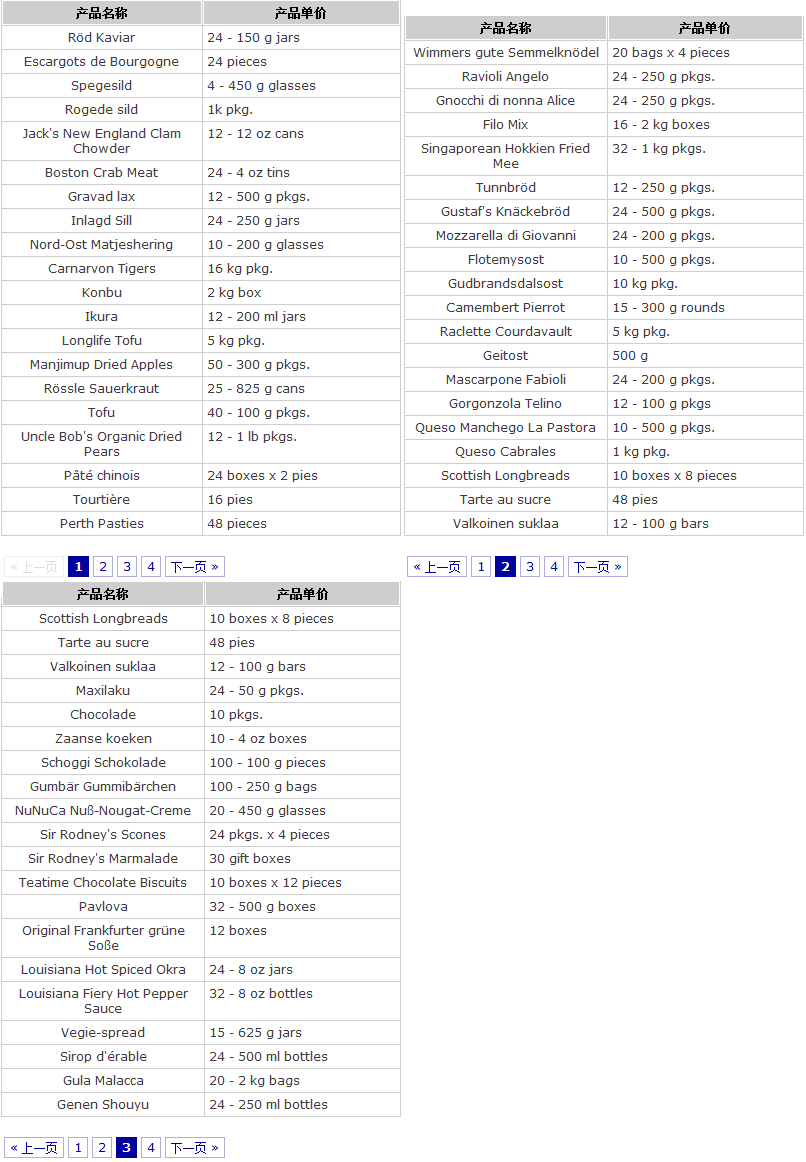
分頁呈現效果(請見下圖):
- 上一篇文章: jQuery Ajax 的 load() 方法詳解
- 下一篇文章: jQuery 與 JavaScript 對照學習:取得父子與前後元素