讓 jQuery UI draggable 支援手機觸屏拖曳
編輯:JQuery特效代碼
問題背景
在行動版頁面中需要讓某個元素可以被拖動,最直接的想法是套用 jQuery UI 的 draggable()。但實測會發現:這個插件只支援 PC 端,手機上完全拖不動。
根本原因
jQuery UI 內部一律以 mousedown、mousemove、mouseup 描述拖拽與點擊;而觸屏裝置並不會觸發這組滑鼠事件,它發的是 touchstart、touchmove、touchend。
解法並不需要改寫插件,只要攔截觸屏事件並把它翻譯成 jQuery UI 認得的滑鼠事件即可。做法是覆寫 $.ui.mouse 的原型方法。
完整可運行的範例
效果預覽:https://hovertree.com/code/jquery/krll21ld.htm
<!DOCTYPE html>
<html lang="zh">
<head>
  <meta charset="UTF-8">
  <meta content="width=device-width, initial-scale=1.0, maximum-scale=1.0, user-scalable=0;" name="viewport">
  <title>jQuery UI draggable 適配移動端</title>
</head>
<body>
  <img id="img" src="https://hovertree.com/hvtimg/bjafjd/wmt3mxd7_l.png">

  <script src="https://down.hovertree.com/jquery/jquery-1.12.4.min.js"></script>
  <script src="https://hovertree.com/jqueryui/jquery-ui.js"></script>

  <script>
    var moveFlag = 0;   // 是否發生過移動

    // 僅在行動裝置上套用
    /iPad|iPhone|Android/.test(navigator.userAgent) && (function ($) {
      var proto = $.ui.mouse.prototype,
          _mouseInit = proto._mouseInit;

      $.extend(proto, {
        _mouseInit: function () {
          this.element.bind("touchstart." + this.widgetName,
                            $.proxy(this, "_touchStart"));
          _mouseInit.apply(this, arguments);
        },

        _touchStart: function (event) {
          this.element
            .bind("touchmove." + this.widgetName, $.proxy(this, "_touchMove"))
            .bind("touchend."  + this.widgetName, $.proxy(this, "_touchEnd"));

          this._modifyEvent(event);
          $(document).trigger($.Event("mouseup"));  // 重置 ui.mouse 的內部旗標
          this._mouseDown(event);
        },

        _touchMove: function (event) {
          moveFlag = 1;
          this._modifyEvent(event);
          this._mouseMove(event);
        },

        _touchEnd: function (event) {
          // 沒有移動過就視為點擊,主動派發 click
          if (moveFlag == 0) {
            var evt = document.createEvent('Event');
            evt.initEvent('click', true, true);
            this.handleElement[0].dispatchEvent(evt);
          }
          this.element
            .unbind("touchmove." + this.widgetName)
            .unbind("touchend."  + this.widgetName);
          this._mouseUp(event);
          moveFlag = 0;
        },

        // 把觸屏座標改寫成滑鼠事件看得懂的格式
        _modifyEvent: function (event) {
          event.which = 1;
          var target = event.originalEvent.targetTouches[0];
          event.pageX = target.clientX;
          event.pageY = target.clientY;
        }
      });
    })(jQuery);
  </script>

  <script>
    $("#img").draggable();
  </script>
</body>
</html>
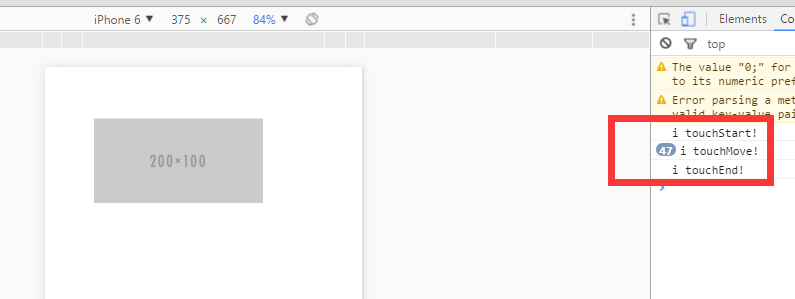
程式碼的三個關鍵設計
_modifyEvent是翻譯核心:把touches[0]的座標搬到pageX/pageY,並把which強制設為 1(左鍵),jQuery UI 後續的位移計算才能正常運作。moveFlag用來分辨拖曳與點擊:觸控裝置上「手指按下」與「手指拖動」需要區分。若整個touchstart~touchend過程中moveFlag一直是 0,就手動派發一個 click 事件,補上觸屏預設不會產生的點擊行為。- 用使用者代理判斷限定範圍:只在 iPad/iPhone/Android 上覆寫,PC 端維持 jQuery UI 原有邏輯,避免影響滑鼠操作。
注意事項
- 這是直接改動 jQuery UI 內部私有方法的做法,升級 jQuery UI 版本後務必重新測試。
- 頁面若為垂直長頁,拖曳區域建議加上
touch-action: none,否則瀏覽器可能把垂直手勢解讀成捲動。 - 若專案允許引入額外套件,jquery-ui-touch-punch 是實作相同思路的現成方案,維護成本更低。
參考資料:jQuery UI Draggable 在行動端瀏覽器不起作用的解決方案
- 上一篇文章: jQuery 實戰要點(下):表單、事件綁定、鏈式編程與插件
- 下一篇文章: jQuery 入門基礎知識(上):入口函式、物件轉換與選擇器