用 jQuery 做隨機抽獎:setInterval 與 toggle 的結合應用
編輯:JQuery特效代碼
體驗效果:https://hovertree.com/texiao/jquerytree/3/
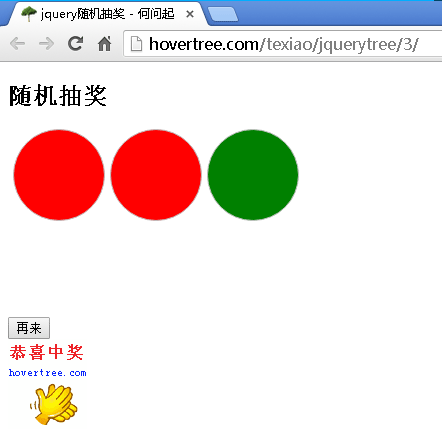
這是一個用色塊變化模擬抽獎滾動的小遊戲。第三個圓會持續隨機變色並隱藏,按下開始後第一個圓記下當時的顏色,按下停止時第三個圓漸進出現,最終顏色交給第二個圓;兩色相同即中獎。
版面與樣式
.mainHovertree,.beginHovertree,.endHovertree{width:30px;height:30px;
border:solid silver 1px;display:inline-block;margin-left:5px;
border-radius: 60px;padding: 30px 30px;}
.mainHovertree{background-color:red}
#resultHovertree{width:100px;height:100px;background-repeat:no-repeat}
核心邏輯
隨機變色由 setInterval 每 400 毫秒呼叫一次,並用 Math.random() 決定紅、綠、黃:
var int = self.setInterval("colorHoverTree()", 400)

function colorHoverTree() {
    switch (hoverTreeRandom(3)) {
        case 1: $(".mainHovertree").css("background-color", "red"); break;
        case 2: $(".mainHovertree").css("background-color", "green"); break;
        case 3: $(".mainHovertree").css("background-color", "yellow"); break;
    }
}
function hoverTreeRandom(n) {
    return Math.floor(Math.random() * n + 1)
}
點擊開始時,把主圓當前顏色複製給第一個圓,隱藏主圓並顯示停止鈕;點擊停止時,用 toggle(2000, callback) 讓主圓在兩秒內平滑展開,動畫結束的 callback 中再取色比對:
$(".mainHovertree").toggle(2000, function () {
    $(".endHovertree").css("background-color", $(".mainHovertree").css("background-color"));
    if ($(".beginHovertree").css("background-color") == $(".endHovertree").css("background-color")) {
        $("#resultHovertree").css("background-image", "url(images/zjhovertree.gif)");
    } else {
        $("#resultHovertree").css("background-image", "url(images/nohovertrees.jpg)");
    }
    $("#replayHovertree").show();
});
本範例主要練習 toggle()、show()、hide()、css() 這幾個基礎 API 的搭配,以及 setInterval 與回呼函式的時序控制。
完整程式碼
<!DOCTYPE html>
<html>
<head>
<meta http-equiv="Content-Type" content="text/html; charset=utf-8"/>
 <title>jquery隨機抽獎 - 何問起</title><base target="_blank"/>
 <meta charset="utf-8" />
 <meta name="viewport" content="width=device-width, initial-scale=1" /><style>.mainHovertree,.beginHovertree,.endHovertree{width:30px;height:30px;
 border:solid silver 1px;display:inline-block;margin-left:5px;
 border-radius: 60px;padding: 30px 30px;}
 .mainHovertree{background-color:red}#resultHovertree{width:100px;height:100px;background-repeat:no-repeat}
 a{color:blue}
 </style>
 <script src="https://hovertree.com/ziyuan/jquery/jquery-1.11.3.min.js"></script>
</head>
<body>
 <div>
 <h2>隨機抽獎</h2>
 <div class="beginHovertree"></div><div class="endHovertree"></div><div class="mainHovertree"></div>
 <br /><br />
 <input type="button" id="startHovertree" value="開始" />
 <input type="button" id="stopHovertree" value="停止" style="display:none" />
 <input type="button" id="replayHovertree" value="再來" style="display:none" />
 <br />
 <div id="resultHovertree"></div>
 </div>
 <script>
$(document).ready(function () {
 var int = self.setInterval("colorHoverTree()", 400)
 $("#startHovertree").on("click", function () {
 $("#startHovertree").hide();
 $(".beginHovertree").css("background-color", $(".mainHovertree").css("background-color"));
 $(".mainHovertree").toggle();
 $("#stopHovertree").show();
 })
 $("#stopHovertree").on("click", function () {
 $("#stopHovertree").hide();
 $(".mainHovertree").toggle(2000, function () {
 $(".endHovertree").css("background-color", $(".mainHovertree").css("background-color"));
 if ($(".beginHovertree").css("background-color") == $(".endHovertree").css("background-color"))
 { $("#resultHovertree").css("background-image", "url(images/zjhovertree.gif)") }
 else { $("#resultHovertree").css("background-image", "url(images/nohovertrees.jpg)") }
 $("#replayHovertree").show();
 });
 })
 $("#replayHovertree").on("click", function () {
 $(this).hide();
 $('.beginHovertree').css("background-color", "white")
 $('.endHovertree').css("background-color", "white")
 $("#resultHovertree").css("background-image", "url()")
 $("#startHovertree").show();
 })
});
function colorHoverTree() {
 switch(hoverTreeRandom(3))
 {
 case 1: $(".mainHovertree").css("background-color", "red"); break;
 case 2: $(".mainHovertree").css("background-color", "green"); break;
 case 3: $(".mainHovertree").css("background-color", "yellow"); break;
 }
}
function hoverTreeRandom(n){
return Math.floor(Math.random()*n+1)
}
 </script>
</body>
</html>