JavaScript 內置對象詳解:String、Date、Array 與 Math
編輯:JavaScript基礎知識
JavaScript 的對象相關知識點很多,本文挑幾個日常開發中最常用的內置對象做一次系統梳理。

一、對象的基本認知
1. JavaScript 中幾乎一切都是對象:字符串、數組、函數都是。
2. 每個對象都帶有屬性與方法。
3. JS 允許自定義對象。
自定義對象的兩條路徑
路徑一:先實例化,再逐個掛屬性
<script>
  var people = new Object();
  people.name = "顏小媛";
  people.age = "18";
  document.write("name:" + people.name + ", age:" + people.age);
</script>
路徑二:直接用對象字面量
<script>
  var people = {
    name: "顏小媛",
    age: 18
  };
  document.write("name:" + people.name + ", age:" + people.age);
</script>
兩種寫法輸出一致。
路徑三:用構造函數批量創建
<script>
  function people(name, age) {
    this.name = name;
    this.age = age;
  }
  var son = new people("顏小媛", 18);
  document.write("name:" + son.name + ", age:" + son.age);
</script>
二、String 字符串對象
字符串對象用於處理已有的字符串文本,可以用單引號或雙引號包裹(混用時注意別沖突)。
indexOf():查找子串位置
<script>
  var str = "hello world";
  document.write("字符串長度:" + str.length + "<br/>");
  document.write("world 的位置:" + str.indexOf("world") + "<br/>");
  document.write("llllll 的位置:" + str.indexOf("llllll"));
</script>
輸出:長度 11;world 的位置是 6;未找到的 llllll 返回 -1。
match():內容匹配
<script>
  var str = "hello world";
  document.write(str.match("world"));    // 返回匹配結果
  document.write(str.match("lllllll"));  // null
</script>
replace():替換內容
<script>
  var str = "hello world";
  document.write(str.replace("world", "123"));   // hello 123
</script>
toUpperCase() / toLowerCase():大小寫轉換
<script>
  var str = "hello world";
  document.write(str.toUpperCase());   // HELLO WORLD
</script>
split():字符串轉數組
<script>
  var str1 = "hello,jjj,lll,kkk";
  var s = str1.split(",");   // 以逗號作為分隔符
  document.write(s[1]);      // jjj
</script>
三、Date 日期對象
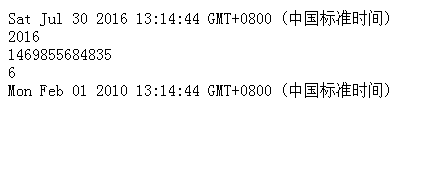
日期對象用於處理日期與時間。常用方法有 getFullYear()(取年份)、getTime()(取毫秒)、setFullYear()(設置日期)、getDay()(取星期)。
<script>
  var date = new Date();
  document.write(date + "<br/>");
  document.write(date.getFullYear() + "<br/>");
  document.write(date.getTime() + "<br/>");
  document.write(date.getDay() + "<br/>");
  date.setFullYear(2010, 1, 1);
  document.write(date);
</script>
實戰:一個走動的時鐘
<html>
<head>
  <script>
    function startTime() {
      var today = new Date();
      var h = today.getHours();
      var m = checkTime(today.getMinutes());
      var s = checkTime(today.getSeconds());
      document.getElementById('txt').innerHTML = h + ":" + m + ":" + s;
      t = setTimeout(startTime, 500);
    }

    function checkTime(i) {
      if (i < 10) {
        i = "0" + i;
      }
      return i;
    }
  </script>
</head>
<body onload="startTime()">
  <div id="txt"></div>
</body>
</html>
setTimeout 每 500 毫秒刷新一次,配合 checkTime 補零,就能得到格式整齊的動態時鐘。

四、Array 數組對象
數組用來存放一系列有序的值,通過「數組名 + 索引」訪問元素,注意索引從 0 開始。
var myArray = ["kkk", "ddd", "ddddd"];
concat():合併數組
<script>
  var a = ["aa", "bb"];
  var b = ["cc", "dd"];
  document.write(a.concat(b));   // aa bb cc dd
</script>
sort():排序
<script>
  var a = ["a", "c", "d", "t", "b", "e"];
  document.write(a.sort());      // a b c d e t
</script>
傳入比較函數可以控制升降序:
<script>
  var a = ["5", "2", "3", "4", "1"];
  document.write(a.sort(function (a, b) { return b - a; }));  // 54321,倒序
</script>
push():末尾追加
<script>
  var a = ["a", "b"];
  a.push("c");
  document.write(a);   // abc
</script>
reverse():元素翻轉
<script>
  var a = ["c", "b", "a"];
  document.write(a.reverse());   // abc
</script>
五、Math 數學對象
Math 用於執行常見的算術任務,常用方法有 round()(四捨五入)、random()(0~1 隨機數)、max()、min()、abs()(絕對值)。
document.write(Math.round(2.5));        // 3
document.write(Math.random());          // 0~1 之間的隨機小數
document.write(Math.random() * 10);     // 0~10 之間的隨機小數
document.write(parseInt(Math.random()));// 幾乎恆為 0
document.write(Math.max(10, 20, 3, 90));// 90
document.write(Math.min(12, 0, 2, 3, 4));// 0
document.write(Math.abs(-10));          // 10
想要取某個區間內的隨機整數,常見組合是 Math.floor(Math.random() * (max - min + 1)) + min,比單純用 parseInt 更可控。
- 上一篇文章: javascript 實現數組的「正態分布」排序問題
- 下一篇文章: 用原生 DOM API 操作 HTML 元素的常用方法清單
相關文章
-
JavaScript 學習總結【3】:String、Number、Math、Array、Date 五大內置對象 淺析正則表達式相關的 String 方法 JavaScript 內置對象總覽:屬性與方法一次整理 Java 常用 String 與 StringBuffer 方法彙整 JavaScript 類型轉換與引用類型(Boolean/Number/String)詳解 JavaScript 基本包裝類型:為什麼字串能呼叫方法 JavaScript 入門(三):用物件的角度看世界 深入 JavaScript String 物件:屬性與方法完整整理 JavaScript 物件基本知識(上):Number、String、Array JavaScript String 與 Array 常用擴展方法彙編