用原生 DOM API 操作 HTML 元素的常用方法清單
編輯:JavaScript基礎知識
1. getElementsByName():按 name 取元素
<p name="pn">hello</p>
<p name="pn">hello</p>
<p name="pn">hello</p>

<script>
  function getName() {
    var count = document.getElementsByName("pn");
    alert(count.length);   // 3
    var p = count[2];
    p.innerHTML = "world";
  }
</script>
執行後彈出「3」,確認後頁面變為 hello、hello、world。
2. getElementsByTagName():按標籤名取元素
<p>hello</p>
<p>hello</p>
<p>hello</p>

<script>
  function getName() {
    var count = document.getElementsByTagName("p");
    alert(count.length);   // 3
    count[2].innerHTML = "world";
  }
</script>
3. getAttribute():讀取元素屬性
<a id="aid" title="得到a的標簽屬性"></a>

<script>
  function getAttr1() {
    var anode = document.getElementById("aid");
    alert("a 的 ID 是:" + anode.getAttribute("id"));
  }
  function getAttr2() {
    var anode = document.getElementById("aid");
    alert("a 的 title 內容是:" + anode.getAttribute("title"));
  }
  getAttr1();
  getAttr2();
</script>
4. setAttribute():設置元素屬性
<a id="aid2">aid2</a>

<script>
  function setAttr() {
    var anode = document.getElementById("aid2");
    anode.setAttribute("title", "動態設置a的title屬性");
    alert("動態設置的 title 值為:" + anode.getAttribute("title"));
  }
  setAttr();
</script>
5. childNodes:訪問子節點
<ul><li>1</li><li>2</li><li>3</li></ul>

<script>
  function getChildNode() {
    var childnode = document.getElementsByTagName("ul")[0].childNodes;
    alert(childnode.length);
    alert(childnode[0].nodeType);
  }
  getChildNode();
</script>
順帶一提:childNodes 會把空白文本節點也算進去,實際開發中若只需要元素節點,用 children 更省心。
6. parentNode:訪問父節點
<div>
  <p id="pid"></p>
</div>

<script>
  function getParentNode() {
    var p = document.getElementById("pid");
    alert(p.parentNode.nodeName);   // DIV
  }
  getParentNode();
</script>
7. createElement():創建元素節點
<script>
  function createNode() {
    var input = document.createElement("input");
    input.type = "button";
    input.value = "按鈕";
    document.body.appendChild(input);   // 插入節點
  }
  createNode();
</script>
8. createTextNode():創建文本節點
<script>
  function createNode() {
    var element = document.createElement("div");
    element.className = "message";

    var textNode = document.createTextNode("Hello world!");
    element.appendChild(textNode);

    document.body.appendChild(element);
  }
  createNode();
</script>
這段做了三件事:新建一個 class 為 message 的 div;建立文本節點並掛到 div 上;最後把 div 追加到 body。瀏覽器中即可看到新元素與文本。
9. insertBefore():在指定節點前插入
<div id="div">
  <p id="pid">p元素</p>
</div>

<script>
  function addNode() {
    var div = document.getElementById("div");
    var node = document.getElementById("pid");
    var newnode = document.createElement("p");
    newnode.innerHTML = "動態插入一個p元素";
    div.insertBefore(newnode, node);
  }
  addNode();
</script>
10. removeChild():刪除節點
<div id="div">
  <p id="pid">p元素</p>
</div>

<script>
  function removeNode() {
    var div = document.getElementById("div");
    div.removeChild(div.childNodes[1]);
  }
  removeNode();
</script>
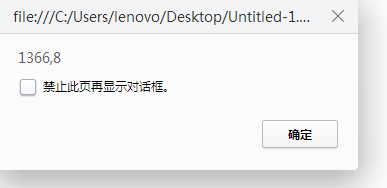
11. offsetHeight / scrollHeight:獲取網頁尺寸
<script>
  function getSize() {
    // 用 || 做兼容:標準模式取 documentElement,怪異模式回退到 body
    var width = document.documentElement.offsetWidth || document.body.offsetWidth;
    var height = document.documentElement.offsetHeight || document.body.offsetHeight;
    alert(width + "," + height);
  }
  getSize();
</script>
以上就是原生 DOM 操作中最常用的一批 API:查詢、讀寫屬性、遍歷節點樹、增刪節點以及讀取尺寸。理解它們背後的節點模型,比記住方法名更重要。