用 typeof 檢測
JavaScript 自帶兩套類型:基本數據類型(undefined、string、null、boolean、function、object)和對象類型。但若用 typeof 檢測對象類型,一律返回 "object",無法區分:
typeof null // "object" typeof [] // "object" typeof document.childNodes //"object" typeof /\d/ //"object" typeof new Number() //"object"
用 constructor 檢測構造函數
[].constructor === Array //true document.childNodes === NodeList //true /\d/.constructor === RegExp //true function isRegExp(obj) { return obj && typeof obj === "object" && obj.constructor === RegExp; } //檢測正則表達式對象 function isNull(obj){ return obj === null; }
用 constructor 能完成大多數檢測,null 特殊需直接比較。但 iframe 中的數組類型無法正確檢測,這是它的缺陷;同時舊版 IE 下 DOM 和 BOM 的 constructor 無法訪問。
用 Object.prototype.toString 判斷
Object.prototype.toString.call([]) //"[object Array]" Object.prototype.toString.call(/\d/) // "[object RegExp]" Object.prototype.toString.call(1)//"[object Number]"
來看看 jQuery 源碼如何使用 toString 方法:
/* * jQuery JavaScript Library v1.11.2 */ var class2type = {}; //用來保存js數據類型 jQuery.each("Boolean Number String Function Array Date RegExp Object Error".split(" "), function(i, name) {//構造class2type存儲常用類型的映射關系,遍歷基本類型並賦值,鍵值為 [object 類型] class2type[ "[object " + name + "]" ] = name.toLowerCase(); }); type: function( obj ) { if ( obj == null ) {//首先如果是null則返回null字符串 return obj + ""; } //接著判斷給定參數類型是否為object或者function,是的話在映射表中尋找 toString後的鍵值名稱並返回,不是的話利用typeof就可以得到正確類型。 return typeof obj === "object" || typeof obj === "function" ? class2type[ toString.call(obj) ] || "object" : typeof obj; }, /****************************/ jQuery.type(/\d/) //"regexp" jQuery.type(new Number()) //"number"
之所以能用 toString 檢測,是因為不同對象都會重新定義自己的 toString 方法。
特殊類型檢測
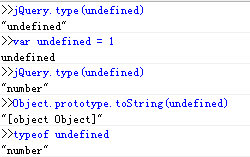
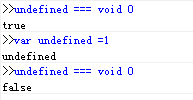
上述調試在 IE8 中進行,因為 undefined 在 JavaScript 中並非關鍵字,IE8 以下(之後版本不可賦值)可以賦值。查 jQuery.type 源碼可知,對 undefined 的檢測是由 typeof undefined 完成的,jQuery.type 並不能在舊 IE 中正確檢測 undefined。想獲得純淨的 undefined 可用 void 0。
另外,對 DOM、BOM 對象,在舊 IE 中用 Object.prototype.toString 檢測出來均為 "[object Object]"。

但在 Chrome 下結果完全不同(Chrome 能檢測出真實類型):

jQuery 如何檢測特殊類型
isWindow: function( obj ) {//ECMA規定window為全局對象global,且global.window === global return obj != null && obj == obj.window; }, isPlainObject: function( obj ) { var key; if ( !obj || jQuery.type(obj) !== "object" || obj.nodeType || jQuery.isWindow( obj ) ) { return false; } try {//判斷它最近的原形對象是否含有isPrototypeOf屬性 if ( obj.constructor && !hasOwn.call(obj, "constructor") && !hasOwn.call(obj.constructor.prototype, "isPrototypeOf") ) { return false; } } catch ( e ) { return false; } if ( support.ownLast ) { for ( key in obj ) { return hasOwn.call( obj, key ); } }
mass Framework 的改進
var class2type = {//將可能出現的類型都映射在了class2type對象中,從而減少isXXX函數 "[object HTMLDocument]": "Document", "[object HTMLCollection]": "NodeList", "[object StaticNodeList]": "NodeList", "[object DOMWindow]": "Window", "[object global]": "Window", "null": "Null", "NaN": "NaN", "undefined": "Undefined" }; type: function(obj, str) { var result = class2type[(obj == null || obj !== obj) ? obj : serialize.call(obj)] || obj.nodeName || "#"; //serialize == class2type.toString if (result.charAt(0) === "#") { //兼容舊式浏覽器與處理個別情況,如window.opera //利用IE678 window == document為true,document == window竟然為false的神奇特性 if (obj == obj.document && obj.document != obj) {//對DOM,BOM對象采用nodeType(單一)和item(節點集合)進行判斷 result = "Window"; //返回構造器名字 } else if (obj.nodeType === 9) { result = "Document"; //返回構造器名字 } else if (obj.callee) { result = "Arguments"; //返回構造器名字 } else if (isFinite(obj.length) && obj.item) { result = "NodeList"; //處理節點集合 } else { result = serialize.call(obj).slice(8, -1); } } if (str) { return str === result; } return result; }
類數組
類數組是一類特殊數據,它們類似 Array 卻不能用 Array 的方法,明顯特徵是含有 length 屬性且鍵值以整數有序排列。這樣的數組可通過 Array.slice() 轉成真數組,進而使用 Array 的方法。
常見類數組:arguments、document.forms、getElementsByClassName(各類 NodeList、HTMLCollection)或一些特殊對象:
var arrayLike={ 0:"a", 1:"b", 2:"c", length:3 }
通常通過 Array.slice.call 即可轉換,但舊 IE 的 HTMLCollection、NodeList 不是 Object 子類,不能用該方法,此時需建一個空數組,遍歷節點 push 進去並返回新數組;同時要區分 window 和 string 對象,因為它們也含 length>=0(length 不可修改),卻不是類數組。
jQuery 如何處理類數組
makeArray: function( arr, results ) { var ret = results || []; if ( arr != null ) { if ( isArraylike( Object(arr) ) ) { jQuery.merge( ret, typeof arr === "string" ? [ arr ] : arr ); //jQuery.merge 合並數組 ,若是字符串則封裝成數組河濱,不是則世界合並 } else { push.call( ret, arr ); } } return ret; }
Ext.js 如何處理類數組
toArray: function(iterable, start, end) { if (!iterable || !iterable.length) { return []; //非類數組類型直接返回[] } if (typeof iterable === 'string') { iterable = iterable.split(''); //分解字符串 } if (supportsSliceOnNodeList) { return slice.call(iterable, start || 0, end || iterable.length); //對於NodeList支持 } var array = [], i; start = start || 0; end = end ? ((end < 0) ? iterable.length + end : end) : iterable.length; for (i = start; i < end; i++) { array.push(iterable[i]); } return array; }
mass Framework.js 如何處理類數組
slice: W3C ? function(nodes, start, end) { //var W3C = DOC.dispatchEvent; IE9開始支持W3C的事件模型 return factorys.slice.call(nodes, start, end); } : function(nodes, start, end) { var ret = [], n = nodes.length; if (end === void 0 || typeof end === "number" && isFinite(end)) { start = parseInt(start, 10) || 0; end = end == void 0 ? n : parseInt(end, 10); if (start < 0) { start += n; } if (end > n) { end = n; } if (end < 0) { end += n; } for (var i = start; i < end; ++i) { ret[i - start] = nodes[i]; } } return ret;
以上就是本文全部內容,希望對大家學習有所幫助。
- 上一篇文章: 動手實現一個簡易的 Promise 異步模式
- 下一篇文章: JavaScript 遞歸函數的用法與注意點
相關文章
-
JS 字串轉數字與數字轉字串:parseInt、Number、toString 的完整比較 JavaScript 中的 toString() 方法 JavaScript 中的型別判斷方法 JS 物件與陣列轉字串:toString 與 join 的用法差異 如何判斷 JavaScript 物件是否為陣列? 一道 JavaScript 面試題解析:那些反直覺的 == 比較 JavaScript arguments 類數組完全指南 Java toString 方法的作用,以及 String 與 StringBuffer 的性能取捨 JavaScript 字串與數字的相互轉換完全指南 JavaScript 進制轉換:把任意進制字串轉成十進制