用 JavaScript 實作表單註冊驗證的完整範例
編輯:JavaScript基礎知識
以下示範一個純前端的註冊表單驗證,涵蓋必填檢查、長度限制、密碼一致性、信箱格式與首字元規則。
<!DOCTYPE HTML PUBLIC "-//W3C//DTD HTML 4.01 Transitional//EN"
  "https://www.w3.org/TR/html4/loose.dtd">
<html>
<head>
<meta http-equiv="Content-Type" content="text/html; charset=gb2312">
<meta name="Author" content="劉江波">
<script type="text/javascript">
function login() {
    var userName = document.getElementById("userName").value;
    var pwd      = document.getElementById("pwd").value;
    var repwd    = document.getElementById("repwd").value;
    var address  = document.getElementById("address").value;
    var matchResult = true;

    if (userName == "" || pwd == "" || repwd == "" || address == "") {
        alert("請確認是否有空缺項!");
        matchResult = false;
    } else if (userName.length < 6 || userName.length > 20) {
        alert("用戶名長度應在6到20個字符之間!");
        matchResult = false;
    } else if (userName == pwd || userName == repwd) {
        alert("密碼或重復密碼不能和用戶名相同!");
        matchResult = false;
    } else if (pwd.length < 6 || pwd.length > 20 ||
               repwd.length < 6 || repwd.length > 20) {
        alert("密碼或重復密碼長度應在6到20個字符之間!");
        matchResult = false;
    } else if (pwd != repwd) {
        alert("密碼和重復密碼不同,請重新輸入!");
        matchResult = false;
    }

    if (matchResult == true) {
        var mailreg = /^\w+@\w+(\.\w+)+$/;
        if (!address.match(mailreg)) {
            alert("郵箱格式不正確");
            matchResult = false;
        }
    }

    if (matchResult == true) {
        if (userName.charAt(0) >= 0 && userName.charAt(0) <= 9) {
            alert("用戶名不能以數字字符開始!");
            matchResult = false;
        }
    }

    return matchResult;
}
</script>
<title>用戶注冊及驗證</title>
</head>

<body>
<center>
<form name="loginForm" action="https://www.ytu.edu.cn"
      onsubmit="return login()" method="post">
<table bgcolor="#6666FF" width="300" cellspacing="0"
       cellpadding="0" border="0" align="left" valign="top">
<tr>
  <td class="table-title" colspan="2" align="center" bgcolor="#3366FF">用戶注冊</td>
</tr>
<tr>
  <td width="130" height="28" align="left">登錄用戶名</td>
  <td><input id="userName" name="userName" type="text" class="input"></td>
</tr>
<tr>
  <td width="80" height="28" align="left">登錄密碼</td>
  <td><input id="pwd" name="pwd" type="password" class="input"></td>
</tr>
<tr>
  <td width="80" height="28" align="left">重復輸入密碼</td>
  <td><input id="repwd" name="repwd" type="password" class="input"></td>
</tr>
<tr>
  <td width="80" height="28" align="left">有效郵箱地址</td>
  <td><input id="address" name="address" type="text" class="input"></td>
</tr>
<tr>
  <td colspan="2">
    <input type="submit" value="登錄">
    <input type="button" value="取消" onClick="reset()">
  </td>
</tr>
</table>
</form>
</center>
</body>
</html>
整體思路是用一個 matchResult 旗標貫穿所有檢查,任何一項不通過就設為 false 並跳脫後續驗證;最後 return matchResult 掛在表單的 onsubmit 上,回傳 false 即可阻止送出。
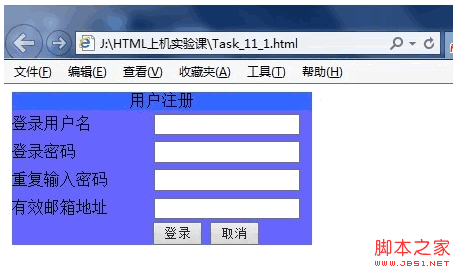
效果如下:
要補充的是,前端驗證只是使用者體驗層面的第一道防線,使用者完全可以停用 JavaScript 繞過它。真正的資料合法性與安全性檢查,仍必須在伺服器端再做一次。
相關文章
-
jQuery 表單驗證實戰:從必填標記到即時提醒的完整流程 不靠插件:用原生 jQuery 手寫一個表單驗證 jquery.validate.js 遇到多個相同 name 欄位該怎麼處理 jQuery Validate 表單驗證實作:格式檢查與重名校驗 JavaScript即時表單驗證:input與propertychange雙寫法 用純 jQuery 做一個前端驗證碼:產生、點擊刷新與比對 用 jQuery 為 textarea 加上字數限制與即時剩餘字數提示 jQuery Validation 插件完全指南:規則、提示、美化與遠程校驗 Bootstrap 表單創建實例詳解 用JavaScript實作圖形驗證碼功能