jQuery UI Selectable 元件深入解析
編輯:JavaScript基礎知識
一、基本用法
Selectable 元件可以讓頁面上的一些元素變成「可選擇的」:使用者可以單擊選取,也可以拖曳框選,還能按住 Ctrl 鍵選取不重連續的項目。
$('.selector').selectable(options);值得注意的是,jQuery UI 主題包中並未提供 ui-selecting 與 ui-selected 這兩個 class 的樣式,因此使用時必須自行建立,否則選取動作在視覺上完全看不出來。
<!DOCTYPE html PUBLIC "-//W3C//DTD XHTML 1.0 Transitional//EN"
  "https://www.w3.org/TR/xhtml1/DTD/xhtml1-transitional.dtd">
<html xmlns="https://www.w3.org/1999/xhtml">
<head>
<meta http-equiv="Content-Type" content="text/html; charset=utf-8" />
<title>selectable 元件</title>
<script language="javascript" src="js/jquery-1.4.2.min.js"></script>
<script type="text/javascript" src="js/jquery.ui.core.js"></script>
<script type="text/javascript" src="js/jquery.ui.widget.js"></script>
<script type="text/javascript" src="js/jquery.ui.mouse.js"></script>
<script type="text/javascript" src="js/jquery.ui.selectable.js"></script>
<style type="text/css">
h1 { color:#006; font-size:24px; font-weight:bold; margin-bottom:0px; }
#feedback { font-size: 1.4em; }
#selectable .ui-selecting { background: #FECA40; }
#selectable .ui-selected  { background: #00BF00; color: white; }
#selectable { list-style-type: none; margin: 0; padding: 0; width: 85%; }
#selectable li { margin: 3px; padding: 0.4em; font-size: 16px; height: 18px; }
</style>
<link href="CSS/base/jquery.ui.all.css" rel="stylesheet" type="text/css" />
<script type="text/javascript">
$(document).ready(function() {
    $("#selectable").selectable();
});
</script>
</head>
<body>
<div class="demo">
  <h1>新手上路</h1>
  <ol id="selectable">
    <li class="ui-widget-content">開通網銀,百付寶為您一路護航</li>
    <li class="ui-widget-content">認准標識,精選實力賣家任您選擇</li>
    <li class="ui-widget-content">收藏 + 購物車,逛街搜店更便捷</li>
    <li class="ui-widget-content">先驗貨再付款,交易更安全</li>
    <li class="ui-widget-content">信用誠實可靠,品質有保障</li>
    <li class="ui-widget-content">精選誠信商戶,賣家可信賴</li>
    <li class="ui-widget-content">強大客服支持,購物更放心</li>
  </ol>
</div>
</body>
</html>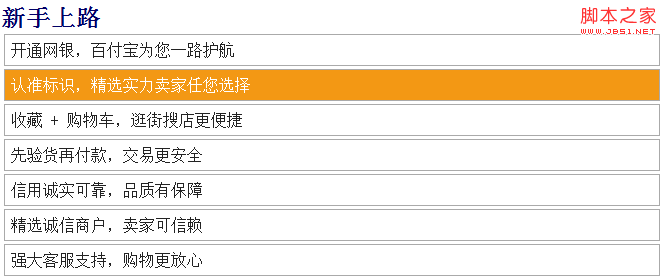
二、用 filter 過濾可選項
可以對子元素進行過濾,指定哪些子元素能夠被選取。做法是在呼叫 selectable() 時把 filter 屬性設為一個 jQuery 選擇器,此時只有與該選擇器相符的元素才會成為選項。
<script type="text/javascript">
$(document).ready(function() {
    $("#wrap").selectable({
        filter: "li",   // 定義 li 元素為可選項
        stop: function (e, ui) {   // 處理選擇結束事件
            var selection = [];
            $("li.ui-selected", this).each(function () {
                selection.push($(this).text());
            });
            $("#result").text("您選擇了 " + selection.length + " 項:" + selection.join(","));
        }
    });
});
</script>
配合的樣式與結構:
<style type="text/css">
body { text-align:center; margin:0 auto; padding:0; }
#wrap {
    margin: 10px auto; padding: 5px; width: 520px; height:220px;
    background: #fff; border: 5px solid #000;
}
h1 { color:#006; font-size:24px; font-weight:bold; margin-bottom:0px; text-align:center; }
#selectable .ui-selecting { background: #FECA40; }
#selectable .ui-selected  { background: #F39814; color: white; }
#selectable { list-style-type: none; margin: 0; padding: 0; }
#selectable li {
    margin: 5px; padding:2px; font-size: 16px; height: 20px; cursor:pointer;
    border: 1px solid #aaaaaa; background: #ffffff; color: #222222;
    width:114px; float:left;
}
#result { clear:both; }
</style>

<div id="wrap">
  <h1>城市列表</h1>
  <ul id="selectable">
    <li>重慶</li><li>北京</li><li>上海</li><li>廣州</li>
    <li>深圳</li><li>成都</li><li>天津</li><li>南京</li>
    <li>杭州</li><li>武漢</li><li>西安</li><li>長沙</li>
    <li>廈門</li><li>鄭州</li><li>太原</li><li>青島</li>
  </ul>
  <div id="result"></div>
</div>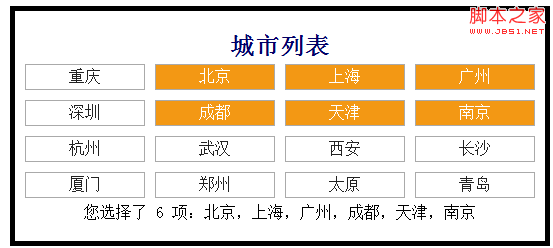
三、六個選擇事件
- selected(
selectableselected):某元素被加入選項且選擇操作結束後觸發。 - selecting(
selectableselecting):選擇過程中,每當選定一個元素時觸發。 - start(
selectablestart):開始選擇操作時觸發。 - stop(
selectablestop):結束選擇操作時觸發。 - unselected(
selectableunselected):某元素被移出選項且選擇操作結束後觸發。 - unselecting(
selectableunselecting):選擇過程中,每當移出一個元素時觸發。
$(document).ready(function() {
    $("#wrap").selectable({
        filter: "li",
        selected:     eventCallback,
        stop:         eventCallback,
        start:        eventCallback,
        selecting:    eventCallback,
        unselecting:  eventCallback
    });

    var selection;
    function eventCallback(e, ui) {
        if (e.type == "selectableselected") {
            selection = [];
            $(".ui-selected", this).each(function () {
                selection.push($(this).text());
            });
        } else if (e.type == "selectablestop") {
            $("#result").text("您選擇了 " + selection.length + " 項:" + selection.join(","));
        }
    }
});
效果與上一例相同,但這種寫法把六個事件的處理集中在一個函式裡,依 e.type 分流,適合需要在多個時機共用邏輯的場合。
實作上的提醒
用滑鼠拖曳框選在觸控裝置上完全不可用,因此若你的頁面需要支援行動裝置,應另外提供「點擊切換」的備援路徑。此外,ui-selected 只是視覺標記,取得實際選項時請記得排除正在拖曳中的 ui-selecting。而若這個元件是要在新專案中使用,建議直接評估原生寫法——用 <input type="checkbox"> 搭配 <label> 就能免費獲得鍵盤操作與螢幕閱讀器支援,這正是自製元件最常忽略的部分。