window 物件
window 物件的屬性相當豐富,以下列出幾個常用的:
- closed:取得視窗是否已關閉。
- defaultStatus / status:設定或取得視窗狀態欄顯示的資訊。
- dialogHeight、dialogWidth、dialogLeft、dialogTop:設定或取得模式對話框的尺寸與座標。
- frameElement:取得在父文件中產生此 window 的 frame 或 iframe 物件。
- length:集合中物件的數目。
- name:視窗名稱。
- opener:建立目前視窗的視窗引用。
- parent / top:取得父視窗/最頂層的祖先視窗。
- screenLeft / screenTop:瀏覽器客戶區左上角相對於螢幕的座標。
- self:目前視窗或框架的引用。
除了屬性,window 還有大量事件與方法。想實現某個效果卻無從下手時,不妨想想 window 物件,它很可能就提供了你要的功能。其中 body 元素是下列 window 事件的宿主:onblur、onbeforeunload、onfocus、onload 與 onunload。
實作:離開頁面時的提示
我們常在離開頁面前跳出確認提示,只要為 body 加上一句即可:
<body onbeforeunload="return 'Are you exiting?'">
這裡有三個重點:必須寫 return 'xxx',只寫字串不會有提示;由於 onbeforeunload 後已有雙引號,return 內要用單引號;這句話對 IE、Chrome、Firefox 都有效。其中 Chrome 與 IE 會在確認欄顯示返回的字串,Firefox 則只顯示預設警告。
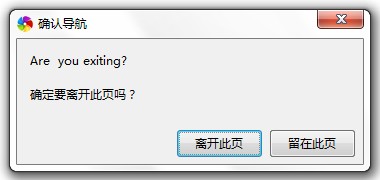
Chrome 中返回的句子會顯示在導覽列上方,效果與 IE 相同。
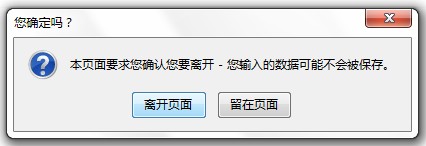
Firefox 只會出現上層的預設提示,與我們寫的字串無關;即便如此仍要寫,否則 Firefox 連提示都不會出現。若想在確認框顯示自訂內容,Firefox 無法用別的對話框取代預設框,只能另外加一個 confirm,但這樣會導致兩次提示。
以下是一個兼顧各瀏覽器的寫法:
<script language="javascript" for="window" event="onbeforeunload"> // for IE
return "Sure to exit?(IE)"   // 回傳字串時會提示是否留在頁面
</script>
<script type="text/javascript">
function closing(){
  var res = confirm("Are you exiting?(FF)");   // 在 FF 顯示
  return "Are you exiting?(chrome)";           // 在 Chrome 顯示
}
</script>
...
<body onbeforeunload="return closing();">
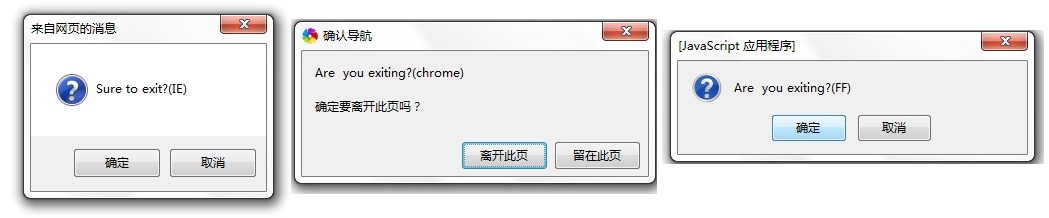
DOM(文件物件模型)
DOM 全名為 Document Object Model。根據 W3C 的定義,它是一個「與平台及語言中立」的介面,允許程式與腳本動態存取並更新文件的內容、結構與樣式,處理後的結果還能重新呈現在頁面上。
簡單來說,DOM 是一套基於「樹狀結構」的規範,與瀏覽器無關。任何 HTML 文件本身就是一棵樹,我們可以透過 JavaScript 對這棵樹進行動態修改。DOM 分為三個級別:Core DOM、XML DOM 與 HTML DOM,本文著重於 HTML DOM。
DOM 把文件拆成「元素、屬性、文本」構成的樹狀結構,這些都稱為「節點」,透過任一節點即可存取其它節點。常見節點類型:
- Element(元素節點)、Attr(屬性節點)、Text(文字節點)、Comment(註解節點)、Document(文件根節點)等。
以下用一個簡單的 HTML 來觀察 DOM 樹狀結構:
<html>
<head><title>DOMcheck</title></head>
<body>
  <a href="#">click here</a>
  <br>
  <input type="text" id="in">
  <input type="button" id="but" value="here~">
</body>
</html>
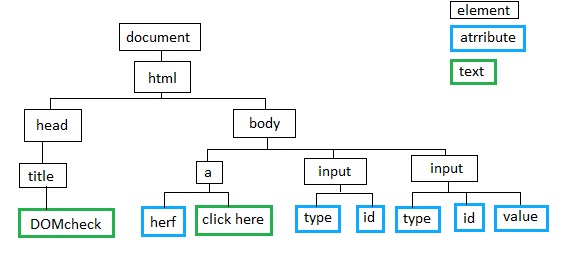
幾個重點:文件永遠是根節點,可用 document.documentElement 或 document.body 取得;script 也是節點,凡 <> 內的(含註解)都是節點;節點名稱(如 head、title)即為該節點的 tagName。取得其它節點無非是「向上、向下、平行」三個方向。
實作:點擊展開/收合子選項
var ifopen = false;
function get(element){ return document.getElementById(element); }
function crea(element){ return document.createElement(element); }
function openlist(){
  var titl = get("chapter1");
  var s = get("sub1") == null ? crea("span") : get("sub1");
  s.setAttribute("id", "sub1");
  ifopen = !ifopen;
  if(ifopen){
    s.innerHTML = "<br><a href='#L1'>list1</a><br><a href='#L2'>list2</a><br><a href='#L3'>list3</a>";
    titl.appendChild(s);
  } else {
    var de = document.getElementById("sub1");
    de.parentNode.removeChild(de);
  }
}
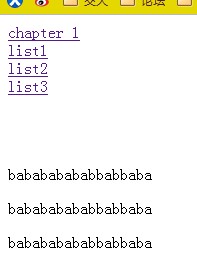
補充:節點除了能新增、刪除,還可用 cloneNode 複製,除了 setAttribute 外,也能用事件綁定的方式附加 onclick 等事件。