本文彙整了 JavaScript 的一批基礎知識點,涵蓋輸出、語句、物件、函數、運算符、流程控制、錯誤處理,以及 HTML DOM 操作、正則表達式、Window 物件與 Cookie 等內容,適合初學者快速回顧。
輸出與基本語法
輸出:
<script>
document.write("<h1>This is a heading</h1>");
document.write("<p>This is a paragraph</p>");
</script>
語句:
document.getElementById("demo").innerHTML="Hello World";
動態類型與物件
JavaScript 擁有動態類型:
<script>
var person={
    firstname : "Bill",
    lastname : "Gates",
    id : 5566
};
document.write(person.lastname + "<br />");
document.write(person["id"] + "<br />");
</script>
另一種建立物件的方式:
<script>
person=new Object();
person.firstname="Bill";
person.lastname="Gates";
person.age=56;
person.eyecolor="blue";
document.write(person.firstname + " is " + person.age + " years old.");
</script>
函數
function myFunction()
{
    alert("Hello World!");
}
<button onclick="myFunction()">點擊這裡</button>
運算符
算術運算:x=y+2、x=y-2、x=y*2、x=y/2、x=y%2、x=++y
賦值運算:x=y、x+=y、x-=y、x*=y、x/=y、x%=y
比較運算符:
x==8  為 false
x===5 為 true;x==="5" 為 false
x!=8  為 true
x>8   為 false
x<8   為 true
x>=8  為 false
x<=8  為 true
邏輯運算符:
(x < 10 && y > 1) 為 true
(x==5 || y==5) 為 false
!(x==y) 為 true
條件運算符:
greeting=(visitor=="PRES")?"Dear President ":"Dear ";
判斷語句
if 語句——只有當條件為 true 時執行代碼;if...else——條件為 true 執行一段,為 false 執行另一段;if...else if....else——在多個代碼塊中選擇其一執行;switch——同樣用於多分支選擇。
循環語句
for (var i=0;i<cars.length;i++)
{
    document.write(cars[i] + "<br>");
}
for 循環固定次數;for/in 遍歷物件屬性;while 在條件為 true 時循環;do/while 同理。break 語句可用於跳出循環(搭配標籤可跳出任意代碼塊),continue 則中斷本次迭代。
錯誤處理 - Throw、Try 和 Catch
try 語句測試代碼塊的錯誤,catch 處理錯誤,throw 建立自定義錯誤。
try
{
    adddlert("Welcome guest!");
}
catch(err)
{
    alert("error");
}
Throw 語句:
var x=document.getElementById("demo").value;
if(x=="") throw "empty";
if(isNaN(x)) throw "not a number";
JavaScript HTML DOM
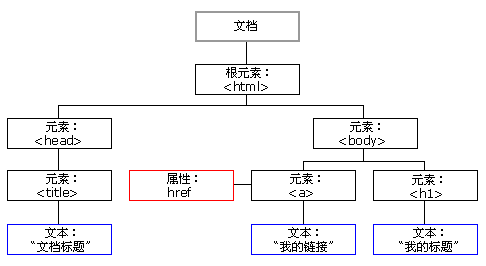
添加節點(HTML 元素):
<div id="div1">
<p id="p1">這是一個段落。</p>
<p id="p2">這是另一個段落。</p>
</div>
<script>
var para=document.createElement("p");
var node=document.createTextNode("這是新段落。");
para.appendChild(node);
var element=document.getElementById("div1");
element.appendChild(para);
</script>
刪除已有的 HTML 元素:
<script>
var parent=document.getElementById("div1");
var child=document.getElementById("p1");
parent.removeChild(child);
</script>
RegExp 正則表達式
當你檢索某個文本時,可以用一種模式來描述要檢索的內容,RegExp 就是這種模式。RegExp 物件有三個方法:test()、exec() 和 compile()。
test() 檢索字串中的指定值,回傳 true 或 false:
var patt1=new RegExp("e");
document.write(patt1.test("The best things in life are free"));
exec() 檢索並回傳被找到的值,若無匹配則回傳 null:
var patt1=new RegExp("e");
document.write(patt1.exec("The best things in life are free"));
compile() 用於改變 RegExp:
var patt1=new RegExp("e");
patt1.compile("d");
document.write(patt1.test("The best things in life are free"));
Window 尺寸與 Screen
var w=window.innerWidth
     || document.documentElement.clientWidth
     || document.body.clientWidth;
var h=window.innerHeight
     || document.documentElement.clientHeight
     || document.body.clientHeight;
document.write("可用寬度:" + screen.availWidth);
document.write("可用高度:" + screen.availHeight);
Window Location 與 History
document.write(location.href);
document.write(location.pathname);
window.location.assign("https://hovertree.com")
location.hostname 返回網域;location.pathname 返回路徑和檔名;location.port 返回端口;location.protocol 返回協議。
history.back()    // 等同於點擊後退按鈕
history.forward() // 等同於點擊前進按鈕
警告框、確認框、提示框
alert("文本")
confirm("文本")
prompt("文本","默認值")
計時
var t=setTimeout("alert('5 seconds!')",5000)
clearTimeout(setTimeout_variable)
建立與讀取 Cookie
function setCookie(c_name,value,expiredays)
{
    var exdate=new Date()
    exdate.setDate(exdate.getDate()+expiredays)
    document.cookie=c_name+ "=" +escape(value)+
    ((expiredays==null) ? "" : ";expires="+exdate.toGMTString())
}

function getCookie(c_name)
{
    if (document.cookie.length>0)
    {
        var c_start=document.cookie.indexOf(c_name + "=")
        if (c_start!=-1)
        {
            c_start=c_start + c_name.length+1
            var c_end=document.cookie.indexOf(";",c_start)
            if (c_end==-1) c_end=document.cookie.length
            return unescape(document.cookie.substring(c_start,c_end))
        }
    }
    return ""
}

function checkCookie()
{
    var username=getCookie('username')
    if (username!=null && username!="")
    { alert('Welcome again '+username+'!') }
    else
    {
        username=prompt('Please enter your name:',"")
        if (username!=null && username!="")
        { setCookie('username',username,365) }
    }
}
- 上一篇文章: 使用 console 命令調試 js 腳本的實用方法
- 下一篇文章: JavaScript 函數中參數的傳遞機制