JavaScript 日期時間處理大總結
編輯:JavaScript基礎知識
寫這篇文章,是為了總結一下前端 JavaScript 開發中經常遇到的時間格式處理問題。
1、C# 時間戳處理
從後台返回的 C# 時間形如:/Date(-62135596800000)/,這是 C# 的 DateTime.MinValue。要在頁面展示,一種做法是後端先轉成 yyyy-MM-dd HH:mm:ss 再給前端。如果後端不處理,就得由前端接手。下面看前端的處理方式:
// 說明:將C#時間戳,格式為:/Date(-62135596800000),轉換為js時間。 // 參數:timeSpan 字符串 例如:'/Date(-62135596800000)' // 結果:JS的Date var parseDate = function(timeSpan) { var timeSpan = timeSpan.replace('Date','').replace('(','').replace(')','').replace(/\//g,''); var d = new Date(parseInt(timeSpan)); return d; };
2、JS 時間格式化處理
2.1 轉換為 yyyy-MM-dd HH:mm:ss 格式
// 說明:JS時間Date格式化參數 // 參數:格式化字符串如:'yyyy-MM-dd HH:mm:ss' // 結果:如2016-06-01 10:09:00 Date.prototype.Format = function (fmt) { //author: meizz var o = { "M+": this.getMonth() + 1, "d+": this.getDate(), "H+": this.getHours(), "m+": this.getMinutes(), "s+": this.getSeconds(), "q+": Math.floor((this.getMonth() + 3) / 3), "S": this.getMilliseconds() }; var year = this.getFullYear(); var yearstr = year + ''; yearstr = yearstr.length >= 4 ? yearstr : '0000'.substr(0, 4 - yearstr.length) + yearstr; if (/(y+)/.test(fmt)) fmt = fmt.replace(RegExp.$1, (yearstr + "").substr(4 - RegExp.$1.length)); for (var k in o) if (new RegExp("(" + k + ")").test(fmt)) fmt = fmt.replace(RegExp.$1, (RegExp.$1.length == 1) ? (o[k]) : (("00" + o[k]).substr(("" + o[k]).length))); return fmt; }
2.2 例如:1993年02月08日 轉換為 08FEB93
// 說明:轉換js的Date為: // 參數:JS的的Date // 返回:例如:1993年02月08日 轉換後為 08FEB93 var parseDateStr = function(d) { var array = d.toDateString().split(' '); var str = array[2]+array[1]+array[3].substr(2,2); return str.toUpperCase() }
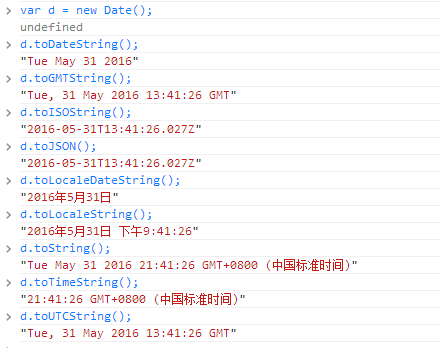
3、常見 JS Date 的函數
如圖所示:
4、兩個時間相減
4.1 兩個日期相減——秒
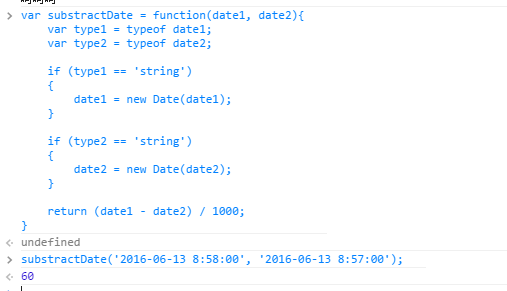
// 說明:兩個時間相減 // 參數:JS的Date類型,或者 string 類型,格式為:yyyy-MM-dd HH:mm:ss // 返回: date1-date2的秒數 var substractDate = function(date1, date2){ var type1 = typeof date1; var type2 = typeof date2; if (type1 == 'string') { date1 = new Date(date1); } if (type2 == 'string') { date2 = new Date(date2); } return (date1 - date2) / 1000; }
測試結果如圖:
根據數學知識(1 天=24 小時、1 小時=60 分、1 分=60 秒),即可由相差的秒數進一步推導出分鐘、小時乃至天數。
4.2 兩個日期相減——月份
兩個日期相差的月份不能簡單地用「每月多少天」來算,因為有的月是 30 天、有的是 31 天。年份差異的計算同理,採用下面這種方式:
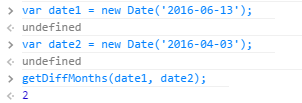
var getDiffMonths = function(date1, date2) { if (!date1 instanceof Date){ console.error('param date1 is not Date'); } if (!date2 instanceof Date){ console.error('param date2 is not Date'); } var months1 = date1.getFullYear() * 12 + date1.getMonth(); var months2 = date2.getFullYear() * 12 + date2.getMonth(); return months1 - months2; }
測試結果如圖:
5、時間相加
5.1 兩個日期相加——天
// 說明:添加天數 // 參數:天數 比如40天 // 結果:比如日期:2016-16-13,加40天,結果為:2016-07-23 Date.prototype.addDays = function(days) { var date = new Date(this); date.setDate(date.getDate() + days); return date; }
相加月份、年份,可參照上面的代碼思路處理。
- 上一篇文章: JS 數組與對象的遍歷方式及性能比較
- 下一篇文章: JavaScript 中的 Touch 事件全解析