XSL 是一種標記語言,用來描述如何把 XML 文件的內容轉換成另一種形式的文件。透過為 XML 撰寫 XSL,同一份資料就能呈現成完全不同的格式。一句常被引用的比喻是:XSL 之於 XML,就像 CSS 之於 HTML。它的全稱是可擴充樣式表語言(EXtensible Stylesheet Language),本質上是一種把 XML 資料以可讀格式呈現出來的語言。
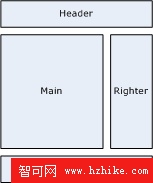
一、從常見的頁面佈局說起
上圖是這個部落格的頁面佈局,也是最普遍、最具代表性的一種配置:Header、Righter、Footer 三個區域幾乎存在於每一頁,各頁的差異只在 Main 區域。
最直覺的做法是正向思維:寫頁面時只專心處理 Main,其他區域「需要的時候再載入」。這在程式開發中很常見,但它只能解決小範圍、臨時性的載入問題,撐不起一個真正的框架。
框架的價值在於:頁面可以繼承框架,同時又能重寫與擴充。既省下重複開發的時間,又保留調整的彈性。這裡要用的是反向思維——先寫好框架,頁面本身只是框架中的一個區域,由主框架來呼叫,而不是主動去呼叫別人。
二、建立主框架 mainframe.xsl
先寫出整體骨架,Main 區域留空,改為呼叫一個固定名稱的樣板 main(概念上類似 C 語言的 main 函式,是每頁的進入點):
<html>
<head>
<title>主框架</title>
</head>
<body>
<div class="box">
    <div class="header">Header</div>
    <div class="middle">
        <div class="main">
            <xsl:call-template name="main" />
        </div>
        <div class="righter">Righter</div>
    </div>
    <div class="footer">Footer</div>
</div>
</body>
</html>
三、抽出公共樣板 common.xsl
再進一步抽象,把 Header、Righter、Footer 以及頁標題樣板抽到獨立檔案中:
<xsl:template name="header">
Header
</xsl:template>

<xsl:template name="righter">
Righter
</xsl:template>

<xsl:template name="footer">
Footer
</xsl:template>

<xsl:template name="pagetitle">
主框架的標題
</xsl:template>
mainframe.xsl 改為引入它,並用 call-template 呼叫各區域:
<xsl:import href="common.xsl" />
...
<html>
<head>
<title><xsl:call-template name="pagetitle" /></title>
</head>
<body>
<div class="box">
    <div class="header">
        <xsl:call-template name="header" />
    </div>
    <div class="middle">
        <div class="main">
            <xsl:call-template name="main" />
        </div>
        <div class="righter">
            <xsl:call-template name="righter" />
        </div>
    </div>
    <div class="footer">
        <xsl:call-template name="footer" />
    </div>
</div>
此時 mainframe.xsl 只負責整體排版、全域 CSS 與 JavaScript,與任何子區域無關。唯一留給各頁的接口,就是那個名為 main 的樣板——它在 mainframe.xsl 與 common.xsl 中都沒有定義,必須由每個頁面自己提供。
四、撰寫列表頁 list.xsl
<xsl:stylesheet xmlns:xsl="https://www.w3.org/1999/XSL/Transform" version="1.0">
    <xsl:import href="mainframe.xsl" />
    <xsl:output
        doctype-system="https://www.w3.org/TR/xhtml1/DTD/xhtml1-transitional.dtd"
        doctype-public="-//W3C//DTD XHTML 1.0 Transitional//EN"
        encoding="utf-8" method="html" />

    <xsl:template name="main">
        此處是 Main 區域,列表頁
    </xsl:template>
</xsl:stylesheet>
這裡有兩個細節必須注意:
第一,必須在 xsl:output 之前載入主框架(主框架又會載入 common.xsl),順序錯了樣板會找不到。
第二,此頁的預設入口是名為 main 的樣板,因此不能存在自動匹配的樣板(例如 match="/" 這種從根節點開始匹配的寫法),否則會搶走入口。list.xsl 中的 main 樣板,就是專門為主框架準備的。詳情頁也照同樣方式撰寫,框架繼承與區域重用的機制就成立了。
五、覆寫預設標題
頁面標題在 mainframe 中定義,但每頁的標題都不一樣,因此需要重寫 pagetitle 樣板來覆蓋預設值:
<xsl:stylesheet xmlns:xsl="https://www.w3.org/1999/XSL/Transform" version="1.0">
    <xsl:import href="mainframe.xsl" />
    <xsl:output
        doctype-system="https://www.w3.org/TR/xhtml1/DTD/xhtml1-transitional.dtd"
        doctype-public="-//W3C//DTD XHTML 1.0 Transitional//EN"
        encoding="utf-8" method="html" />

    <xsl:template name="main">
        此處是 Main 區域,列表頁
    </xsl:template>

    <xsl:template name="pagetitle">
        列表頁的標題
    </xsl:template>
</xsl:stylesheet>
這裡的 pagetitle 樣板會覆蓋 common.xsl 中的同名樣板,於是列表頁的標題與其他未定義 pagetitle 的頁面不再相同。
最後提醒一個關鍵差異:只有用 xsl:import 匯入的樣板才能被覆蓋。若改用 xsl:include,會得到錯誤訊息「不能使用相同匯入優先權多次定義命名樣板」。
- 上一篇文章: 如何消除 XML 中多餘的 xmlns="" 屬性
- 下一篇文章: XML 概念入門(下):Meta 資料、顯示樣式與 DOM