摘要:本文說明在 XML 應用中合併 XML 文件的方法與實作。由於此類需求在眾多以 XML 為資料交換基礎的系統中相當常見,具備廣泛的應用前景。
關鍵詞:XML 文件 解析器 元素
在 XML 應用裡,最常用也最實用的莫過於文件的讀寫。但 XML 的語意比一般文字檔嚴格——起始標記必須成對出現、根元素唯一——因此「合併」兩個 XML 文件並不像合併純文字那樣把內容接起來就好。以下示範在 Java 中怎麼做。
設計思路
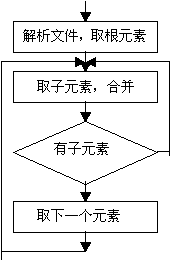
使用 javax.xml.parsers 中的解析器分別取得兩份 XML 的 DOM 結構與根元素,再以遞迴方式把被合併文件的元素逐一複製進目標文件,最後序列化寫回檔案。
實作過程
需要的 import 如下(JDK 1.3.1 與 1.4.0 皆已實測通過):
import java.io.*;
import java.util.*;
import javax.xml.parsers.*;
import org.w3c.dom.*;
import javax.xml.transform.*;
import javax.xml.transform.dom.*;
import javax.xml.transform.stream.*;
整體流程由三個方法組成:isMerging() 負責協調,duplicate() 負責遞迴複製節點,writeTo() 負責輸出檔案。實務上還可以在合併過程中插入更多判斷,例如被合併檔案不存在時該如何處理、是否要過濾特定元素等。
一、協調流程:isMerging()
參數分別是目標 XML 檔名與被合併的 XML 檔名。它取得兩份文件的 Document 與根元素,逐一呼叫 duplicate() 複製,最後呼叫 writeTo() 寫回。
private boolean isMerging(String mainFileName, String subFileName) throws Exception {
    boolean isOver = false;
    DocumentBuilderFactory dbf = DocumentBuilderFactory.newInstance();
    DocumentBuilder db = null;
    try {
        db = dbf.newDocumentBuilder();
    } catch (ParserConfigurationException pce) {
        System.err.println(pce);   // 發生異常時輸出資訊
    }

    Document doc_main = null, doc_vice = null;
    try {
        doc_main = db.parse(mainFileName);
        doc_vice = db.parse(subFileName);
    } catch (DOMException dom) {
        System.err.println(dom.getMessage());
    } catch (Exception ioe) {
        System.err.println(ioe);
    }

    // 取得兩份文件的根元素
    Element root_main = doc_main.getDocumentElement();
    Element root_vice = doc_vice.getDocumentElement();

    // 逐一附加被合併文件根節點下的每個元素
    NodeList messageItems = root_vice.getChildNodes();
    int item_number = messageItems.getLength();

    // 若要去掉根節點下的首個元素(例如 <所屬管理系統>),i 從 3 起算;否則從 1 起算
    for (int i = 1; i < item_number; i = i + 2) {
        Element messageItem = (Element) messageItems.item(i);
        isOver = duplicate(doc_main, root_main, messageItem);
    }

    // 寫回目標檔案
    boolean isWritten = writeTo(doc_main, mainFileName);
    return isOver && isWritten;
}
這裡有個實作上的細節值得注意:迴圈以 i = i + 2 的方式跳著取,是因為 DOM 的 childNodes 清單裡元素節點與文字節點(含純空白與換行)是交錯排列的。這種寫法對「每個元素之間剛好只有一個文字節點」的格式良好文件有效,但相當脆弱——一旦某個元素換行加了縮排空白,索引就會錯位。更穩健的作法是判斷 nodeType == Node.ELEMENT_NODE 後再處理,如下一節所示。
二、遞迴複製:duplicate()
三個參數分別是目標 Document、要附加的父節點、以及被複製的來源節點。
private boolean duplicate(Document doc_dup, Element father, Element son)
        throws Exception {
    boolean isDone = false;
    String son_name = son.getNodeName();
    Element subItem = doc_dup.createElement(son_name);

    // 複製屬性
    if (son.hasAttributes()) {
        NamedNodeMap attributes = son.getAttributes();
        for (int i = 0; i < attributes.getLength(); i++) {
            String attribute_name  = attributes.item(i).getNodeName();
            String attribute_value = attributes.item(i).getNodeValue();
            subItem.setAttribute(attribute_name, attribute_value);
        }
    }
    father.appendChild(subItem);

    // 複製節點的值
    Text value_son = (Text) son.getFirstChild();
    String nodevalue_root = "";
    if (value_son != null && value_son.getLength() > 0) {
        nodevalue_root = value_son.getNodeValue();
    }
    Text valuenode_root = null;
    if (nodevalue_root != null && nodevalue_root.length() > 0) {
        valuenode_root = doc_dup.createTextNode(nodevalue_root);
    }
    if (valuenode_root != null && valuenode_root.getLength() > 0) {
        subItem.appendChild(valuenode_root);
    }

    // 複製子節點
    NodeList sub_messageItems = son.getChildNodes();
    int sub_item_number = sub_messageItems.getLength();
    if (sub_item_number < 2) {
        return true;                       // 沒有子節點,結束
    } else {
        for (int j = 1; j < sub_item_number; j = j + 2) {
            Element sub_messageItem = (Element) sub_messageItems.item(j);
            isDone = duplicate(doc_dup, subItem, sub_messageItem);
        }
    }
    return isDone;
}
如果改用型別判斷取代固定步長,信賴度會高很多:
private boolean duplicate(Document doc, Element father, Element son) {
    Element subItem = doc.createElement(son.getNodeName());

    NamedNodeMap attrs = son.getAttributes();
    for (int i = 0; i < attrs.getLength(); i++) {
        Node a = attrs.item(i);
        subItem.setAttribute(a.getNodeName(), a.getNodeValue());
    }

    // 只複製元素與文字子節點,跳過空白與註解
    NodeList children = son.getChildNodes();
    for (int i = 0; i < children.getLength(); i++) {
        Node child = children.item(i);
        switch (child.getNodeType()) {
            case Node.ELEMENT_NODE:
                duplicate(doc, subItem, (Element) child);
                break;
            case Node.TEXT_NODE:
            case Node.CDATA_SECTION_NODE:
                if (child.getNodeValue().trim().length() > 0) {
                    subItem.appendChild(doc.createTextNode(child.getNodeValue()));
                }
                break;
        }
    }

    father.appendChild(subItem);
    return true;
}
這版本另外示範了兩個實務上更常被需要的技巧:以 importNode 語意複製跨文件節點,以及過濾純空白節點。真正在專案中使用時,建議直接採用這一版。
三、輸出檔案:writeTo()
兩個參數:目標 Document 與檔名。透過 JAXP 的 Transformer 完成序列化,並指定編碼。
private boolean writeTo(Document doc, String fileName) throws Exception {
    boolean isOver = false;
    DOMSource doms = new DOMSource(doc);
    File f = new File(fileName);
    StreamResult sr = new StreamResult(f);
    try {
        TransformerFactory tf = TransformerFactory.newInstance();
        Transformer t = tf.newTransformer();
        Properties properties = t.getOutputProperties();
        properties.setProperty(OutputKeys.ENCODING, "UTF-8");
        properties.setProperty(OutputKeys.INDENT, "yes");
        t.setOutputProperties(properties);
        t.transform(doms, sr);
        isOver = true;
    } catch (TransformerConfigurationException tce) {
        tce.printStackTrace();
    } catch (TransformerException te) {
        te.printStackTrace();
    }
    return isOver;
}
順帶一提,原稿使用的 org.apache.crimson.tree.XmlDocument 已隨 JDK 演進而被淘汰,現在一律應透過 DocumentBuilderFactory 建立 Document,再由 Transformer 輸出,這也是上面採用 JAXP 標準 API 的原因。
四、測試
public static void main(String[] args) throws Exception {
    boolean isDone = isMerging("D:/a.xml", "D:/b.xml");
    if (isDone) {
        System.out.println("XML files have been merged.");
    } else {
        System.out.println("XML files have NOT been merged.");
    }
}
總結
本文示範了如何借助 Java 的 XML 解析器合併兩份文件。實務上還可以加入更多約束條件,例如過濾掉特定元素、限制新元素的插入位置,或在合併前先以 DTD/XSD 驗證兩份文件的結構相容性——最後這一點在大規模整合場景中尤其值得做,因為結構不一致的合併往往會產生看似成功、實則語意錯亂的結果。
- 上一篇文章: 寫一次就夠:通用表單驗證函式設計
- 下一篇文章: 學習 XML:製作圖像超連結的方法