XSLT 是什麼
XSL(eXtensible Stylesheet Language,可擴充樣式表語言)主要用於把一份 XML 文件轉換成另一份文件(XML 或 HTML),並定義轉換後的呈現外觀。XSL 實際上涵蓋三種語言:XSL 轉換(XSLT)、XML 路徑語言(XPath)與 XSL 格式化物件(XSL-FO)。其中 XSLT 負責把 XML 轉成其他 XML 或其他型別的文件;XPath 主要在 XSLT 與 XPointer 中使用,用來識別、選取、比對 XML 文件中的元素、屬性與文字內容;XSL-FO 則定義了一批描述呈現方式的 XML 標記,最常見的用途是把 XML 轉成 PDF。
XSLT 是這套標準裡最核心的部分,因此一般提到 XSL 多半就是在說 XSLT。以下先談 XSLT 與 XPath。
XSLT 概述
XML 把資料與呈現分開:XML 文件承載資料,要顯示它就得加上樣式資訊。一個選擇是 CSS(層疊樣式表),另一個選擇是 XSLT。XSLT 比 CSS 複雜得多,能力也強得多——CSS 無法對來源 XML 的資料做計算、整理與排序,而這些在 XSLT 裡都能輕易完成。
有了 XSLT,同一份 XML 文件可以按呈現需要轉成多種文件:要在 PC 瀏覽器上閱讀,就轉成 HTML;要在手持裝置上閱讀,就轉成適合小螢幕的文件。轉換過程中,你可以往輸出文件加入新元素、刪去不需要的元素、重新排列並分類元素,也可以用條件判斷決定哪些元素該顯示。
W3C 於 1999 年 11 月 16 日發布 XSLT 1.0 推薦標準;由於 XSLT 依賴 XPath,同一天也發布了 XPath 1.0 推薦標準。兩份標準可分別在 https://www.w3.org/TR/xslt 與 https://www.w3.org/TR/xpath 查到。
先看一個簡單例子。清單 1 是一份 XML 文件:
清單 1. hello.xml
<?xml version="1.0" encoding="utf-8" ?>
<?xml-stylesheet type="text/xsl" href="helloworld.xsl" ?>
<helloworld>
  <title>Welcome to XSLT world!</title>
  <content>Hello! Welcome here!</content>
</helloworld>
XML 宣告之後的處理指令,表明這份文件關聯了一個名為 helloworld.xsl 的樣式表。瀏覽器內建的 XML 處理器在分析文件時,會呼叫相應的 XSLT 處理器來做轉換。樣式表內容如下:
清單 2. helloworld.xsl
<?xml version="1.0" encoding="utf-8"?>
<xsl:stylesheet version="1.0"
  xmlns:xsl="https://www.w3.org/1999/XSL/Transform">

  <xsl:template match="/">
    <html>
      <xsl:apply-templates/>
    </html>
  </xsl:template>

  <xsl:template match="helloworld">
    <head><title>
      <xsl:value-of select="title"/>
    </title></head>
    <body>
      <xsl:value-of select="content"/>
    </body>
  </xsl:template>
</xsl:stylesheet>
在瀏覽器中開啟,會看到圖 1 的效果:
圖 1. XSLT 轉換結果預覽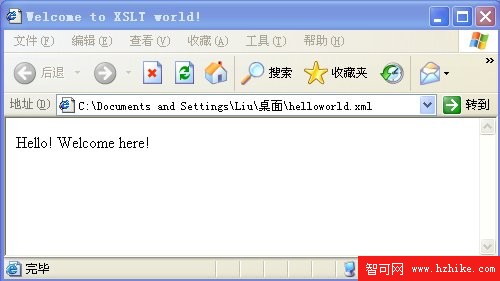
可以看到,樣式表把 XML 中的 title 元素轉成了 HTML 的 title,把 content 轉成了 HTML 的 body。
XSLT 處理器依樣式表把來源文件轉成結果文件。來源文件、結果文件與樣式表採用同一套資料模型,也就是相同的樹狀結構;但要留意,樣式表中的處理指令與註解會被忽略——樣式表被視為一棵既無處理指令節點、也無註解節點的樹。處理器在構造結果樹時,可以對來源樹做過濾、修改與新增,結果樹的結構也可以與來源樹完全不同。圖 2 是這個轉換流程的示意:
圖 2. XSLT 處理器工作流程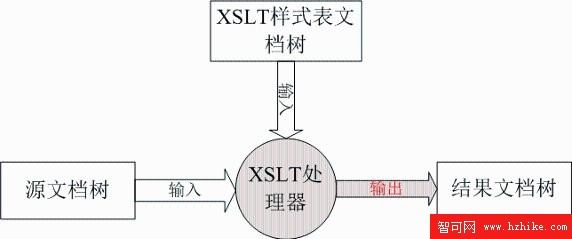
用 Xalan 做 XSLT 轉換
想在 Apache 官方站點進一步了解 Xalan,可以下載資源包、閱讀教學文件,對它的用法與設計會有更完整的認識:
- Xalan 首頁:
https://xalan.apache.org/ - Xalan for Java:
https://xml.apache.org/xalan-j/ - 線上 API 文件:
https://xml.apache.org/xalan-j/apidocs/index.html
Xalan 是相當普及的開源 XSLT 解析處理器,屬於 Apache 基金會的專案,實作了 W3C 的 XSLT 1.0 與 XPath 1.0 規範,並提供 Java 與 C++ 兩個版本。本文使用 Xalan-Java 2.7.1。
Xalan 既可當作命令列 XSLT 工具使用,也能作為模組嵌入其他應用程式。解壓後的目錄中有一支 xalan.jar,這就是實作 XSLT 與 XPath 規範的類別庫;docs 目錄下的 commandline.html 說明了命令列用法。本文則從 Java 程式呼叫相關類別庫的角度,來做 XML 的解析轉換。
清單 3 是我們接下來要用的範例 XML:
清單 3. 範例 XML 文件
<?xml version="1.0"?>
<doc>
  <name first="David" last="Marston">David Marston</name>
  <name first="David" last="Bertoni">David Bertoni</name>
  <name first="Donald" last="Leslie">Donald Leslie</name>
  <name first="Emily" last="Farmer">Emily Farmer</name>
  <name first="Joseph" last="Kesselman">Joseph Kesselman</name>
  <name first="Myriam" last="Midy">Myriam Midy</name>
  <name first="Paul" last="Dick">Paul Dick</name>
  <name first="Stephen" last="Auriemma">Stephen Auriemma</name>
  <name first="Scott" last="Boag">Scott Boag</name>
  <name first="Shane" last="Curcuru">Shane Curcuru</name>
</doc>
清單 4 的程式示範如何用 Xalan 搭配 XPath 解析 XML,找出所有 first 屬性以 D 開頭的名字:
清單 4. 使用 Xalan 進行 XML 解析
public class ApplyXPath
{
    protected String filename = null;
    protected String xpath = null;

    /** Process input args and execute the XPath. */
    public void doMain(String[] args) throws Exception
    {
        filename = args[0];
        xpath = args[1];

        if ((filename != null) && (filename.length() > 0)
            && (xpath != null) && (xpath.length() > 0))
        {
            System.out.println("Loading classes, parsing "
                + filename + ", and setting up serializer");

            // Set up a DOM tree to query.
            InputSource in = new InputSource(new FileInputStream(filename));
            DocumentBuilderFactory dfactory = DocumentBuilderFactory.newInstance();
            dfactory.setNamespaceAware(true);
            Document doc = dfactory.newDocumentBuilder().parse(in);

            // Set up an identity transformer to use as serializer.
            Transformer serializer =
                TransformerFactory.newInstance().newTransformer();
            serializer.setOutputProperty(OutputKeys.OMIT_XML_DECLARATION, "yes");

            // Use the simple XPath API to select a nodeIterator.
            System.out.println("Querying DOM using " + xpath);
            NodeIterator nl = XPathAPI.selectNodeIterator(doc, xpath);

            // Serialize the found nodes to System.out.
            System.out.println("<output>");
            Node n;
            while ((n = nl.nextNode()) != null)
            {
                if (isTextNode(n)) {
                    // Coalesce contiguous text nodes at this level.
                    StringBuffer sb = new StringBuffer(n.getNodeValue());
                    for (Node nn = n.getNextSibling();
                         isTextNode(nn);
                         nn = nn.getNextSibling()) {
                        sb.append(nn.getNodeValue());
                    }
                    System.out.print(sb);
                }
                else {
                    serializer.transform(new DOMSource(n),
                        new StreamResult(new OutputStreamWriter(System.out)));
                }
                System.out.println();
            }
            System.out.println("</output>");
        }
        else
        {
            System.out.println("Bad input args: " + filename + ", " + xpath);
        }
    }

    /** Decide if the node is text, and so must be handled specially */
    static boolean isTextNode(Node n) {
        if (n == null) return false;
        short nodeType = n.getNodeType();
        return nodeType == Node.CDATA_SECTION_NODE
            || nodeType == Node.TEXT_NODE;
    }

    public static void main(String[] args) throws Exception
    {
        ApplyXPath app = new ApplyXPath();
        app.doMain(new String[]{"foo.xml",
            "/doc/name[starts-with(@first,'D')]"});
    }
}
程式把解析結果序列化後印到主控台。執行結果如清單 5,正好是所有 first 以 D 開頭的名字。
清單 5. starts-with 的執行結果
Loading classes, parsing foo.xml, and setting up serializer
Querying DOM using /doc/name[starts-with(@first,'D')]
<output>
<name first="David" last="Marston">David Marston</name>
<name first="David" last="Bertoni">David Bertoni</name>
<name first="Donald" last="Leslie">Donald Leslie</name>
</output>
那如果要找出所有 first 以 d 結尾的名字呢?把 starts-with 換成 ends-with 再跑一次,會得到清單 6 的錯誤:
清單 6. 遇到不支援的函式
Loading classes, parsing foo.xml, and setting up serializer
Querying DOM using /doc/name[ends-with(@first,'D')]
Exception in thread "main" javax.xml.transform.TransformerException:
    找不到函數:ends-with
    at org.apache.xpath.compiler.XPathParser.error(XPathParser.java:610)
    at org.apache.xpath.compiler.XPathParser.FunctionCall(...)
    ...
    at org.apache.xpath.XPathAPI.selectNodeIterator(XPathAPI.java:128)
    at ApplyXPath.ApplyXPath.doMain(ApplyXPath.java:73)
    at ApplyXPath.ApplyXPath.main(ApplyXPath.java:123)
訊息很明確:找不到名為 ends-with 的函式。原因在於 XSLT 1.0 規範並未提供這個字串處理函式,要用它就得往 XSLT 2.0 邁進。
XSLT 2.0 與 1.0 的差別
自 XSLT 1.0 與 XPath 1.0 成為推薦標準以來,XSLT 被廣泛採用,不少人開始拿它和 XML 取代 HTML 做開發。但實務中也逐漸暴露一些不足:沒有內建的分組機制、內建函式偏少又不支援自訂函式等等,都限制了它的進一步普及。為了補足這些缺口,不少廠商與開源組織各自推出專屬擴充。W3C 也意識到問題,自 2001 年起著手制定 XSLT 2.0;經過漫長的討論與修訂,XSLT 2.0 推薦標準終於在 2007 年 1 月 23 日正式發布,同一天也發布了 XPath 2.0。
與 1.0 不同,XSLT 2.0 家族現在包含六份規範:XSL Transformations (XSLT) 2.0、XML Path Language (XPath) 2.0、XQuery/XPath Data Model (XDM)、XQuery 1.0 and XPath 2.0 Formal Semantics、XQuery 1.0 and XPath 2.0 Functions and Operators,以及 XSLT 2.0 and XQuery 1.0 Serialization。
XPath 2.0
XPath 2.0 現在是 XSLT 2.0 與 XQuery 1.0 共同的基礎,兩者都用它作為核心查詢語言。與 1.0 相比,主要差異有:
- 採用以序列為基礎的新資料模型,取代原本的節點集合。
- 可直接在 XPath 內部綁定變數(1.0 的變數綁定得靠宿主語言 XSLT)。
- 完整支援 XML Schema 資料型別。
- 最關鍵的一點:新增了大量函式,涵蓋正規表達式、日期與時間處理,以及數值、字串、布林值、序列操作與聚合函式。
為 Xalan 補上 XPath 2.0 函式
雖然 W3C 早在 2007 年 1 月就發布了 XSLT 2.0 與 XPath 2.0 推薦標準,Apache Xalan 至今仍未支援 XPath 2.0 的函式庫。若想在 Xalan 上使用這些函式,就得自行擴充它的函式庫。以下說明做法。
先看差在哪:函式對照
要擴充 Xalan,先得弄清楚兩版各自提供了哪些函式。受限於篇幅,這裡只以字串處理函式為例,其他類型可參考 https://www.w3.org/TR/xpath-functions/。
表 1. XPath 2.0 與 1.0 字串處理函式對照
| 函式名稱 | XPath 2.0 | XPath 1.0 |
|---|---|---|
| concat | 支援 | 支援 |
| starts-with | 支援 | 支援 |
| contains | 支援 | 支援 |
| substring-before | 支援 | 支援 |
| substring-after | 支援 | 支援 |
| substring | 支援 | 支援 |
| string-length | 支援 | 支援 |
| normalize-space | 支援 | 支援 |
| translate | 支援 | 支援 |
| string-join | 支援 | 不支援 |
| ends-with | 支援 | 不支援 |
| normalize-unicode | 支援 | 不支援 |
| upper-case | 支援 | 不支援 |
| lower-case | 支援 | 不支援 |
| encode-for-uri | 支援 | 不支援 |
| iri-to-uri | 支援 | 不支援 |
| escape-html-uri | 支援 | 不支援 |
| matches | 支援 | 不支援 |
| replace | 支援 | 不支援 |
| tokenize | 支援 | 不支援 |
很明顯,XPath 2.0 的內建函式強上不少;若能全部實作,對 XSLT 開發者是一大福音。
Xalan 的結構
要為 Xalan 實作 XSLT 2.0 的內建函式,先得對它的架構有系統的認識,才能正確地在其上擴充。圖 3 是 XSLT 的抽象處理模型:XSLT 描述的就是把 XML 來源樹轉換為目標樹的規則。
圖 3. XSLT 抽象處理模型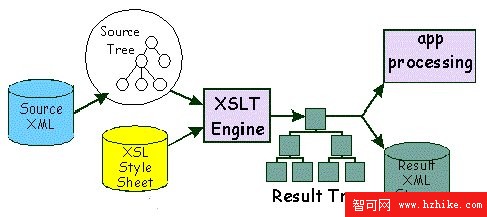
Xalan 的主要功能介面定義在 javax.xml.transform 套件中,這組介面構成了一套標準而強大的樹狀轉換 API。內部設計則分為四個主要模組與若干小模組:
org.apache.xalan.processor:處理樣式表,提供 Xalan 的主要功能入口。org.apache.xalan.templates:定義樣式表結構,包括 Stylesheet 物件、樣板元素指令與屬性值樣板。org.apache.xalan.transformer:把來源樹套用到樣板,產生出目標結果樹。org.apache.xpath:處理 XPath 運算式與 XSLT 比對運算式。
除此之外,Xalan 也實作了整組依賴 SAX2 與 DOM 的 javax.xml.transform 介面。圖 4 是它的工作流程:
圖 4. Xalan 工作流程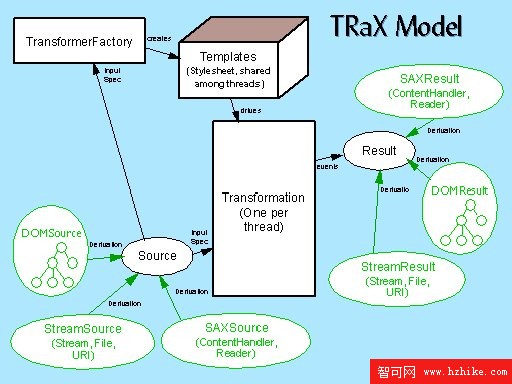
Xalan 另有一個收納所有公共基礎類別的套件,裡頭有 XML 基礎類別(例如 QName)與一些實用的輔助類別(例如 StringToIntTable)。圖 5 的類別圖中,箭頭表示呼叫關係,所有套件都可以呼叫 SAX2 與 DOM。
圖 5. Xalan 模組相依關係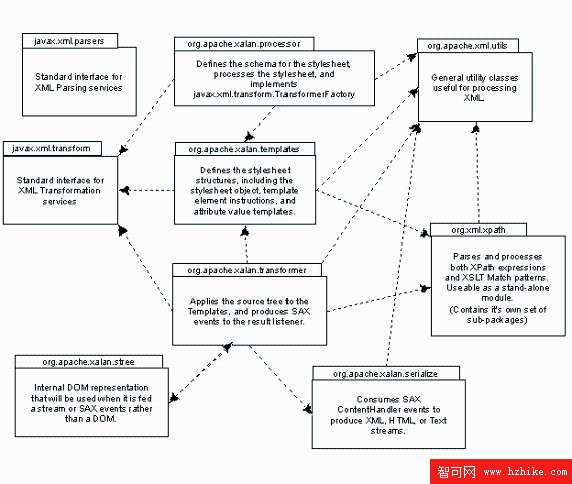
其他主要模組還包括:
org.apache.xalan.client:包含一個客戶端 Applet。org.apache.xalan.extensions:實作 Xalan 擴充機制的所有類別,允許在樣式表中呼叫 Java 程式碼與腳本。org.apache.xalan.lib:Xalan 內建的擴充套件,實作了 Redirect 之類的功能擴充。org.apache.xalan.res:Xalan 所需的資源檔,例如錯誤訊息資源。org.apache.xalan.trace:包含讓呼叫者為轉換器加上追蹤輸出的類別與介面。org.apache.xalan.xslt:Xalan 的命令列處理器。
要實作 XPath 2.0 的內建函式,重點就在擴充 org.apache.xpath。
XPath 模組透視
在較新的 Xalan 版本中,xpath 模組已從 xalan 套件獨立出來、移到 org.apache 之下,用以強調它雖然依賴 Xalan 的 utils 模組,卻可以被當成獨立的 XPath 引擎來呼叫。
XPath 處理模組先把 XPath 字串轉成運算式樹,再呼叫 XPath 的 execute 方法執行該樹。套件中的主要類別有:
- XPath:表示一支已編譯的 XPath,核心方法是
XObject execute(XPathContext xctxt, Node contextNode, PrefixResolver namespaceContext)。 - XPathAPI:提供存取底層 XPath API 的方法。
- XPathContext:表示 XPath 的執行期上下文。
- DOMHelper:處理 DOM 相關問題的輔助類別,可作為特定 DOM 實作的基底。
- SourceTreeManager:來源 XML 樹的管理類別,可解析與丟棄來源樹。
- Expression:所有運算式物件的基底類別,提供多型行為。
這個模組設計成兩個主要部件:編譯器與運算式物件集合。圖 6 是類別圖。
圖 6. XPath 模組類別圖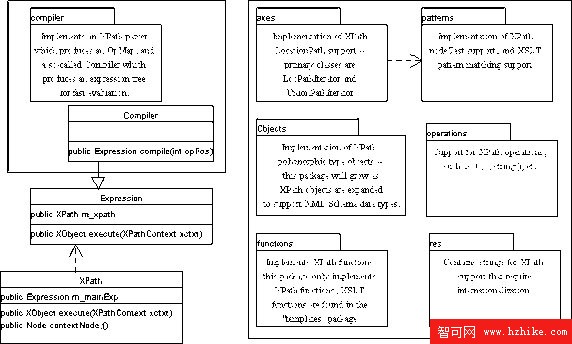
模組中最關鍵的是 axes 部分,它實作了 DOM 的 NodeIterator 介面,也就是允許 XPath 客戶端覆寫或替換這項操作。
實作一個 XPath 2.0 函式:ends-with
從 XPath 模組類別圖可以看到,Xalan 的內建函式實作都在 org.apache.xpath.functions 套件中,新函式也加在這裡。以下以 ends-with 為例,說明逐步擴充的過程。
步驟一:在編譯器中註冊函式
要讓 XPath 編譯器在執行轉換時能正確辨識 XPath 裡的函式,必須先完成註冊。org.apache.xpath.compiler.KeyWords 類別存放著 Xalan 實作的所有 XPath 函式名稱,我們在這裡新增一個變數:
清單 8. 註冊函式關鍵字
/** ends-with function string. */
public static final String FUNC_ENDS_WITH_STRING = "ends-with";
接著要指定該函式的實作類別與對應關係,這部分在 org.apache.xpath.compiler.FunctionTable 中。先為 ends-with 配一個唯一的函式 ID:
清單 9. 註冊函式 ID
/** The 'ends-with()' id. */
public static final int FUNC_ENDS_WITH = 37;
XPath 1.0 規範共有 37 個函式,最大的 ID 是 36(從 0 起算),所以這裡取 37。接著在 Class m_functions[] 與 HashMap m_functionID 中補上映射:
清單 10. 加上實作映射
m_functions[FUNC_ENDS_WITH] =
    org.apache.xpath.functions.FuncEndsWith.class;

m_functionID.put(KeyWords.FUNC_ENDS_WITH_STRING,
    new Integer(FunctionTable.FUNC_ENDS_WITH));
這樣一來,函式名 ends-with 就與實作類別 org.apache.xpath.functions.FuncEndsWith 關聯起來了。剩下的就是寫出這個類別。
步驟二:實作函式類別
Xalan 的所有函式實作類別都繼承 org.apache.xpath.functions.Function 並實作 org.apache.xpath.Expression 介面。Xalan 本身已針對不同參數個數提供了子類別:單參數的 FunctionOneArg、雙參數的 Function2Args、三參數的 Function3Args,以及多參數的 FunctionMultiArgs。ends-with 確定接受兩個參數,因此繼承 Function2Args,在 XObject execute(XPathContext xctxt) 中完成功能即可:
清單 11. ends-with 的實作類別
import org.apache.xpath.XPathContext;
import org.apache.xpath.objects.XBoolean;
import org.apache.xpath.objects.XObject;

/**
 * Execute the EndsWith() function.
 * @xsl.usage advanced
 */
public class FuncEndsWith extends Function2Args
{
    static final long serialVersionUID = 2194585774699567928L;

    /**
     * Execute the function. The function must return a valid object.
     * @param xctxt The current execution context.
     * @return A valid XObject.
     * @throws javax.xml.transform.TransformerException
     */
    public XObject execute(XPathContext xctxt)
        throws javax.xml.transform.TransformerException
    {
        return m_arg0.execute(xctxt).xstr()
                     .endsWith(m_arg1.execute(xctxt).xstr())
             ? XBoolean.S_TRUE : XBoolean.S_FALSE;
    }
}
這段實作呼叫了 XString 物件的 endsWith 方法,因此還需要為 XString 類別補上對應方法(細節請見參考資料所附程式碼,此處不再贅述)。
步驟三:驗證
實作完成後要驗證正確性。修改清單 4 的範例,把 starts-with 換成我們新做的 ends-with,例如找出所有 first 以 d 結尾的名字:
清單 12. ends-with 測試程式碼
ApplyXPath app = new ApplyXPath();
app.doMain(new String[]{"foo.xml",
    "/doc/name[ends-with(@first,'d')]" });
執行結果如下:
清單 13. 測試結果
Loading classes, parsing foo.xml, and setting up serializer
Querying DOM using /doc/name[ends-with(@first,'d')]
<output>
<name first="David" last="Marston">David Marston</name>
<name first="David" last="Bertoni">David Bertoni</name>
<name first="Donald" last="Leslie">Donald Leslie</name>
</output>
程式成功呼叫了我們自行實作的 XPath 2.0 函式 ends-with,找出所有 first 以 d 結尾的名字。依同樣的步驟,你可以為 Xalan 補上更多 XPath 2.0 內建函式。
總結
本文說明了以 XSLT 與 XPath 進行 XML 轉換處理的相關知識,比較了 XSLT 2.0 相對 1.0 的改進,並以 Apache Xalan 為例示範實際操作。最後我們走完了擴充 Xalan、使其支援 XPath 2.0 內建函式的完整流程,並用範例驗證成果。
讀完本文,你應該已對 XSLT、XPath 與 Xalan 的用法與擴充方式有基本掌握,足以進行 XML 文件的轉換與解析。若想更深入,建議直接研讀 W3C 網站上的 XSLT 規範細節,並嘗試為 Xalan 實作 XSLT 2.0 的其餘部分——這件事既富挑戰,也很有學習價值。
此外,筆者已把「為 Xalan 實作完整 XSLT 2.0 規範」當作一個 Apache 授權條款下的開源專案在進行,網址為 https://code.google.com/p/xslt2runner/,本文範例程式碼也可在那裡取得,歡迎關注與參與。
- 上一篇文章: 用 SVG 在瀏覽器裡打造可互動的客戶端圖表
- 下一篇文章: 為嵌入式設備建立可執行的測試命令序列