什麼是 XML Schema
XML Schema 用來定義 XML 文檔的結構、元素順序、元素關係與資料類型。它本身就是 XML 文檔,可用一般 XML 解析器處理。
為什麼需要 Schema
DTD 也能定義結構,但有表達能力、資料類型、命名空間與可重用性方面的限制。XML Schema 基於 XML 語法,支援豐富資料類型、命名空間整合、屬性組與更細緻的約束。
最簡單的 Schema
下圖展示一個宣告 quantity 元素的簡單 Schema。
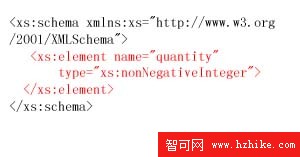
<xsd:schema xmlns:xsd="https://www.w3.org/2001/XMLSchema">
    <xsd:element name="quantity" type="xsd:nonNegativeInteger" />
</xsd:schema>
因此 <quantity>5</quantity> 合法,<quantity>-4</quantity> 不合法。
Schema 的主要部件
基本部件包括 element、attribute、notation;延伸部件包括簡單類型、複合類型、元素組、屬性組。
簡單類型
簡單類型只能包含文字或數字內容,不能有子元素或屬性。
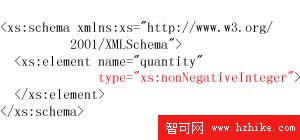
例如下面寫法不符合非負整數:
<quantity>some</quantity>內建簡單類型
常見原始類型包括 string、boolean、decimal、float、double、dateTime、date、time、hexBinary、base64Binary、anyURI、QName、NOTATION 等;衍生類型包括 normalizedString、token、Name、NCName、ID、IDREF、integer、int、long、short、byte、nonNegativeInteger、positiveInteger 等。
自訂簡單類型
可用 restriction 從既有類型衍生新類型,並限制範圍。
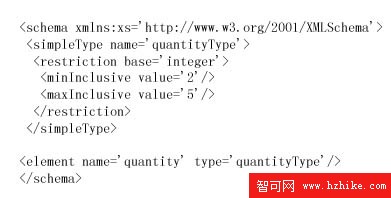
<xsd:simpleType name="quantityType">
    <xsd:restriction base="xsd:integer">
        <xsd:minInclusive value="2" />
        <xsd:maxInclusive value="5" />
    </xsd:restriction>
</xsd:simpleType>

<xsd:element name="quantity" type="quantityType" />
因此 3 合法,10 或 aaa 不合法。
限制 facets
常用限制包括 length、minLength、maxLength、pattern、enumeration、whiteSpace、maxInclusive、maxExclusive、minInclusive、minExclusive、totalDigits、fractionDigits。
簡單類型範例:SKU
下圖以 pattern 限制 SKU 必須是三位數字、連字號、兩個大寫英文字母。
<xsd:simpleType name="SKU">
    <xsd:restriction base="xsd:string">
        <xsd:pattern value="[0-9]{3}-[A-Z]{2}" />
    </xsd:restriction>
</xsd:simpleType>
<ourSKU>123-AB</ourSKU> 合法;<ourSKU>abc-AB</ourSKU> 或 <ourSKU>123-ab</ourSKU> 不合法。
列舉類型
enumeration 可限制只能取列出的值,例如美國州名。
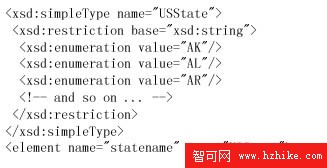
<xsd:simpleType name="USState">
    <xsd:restriction base="xsd:string">
        <xsd:enumeration value="AK" />
        <xsd:enumeration value="CA" />
    </xsd:restriction>
</xsd:simpleType>
<statename>AK</statename> 合法;<statename>Alaska</statename> 不合法。
列表類型
list 可定義以空白分隔的多個值。
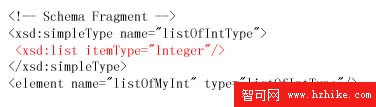
<xsd:simpleType name="listOfIntType">
    <xsd:list itemType="xsd:integer" />
</xsd:simpleType>
<listOfMyInt>1 5 15037</listOfMyInt> 合法;若包含 abc 則不合法。
聯合類型
union 可結合多個成員類型,但同一個元素值只能符合其中一種。
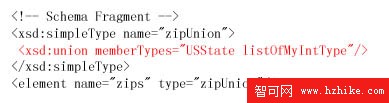
<xsd:simpleType name="zips">
    <xsd:union memberTypes="USState listOfIntType" />
</xsd:simpleType>
因此 <zips>CA</zips> 或 <zips>95630 95977</zips> 可成立,但 <zips>CA 95630</zips> 不行。
匿名類型
若自訂類型只使用一次,可直接寫在元素宣告內,不必另外命名。
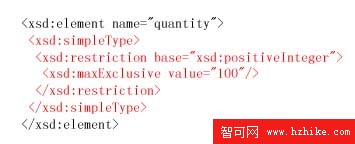
<xsd:element name="quantity">
    <xsd:simpleType>
        <xsd:restriction base="xsd:integer">
            <xsd:minInclusive value="1" />
            <xsd:maxInclusive value="99" />
        </xsd:restriction>
    </xsd:simpleType>
</xsd:element>
複合類型
複合類型可包含屬性與子元素。simpleContent 表示元素只有文字內容,但可有屬性。
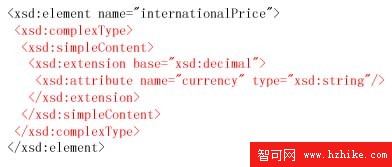
<xsd:element name="internationalPrice">
    <xsd:complexType>
        <xsd:simpleContent>
            <xsd:extension base="xsd:decimal">
                <xsd:attribute name="currency" type="xsd:string" />
            </xsd:extension>
        </xsd:simpleContent>
    </xsd:complexType>
</xsd:element>合法例:<internationalPrice currency="EUR">423.46</internationalPrice>
混合內容
complexType 加上 mixed="true" 可讓元素同時包含文字與子元素。
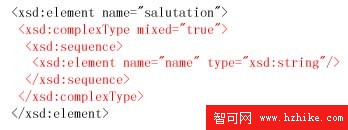
<xsd:element name="salutation">
    <xsd:complexType mixed="true">
        <xsd:sequence>
            <xsd:element name="name" type="xsd:string" />
        </xsd:sequence>
    </xsd:complexType>
</xsd:element>合法例:<salutation>Dear Mr.<name>Robert Smith</name>.</salutation>
空內容
有些元素沒有文字內容,只有屬性。
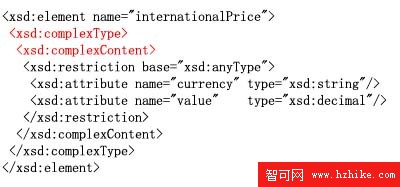
<xsd:element name="internationalPrice">
    <xsd:complexType>
        <xsd:attribute name="currency" type="xsd:string" />
        <xsd:attribute name="value" type="xsd:decimal" />
    </xsd:complexType>
</xsd:element>合法例:<internationalPrice currency="EUR" value="423.46" />
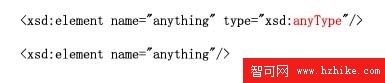
anyType
anyType 幾乎不限制內容,適合無法事先約束的資料。
注釋
Schema 可用 annotation、documentation、appinfo 加入說明。
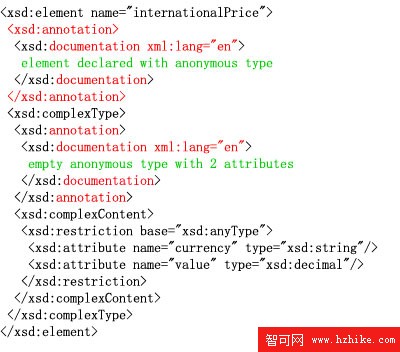
<xsd:annotation>
    <xsd:documentation>這是學生花名冊,請勿刪改。</xsd:documentation>
</xsd:annotation>
內容模型
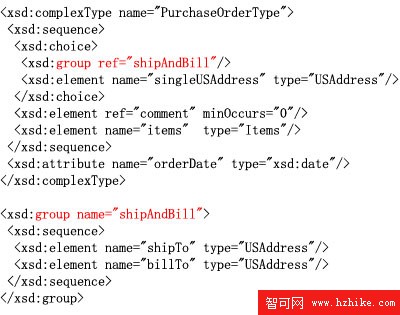
sequence 要求子元素順序固定;choice 表示多選一;all 表示各子元素可任意順序且通常各出現一次。group 可重用元素組。
屬性組
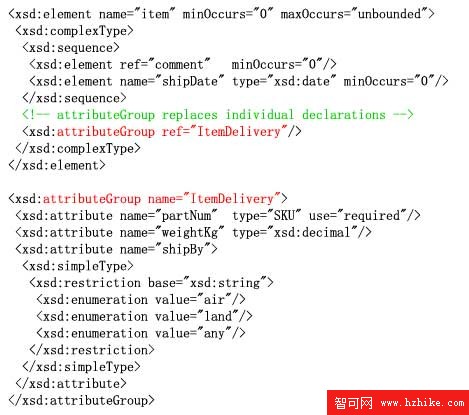
attributeGroup 可把常用屬性集中定義,方便重複引用。
空值 nil
Schema 可用 nillable="true" 讓元素明確表示空值,實例中再以 xsi:nil="true" 標示。使用時需在實例中宣告 xsi 前綴。
<xsd:element name="shipDate" type="xsd:date" nillable="true" />

<shipDate xsi:nil="true" />- 上一篇文章: XML 認證教程,第 4 部分:XSL 樣式單與 XSLT 轉換
- 下一篇文章: XML 認證教程,第 7 部分:解析器基礎與選型