Fireworks 產出的彈出式選單,功能上堪用,但預設樣式實在稱不上好看——邊框粗得像上個世紀。好消息是它背後所有的外觀參數都寫在一支 JavaScript 檔裡,改幾行數字就能改頭換面。
一、把選單搬進 Dreamweaver 4
開啟 DW4,新增或開啟一個站點(Site),在站點內建立並存檔一個 HTML 檔。接著從 Insert 選單進入 Interactive Images,挑 Fireworks Html;也可以按 Ctrl+F2 叫出 Objects(物件)面板,在 Common 類別裡點那顆 Fireworks 圖示。
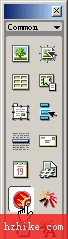
在對話框中按 Browser,選取你在 FW4 裡輸出的 HTML 檔,按 OK,選單就進來了。如果輸出的檔案不在目前站點內,DW4 會問你要不要複製進站點——一定要按 OK,而且建議幫這些檔案單獨開一個資料夾收著,後續維護會清爽很多。此時按 F12 預覽,你大概會皺一下眉頭。
二、直接改 fw_menu.js 決定外觀
複製進站點的檔案裡,有一支名為 fw_menu.JS 的腳本,用 DW4 打開它,開頭就是這一段:
this.menuWidth = mw;
this.menuItemHeight = mh;
this.fontSize = fs||12;
this.fontWeight = "plain";
this.fontFamily = fnt||"arial,helvetica,verdana,sans-serif";
this.fontColor = fclr||"#000000";
this.fontColorHilite = fhclr||"#ffffff";
this.bgColor = "#555555";
this.menuBorder = 1;
this.menuItemBorder = 1;
this.menuItemBgColor = bg||"#cccccc";
this.menuLiteBgColor = "#ffffff";
this.menuBorderBgColor = "#777777";
this.menuHiliteBgColor = bgh||"#000084";
this.menuContainerBgColor = "#cccccc";
this.childMenuIcon = "arrows.gif";
注意 this. 後面那些變數名,它們對應的選單屬性如下:
menuWidth:選單寬度
menuItemHeight:每個條目的高度
fontWeight:文字粗細
fontFamily:文字字型
fontSize:文字大小
fontColor:文字顏色
fontColorHilite:滑鼠移上去時的文字色
bgColor:暗邊背景色
menuBorder:選單邊框寬度
menuItemBorder:條目之間分隔線的寬度
menuItemBgColor:條目背景色
menuLiteBgColor:亮邊背景色
menuBorderBgColor:邊框背景色
menuHiliteBgColor:滑鼠移上去時的背景色
childMenuIcon:子選單的展開箭頭圖(預設是小黑箭頭)
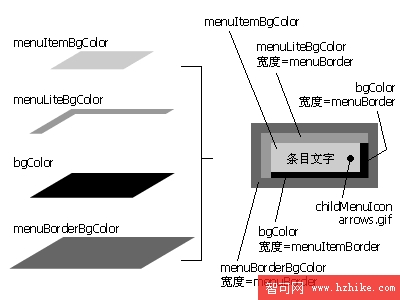
選單的明暗邊框、分隔線、高亮色之間是有層次關係的,對照上圖一個參數一個參數調,比一次全改容易看出效果。舉個把邊框改細、配色改沉穩的寫法:
this.bgColor = "#000000";
this.menuBorder = 1;
this.menuItemBorder = 1;
this.menuItemBgColor = bg||"#cccccc";
this.menuLiteBgColor = "#000000";
this.menuBorderBgColor = "";
this.menuHiliteBgColor = bgh||"#000084";
this.menuContainerBgColor = "#cccccc";
this.childMenuIcon = "arrows.gif";
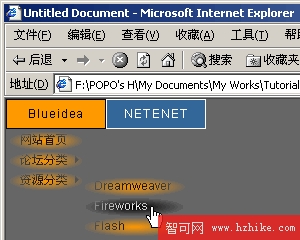
存檔後回到 HTML 檔按 F12,邊框立刻細緻起來。剩下的配色變化就留給你自己試。
三、選單收回去太慢?改毫秒就好
預設情况下游標移開後要等一秒多才收起來,難免覺得拖泥帶水。找到這一行:
fwHideMenuTimer = setTimeout("fwDoHide()", 1000);
把 1000 改成 300。接著再找這一段:
if (elapsed < 1000) {
fwHideMenuTimer = setTimeout("fwDoHide()", 1100-elapsed);
return;
}
把 1000 改成 300、1100 改成 330,存檔預覽,反應快很多。這些數字單位是毫秒,1000 就是一秒。別貪心調太小,收得太快反而會來不及把游標移進子選單。
四、加上 CSS 濾鏡的額外效果
用 JavaScript 呼叫 CSS 濾鏡,可以讓選單多一層質感。先把參數改成:
this.bgColor = "";
this.menuBorder = 3;
this.menuItemBorder = 3;
this.menuItemBgColor = bg||"#cccccc";
this.menuLiteBgColor = "";
this.menuBorderBgColor = "";
this.menuHiliteBgColor = bgh||"#000084";
this.menuContainerBgColor = "#cccccc";
this.childMenuIcon = "arrows.gif";
然後補上一行透明度漸變的定義:
this.alpha = "Alpha(Opacity=100, FinishOpacity=0, Style=2, StartX=0, StartY=0, FinishX=200, FinishY=0)";
找到這行:
l.style.backgroundColor = menu.menuItemBgColor;
在它下面補一句,讓每個條目套用這個濾鏡:
l.style.filter = menu.alpha;
存檔、回 HTML 按 F12,效果就出來了。CSS 濾鏡的種類還很多,有興趣可以另外找資料試。
最後提醒一個省時小技巧:找 code 時善用 DW4 的搜尋取代,頁面中按 Ctrl+F 叫出視窗,輸入要找的片段按 Find Next 即可。
- 上一篇文章: Fireworks 貝茲曲線入門:搞懂角點、平滑點與拐點的差別
- 下一篇文章: Fireworks 五分鐘:用星形與打孔做出五色圓盤