用 map 標籤實作單圖多區域點擊
編輯:CSS詳解
有時候你會拿到一張圖,需要在上面劃出九個可點擊的區域。傳統做法是把圖切開,但其實用 HTML 的 map 標籤就能不切圖完成,程式碼量還非常少。
一、map 標籤是什麼
map 用來定義一個「客戶端圖像映射」(image-map),也就是帶有可點擊區域的一張圖片。area 元素必須永遠嵌套在 map 內部,每個 area 定義一個可點擊的區域。
img 標籤的 usemap 屬性用來關聯 map。這裡有個實務細節:不同瀏覽器對 map 的 id 與 name 屬性支援不一致,所以最保險的做法是「兩個都寫」。
二、先量座標
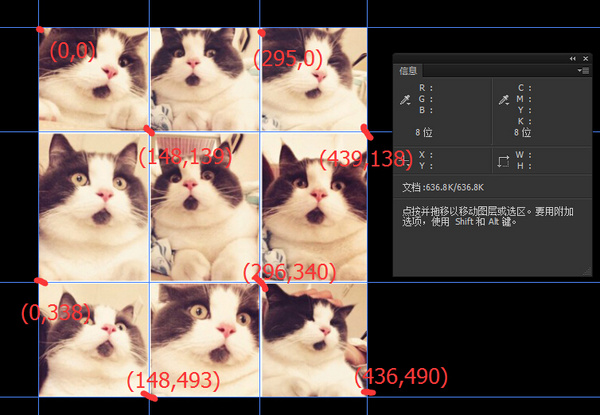
例如我們要在下圖上做出九宮格熱點:

接著用 Photoshop 把每個區域的座標量出來:
三、程式碼實作
<!DOCTYPE html>
<html lang="en">
<head>
  <meta charset="UTF-8">
  <title>Document</title>
</head>
<body>
  <img src="cat.jpg" alt="" usemap="#catmap">
  <map name="catmap" id="catmap">
    <area shape="rect" coords="0,0,148,139"     href="https://www.baidu.com"  target="_blank" alt="">
    <area shape="rect" coords="148,0,295,139"   href="https://www.sina.com"   target="_blank" alt="">
    <area shape="rect" coords="295,0,439,140"   href="https://www.qq.com"     target="_blank" alt="">
    <area shape="rect" coords="0,139,148,340"   href="https://www.163.com"    target="_blank" alt="">
    <area shape="rect" coords="148,139,296,340" href="https://www.soso.com"   target="_blank" alt="">
    <area shape="rect" coords="296,140,439,340" href="https://sf.gg"          target="_blank" alt="">
    <area shape="rect" coords="0,340,148,493"   href="https://www.zhihu.com" target="_blank" alt="">
    <area shape="rect" coords="148,340,296,493" href="https://z.cn"          target="_blank" alt="">
    <area shape="rect" coords="296,340,436,490" href="https://jd.com"         target="_blank" alt="">
  </map>
</body>
</html>
四、area 的三種形狀與座標規則
area 可以是矩形(rect)、圓形(circle)或多邊形(polygon),形狀不同,coords 的含義也不同。所有座標的原點 (0,0) 都在圖片的左上角。
圓形 circle
shape="circle" coords="x,y,z"
x, y 是圓心座標,z 是半徑。
多邊形 polygon
shape="polygon" coords="x1,y1,x2,y2,x3,y3,..."
每一組 x, y 定義多邊形的一個頂點。三角形至少需要三組座標,邊數越多就需要越多頂點。
矩形 rect
shape="rectangle" coords="x1,y1,x2,y2"
兩組座標分別是矩形對角線上兩個端點的頂點位置。也就是說,只要知道對角兩點,矩形就定了——它其實是多邊形的一種簡化寫法。
五、什麼時候該用,什麼時候別用
image-map 的優點是不用切圖、維護單一素材。但它有幾個明顯限制:熱區無法自適應縮放(圖片一改尺寸,座標就得全部重算)、行動裝置體驗不佳,而且對 SEO 與無障礙支援都不友善。所以如果是「版面配置型」的九宮格入口,用 CSS Grid 或 Flexbox 搭配 <a> 標籤會更好;只有在真的必須「在一張插畫上劃熱區」時,map 才是最合適的工具。無論用哪一種,都別忘了給每個 area 補上有意義的 alt 文字。
- 上一篇文章: CSS 背景完全學習筆記:從單圖到多圖與漸層
- 下一篇文章: 詳解 CSS 規則中的「聲明」:屬性、數值與顏色表示法