用 CSS 讓按鈕水平居中的思路與程式碼
編輯:CSS詳解
目標是做成像下圖這樣的效果——讓按鈕在容器中水平居中顯示:
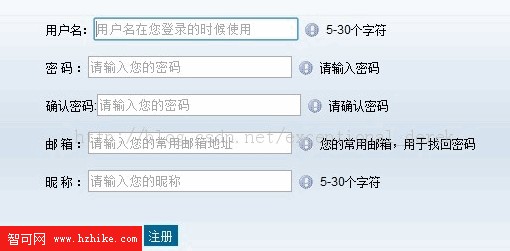
其實透過簡單的 CSS 樣式就能實現:
<div style="margin:0 auto;width:200px;">
<input class="submit" id="btn" type="submit" value="注冊" />
</div>
使用 margin-left:auto; margin-right:auto; 可以讓你的 div 水平居中。寫成 .style{margin-left:auto; margin-right:auto;},縮寫形式即為 .style{margin:0 auto;},其中的數字 0 代表上下邊距為 0,可依需要設成不同的值。
而後面那個 width 也是相當關鍵的屬性——因為按鈕本身的寬度非常小,所以必須給外層容器設定一個合適的 width 值,才能讓按鈕真正居中顯示。
- 上一篇文章: IE6 與 CSS 樣式相容問題大集合
- 下一篇文章: CSS 強制中英文換行與不換行:強制英文換行示例