在 IE6 中,某些元素會莫名其妙地多出一些空白間隙,或者更形象一點說,就是多出了「外邊距(margin)」——可能是 margin-top,也可能是 margin-bottom,當然還有 margin-left 與 margin-right。這個現象在表單元素上尤其常見,即使我們已經在 reset CSS 裡把這些元素的 margin 值全部歸零,問題依然存在。
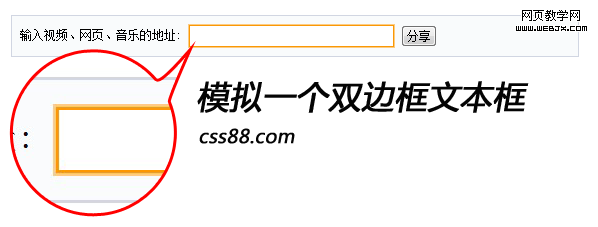
我們來看一個實例。假設我們想模擬一個雙邊框的文字輸入框,如下圖:
HTML 代碼:
1.<span><input type="text" name="textfield2" id="textfIEld2" /></span>
CSS 代碼:
1.span{border:1px solid #FCCC83; display:inline-block; overflow:hidden; zoom:1}
3..url-input{ width:200px; height:18px; background-color:#FFFFFF; padding:2px 0 0 3px; border:1px solid #FA9806;}
在其他瀏覽器下顯示正常,但在 IE6 中(IE7 未測試)卻出現了問題,如下圖:

可以明顯看到 span 與 input 之間存在一段多餘的間距,實在令人無奈。即使我們把 input 設為 margin:0; padding:0; 也依然無法消除。
百般無奈之下,我嘗試讓 input 浮動。之所以想到這個方法,是因為以前也碰過類似問題——【IE6 的瘋狂之六】li 在 IE 中底部 3 像素的 BUG(透過增加浮動來解決)。
HTML 代碼:
1.<div>輸入視頻、網頁、音樂的地址: <span><input type="text" name="textfield2" id="textfIEld2" /></span> <input type="submit" name="button" id="" value="分享" /> </div>
CSS 代碼:
1.*{ margin:0; padding:0; font-size:12px}
2..share-submit{margin:5px 0 20px; background-color:#F9FBFC; border:1px solid #D1D6E2; padding:8px; overflow:hidden; zoom:1; width:550px; margin:20px auto }
3..share-submit .url-input{width:200px;height:18px;background-color:#FFFFFF; padding:2px 0 0 3px; float:left;border:1px solid #FA9806}
4..share-submit span,.share-submit input{ vertical-align:middle}
5..share-submit span{border:1px solid #FCCC83; display:inline-block; overflow:hidden; zoom:1}
這個問題我也曾在 CSS 森林社群中討論過,期待能找到更好的解法,但起初一無所獲。經過多次測試,這個「浮動」的方法屢試不爽,雖然我至今不清楚背後的真正原理,但至少它提供了一個可行的解決方案。
如果你有其他更好的解法,或者知道背後的原因,非常歡迎留言告訴我,不吝指教,感激不盡!
- 上一篇文章: position 定位屬性與元素的層級疊加關係全解析
- 下一篇文章: CSS 定位完整教程:從普通流、相對、絕對到浮動