用 CSS 美化 input file 上傳按鈕:透明度加 label 的偷梁換柱法
編輯:CSS詳解
做表單時,input、textarea、button 的樣式都還算好定義,真正棘手的是 select 與 file 上傳元件。以下是 file 元件在系統預設下的外觀:

我們能做的頂多只是改寫它的 border:
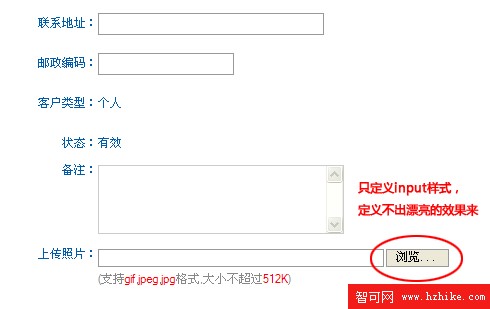
如果想讓「瀏覽」那顆按鈕更漂亮一點——換背景色,甚至換成背景圖——純靠 CSS 直接定義 input file 是辦不到的,這是瀏覽器基於安全性考量的限制。偶然看到一篇文章提到一招:把系統預設按鈕的透明度設為 0,再定義一個 label 標籤的樣式覆蓋在透明按鈕之上。我照著試了一遍,確實可行。
實作代碼
<!DOCTYPE html PUBLIC "-//W3C//DTD XHTML 1.0 Transitional//EN"
  "https://www.w3.org/TR/xhtml1/DTD/xhtml1-transitional.dtd">
<html xmlns="https://www.w3.org/1999/xhtml">
<head>
<meta http-equiv="Content-Type" content="text/html; charset=utf-8" />
<title>input file 的另類做法</title>
<style type="text/css">
* { font-size: 12px }
body { margin: 0 }
.line { position: relative; float: left; padding: 8px 0 }
.line span { float: left }
input { border: 1px solid #888; vertical-align: middle }
.file {
  position: absolute; left: 90px; top: 8px;
  display: none;
  filter: alpha(opacity=0);
  opacity: 0;
}
.file1 {
  padding: 2px 10px; display: block; float: left;
  background: #FF66CC; color: #fff;
  z-index: 1; margin-left: 5px;
  vertical-align: middle; cursor: pointer;
}
.inputstyle { width: 150px; border: 1px solid #888; z-index: 99 }
</style>
</head>
<body>
<div class="line">
  <span>
    <label>上傳文件:</label>
    <input name="" type="text" id="viewfile" class="inputstyle"
      onmouseout="document.getElementById('upload').style.display='none';" />
  </span>
  <label for="upload" class="file1"
    onmouseover="document.getElementById('upload').style.display='block';">瀏覽...</label>
  <input type="file" class="file" id="upload"
    onchange="document.getElementById('viewfile').value=this.value; this.style.display='none';" />
</div>
</body>
</html>
效果

原理與取捨
整個技巧的核心是「三層疊疊樂」:一個只讀的文字 input 負責顯示選到的檔名;一個自訂樣式的 label 呈現我們想要的外觀;真正的 file input 被設為透明並藏在 label 下方,使用者點擊 label 時,等於點到了上傳元件,系統的檔案選擇視窗照常彈出。選檔完成後,再把路徑寫回文字欄位。
代價是標籤數量增加了不少,而且依賴滑鼠事件(onmouseover/onmouseout),在鍵盤操作與觸控裝置上的表現需要額外處理。這種偷梁換柱的做法值得研究,但是否有更簡潔、更科學的解法,仍有待進一步挖掘。