什麼是 CSS Reset?從各大網站實例到 Eric Meyer 與 YUI 的標準寫法
編輯:CSS詳解
最近常看到一個詞:CSS reset。顧名思義就是「重置 CSS」,也就是重置瀏覽器為 HTML 元素預設的樣式。
為什麼需要重置
瀏覽器為許多標籤都內建了一組預設樣式——body 有 8px 外边距、h1 到 h6 有不同級距的字級與粗體、清單有項目符號與縮排、表格有 cellspacing。這些預設值不但各家瀏覽器不完全一致,也會讓你在寫樣式時被迫重複定義、到處「消極覆蓋」。與其如此,不如在樣式檔開頭統一歸零,建立一個可預期的基準線。
國外有一份關於 CSS reset 使用比例的調查:
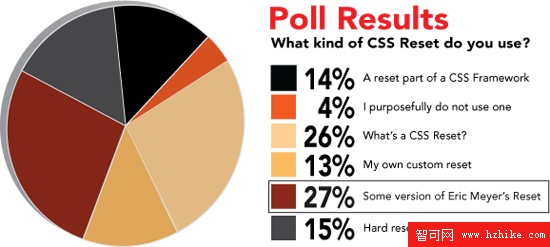
網路上也有整理得相當完整的文章,列舉了多種 reset 寫法,值得一看。接著我用開發者工具查看了幾個國內大型網站的做法。
淘寶的寫法
特点是把 html 的滾動行為、body 的基礎字型色彩都一起納入,並針對 hr、legend 等元素做了較細的處理:
html {
  overflow-x: auto;
  overflow-y: scroll;
}
body, dl, dt, dd, ul, ol, li, pre, form, fieldset, input, p, blockquote, th, td {
  font-weight: 400;
  margin: 0;
  padding: 0;
}
h1, h2, h3, h4, h5 { margin: 0; padding: 0; }
body {
  background-color: #FFFFFF;
  color: #666666;
  font-family: Helvetica, Arial, sans-serif;
  font-size: 12px;
  padding: 0 10px;
  text-align: left;
}
table { border-collapse: collapse; }
fieldset, img { border: 0 none; }
legend { display: none; }
address, caption, em, strong, th, i { font-style: normal; font-weight: 400; }
ol, ul { list-style-image: none; list-style-position: outside; list-style-type: none; }
caption, th { text-align: left; }
q:before, q:after, blockquote:before, blockquote:after { content: ""; }
百度有啊的寫法
架構基本沿用 YUI 的思路,另外把 body 的字型屬性寫得相當完整,並以置中作為全域基準:
body {
  font-family: arial, helvetica, sans-serif;
  font-size: 13px;
  line-height: 1.4;
  text-align: center;
}
body, ul, ol, dl, dd, h1, h2, h3, h4, h5, h6, p, form, fieldset, legend,
input, textarea, select, button, th, td { margin: 0; padding: 0; }
h1, h2, h3, h4, h5, h6 { font-size: 100%; font-weight: normal; }
table { font-size: inherit; }
input, select { font-size: 100%; line-height: normal; }
button { overflow: visible; }
th, em, strong, b, address, cite { font-style: normal; font-weight: normal; }
li { list-style: none; }
img, fieldset { border: 0 none; }
ins { text-decoration: none; }
《超越 CSS》的建議版本
書中建議在專案開始時先重置所有預設樣式,重點是保持精簡、註解清楚:
/* 歸零外边距與內邊距 */
body, div, dl, dt, dd, ul, ol, li,
h1, h2, h3, h4, h5, h6, pre, form, fieldset, input, p, blockquote, th, td {
  margin: 0; padding: 0;
}
/* 標題字級統一 */
h1, h2, h3, h4, h5, h6 { font-size: 100% }
/* 移除清單樣式 */
ol, ul { list-style: none }
/* 字型樣式歸於 normal */
address, caption, cite, code, dfn, em, strong, th, var {
  font-style: normal; font-weight: normal;
}
/* 表格邊框合併 */
table { border-collapse: collapse; border-spacing: 0 }
/* 移除 fieldset 與 img 邊框 */
fieldset, img { border: 0 }
/* 標題與表格標頭靠左 */
caption, th { text-align: left }
/* 移除 q 的引號 */
q:before, q:after { content: '' }
實務上該怎麼寫?兩個主流選擇
Eric Meyer 版
語意最徹底,幾乎把所有 HTML 元素的 margin、padding、border 全部歸零,並統一字級與垂直對齊:
html, body, div, span, applet, object, iframe,
h1, h2, h3, h4, h5, h6, p, blockquote, pre,
a, abbr, acronym, address, big, cite, code,
del, dfn, em, font, img, ins, kbd, q, s, samp,
small, strike, strong, sub, sup, tt, var,
b, u, i, center,
dl, dt, dd, ol, ul, li,
fieldset, form, label, legend,
table, caption, tbody, tfoot, thead, tr, th, td {
  margin: 0;
  padding: 0;
  border: 0;
  outline: 0;
  font-size: 100%;
  vertical-align: baseline;
  background: transparent;
}
body { line-height: 1; }
ol, ul { list-style: none; }
blockquote, q { quotes: none; }
blockquote:before, blockquote:after,
q:before, q:after { content: ''; content: none; }

/* 別忘了重新定義焦點樣式 */
:focus { outline: 0; }

/* 別忘了為插入內容加上標示 */
ins { text-decoration: none; }
del { text-decoration: line-through; }

/* 表格仍需語意上的 cellspacing="0" */
table { border-collapse: collapse; border-spacing: 0; }
YUI 版
風格較保守,主要處理邊距與表格、清單,並保留標題的粗細差異供後續覆寫:
body, div, dl, dt, dd, ul, ol, li,
h1, h2, h3, h4, h5, h6, pre, form, fieldset, input, textarea,
p, blockquote, th, td {
  margin: 0;
  padding: 0;
}
table {
  border-collapse: collapse;
  border-spacing: 0;
}
fieldset, img { border: 0; }
address, caption, cite, code, dfn, em, strong, th, var {
  font-style: normal;
  font-weight: normal;
}
ol, ul { list-style: none; }
caption, th { text-align: left; }
h1, h2, h3, h4, h5, h6 { font-size: 100%; font-weight: normal; }
q:before, q:after { content: ''; }
abbr, acronym { border: 0; }
我的建議
沒有一套 reset 適合所有專案。Eric Meyer 版夠徹底,適合從零開始、設計自由度高的站點;YUI 版較溫和,適合沿用既有設計慣例的團隊。實際操作時,最好的做法是把兩者當作起點,再依自己網站的實際用到的元素增刪——例如沒有用到 abbr 就不必留著,有用到 code 區塊就要記得補上字型設定。適度取捨,才能寫出真正屬於自己網站的 reset。