用 CSS 與 jQuery 打造 Facebook 風格底部管理面板(上)
編輯:關於網頁技巧
近年社群網站蓬勃發展,Facebook 更是其中的佼佼者。站內大量以 Ajax 實作的互動效果令人印象深刻,而它底部的管理面板尤其出色,幾乎把使用頻率最高的功能都妥善地組織在此。本文將分兩部分,示範如何以 CSS 與 jQuery 重現這個經典設計。
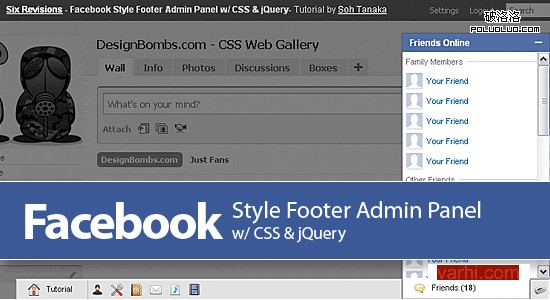
part 1 演示 | 最終演示
第一部分:結構與資訊提示框——HTML & CSS
管理面板以無序列表 ul 建立。最後兩個 li(Alert Panel 與 Chat Panel)會賦予 id,並設為向右浮動;值得注意的是,它們在程式碼中的先後順序與畫面呈現的順序恰好相反。
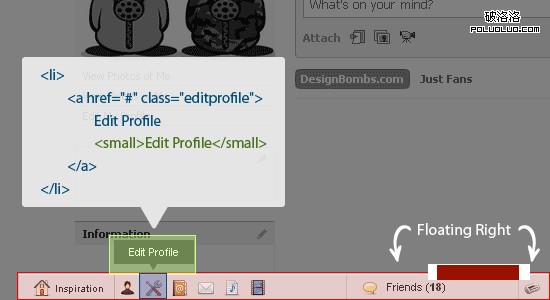
注意:a 標籤內嵌了一個 small 標籤,主要用來實作導航列中的資訊提示。
一、HTML 結構:
<div id="footpanel"> <ul id="mainpanel"> <li><a href="#">Inspiration <small>Design Bombs</small></a></li> <li><a href="#">View Profile <small>View Profile</small></a></li> <li><a href="#">Edit Profile <small>Edit Profile</small></a></li> <li><a href="#">Contacts <small>Contacts</small></a></li> <li><a href="#">Messages (10) <small>Messages</small></a></li> <li><a href="#">Play List <small>Play List</small></a></li> <li><a href="#">Videos <small>Videos</small></a></li> <li id="alertpanel"><a href="#">Alerts</a></li> <li id="chatpanel"><a href="#">Friends (<strong>18</strong>)</a></li> </ul> </div>
二、CSS 樣式:
1. 先將管理面板固定在瀏覽器可視區域底部
#footpanel { position: fixed; bottom: 0; left: 0; z-index: 9999; /*--Keeps the panel on top of all other elements--*/ background: #e3e2e2; border: 1px solid #c3c3c3; border-bottom: none; width: 94%; margin: 0 3%; }
IE6 並不支援 fixed,可透過以下方式修正這個 bug。
*html #footpanel { /*--IE6 Hack - Fixed Positioning to the Bottom--*/ margin-top: -1px; /*--Prevents IE6 from having an infinity scroll bar - due to 1px border on #footpanel--*/ position: absolute; top:expression(eval(document.compatMode &&document.compatMode=='CSS1Compat') ?documentElement.scrollTop+(documentElement.clientHeight-this.clientHeight) : document.body.scrollTop +(document.body.clientHeight-this.clientHeight)); }
注意:這種寫法會拖慢瀏覽器解析速度。替代方案是改用絕對定位 position: absolute;,或在客戶允許的情況下,讓面板在 IE6 中不顯示。
2. 定義無序列表的樣式
#footpanel ul { padding: 0; margin: 0; float: left; width: 100%; list-style: none; border-top: 1px solid #fff; /*--Gives the bevel feel on the panel--*/ font-size: 1.1em; } #footpanel ul li{ padding: 0; margin: 0; float: left; position: relative; } #footpanel ul li a{ padding: 5px; float: left; text-indent: -9999px; /*--For text replacement - Shove text off of the page--*/ height: 16px; width: 16px; text-decoration: none; color: #333; position: relative; } html #footpanel ul li a:hover{ background-color: #fff; } html #footpanel ul li a.active { /*--Active state when sub-panel is open--*/ background-color: #fff; height: 17px; margin-top: -2px; /*--Push it up 2px to attach the active button to sub-panel--*/ border: 1px solid #555; border-top: none; z-index: 200; /*--Keeps the active link on top of the sub-panel--*/ position: relative; }

3. 為每個 a 標籤定義對應的 class 以套用圖示
#footpanel a.home{ background: url(home.png) no-repeat 15px center; width: 50px; padding-left: 40px; border-right: 1px solid #bbb; text-indent: 0; /*--Reset text indent since there will be a combination of both text and image--*/ } a.profile{ background: url(user.png) no-repeat center center; } a.editprofile{ background: url(wrench_screwdriver.png) no-repeat center center; } a.contacts{ background: url(address_book.png) no-repeat center center; } a.messages{ background: url(mail.png) no-repeat center center; } a.playlist{ background: url(document_music_playlist.png) no-repeat center center; } a.videos{ background: url(film.png) no-repeat center center; } a.alerts{ background: url(newspaper.png) no-repeat center center; } #footpanel a.chat{ background: url(balloon.png) no-repeat 15px center; width: 126px; border-left: 1px solid #bbb; border-right: 1px solid #bbb; padding-left: 40px; text-indent: 0; /*--Reset text indent since there will be a combination of both text and image--*/ } #footpanel li#chatpanel, #footpanel li#alertpanel { float: right; } /*--Right align the chat and alert panels--*/

4. 定義資訊提示框:small 標籤預設隱藏,滑鼠移入時才顯示。
#footpanel a small { text-align: center; width: 70px; background: url(pop_arrow.gif) no-repeat center bottom; padding: 5px 5px 11px; display: none; /*--Hide by default--*/ color: #fff; font-size: 1em; text-indent: 0; } #footpanel a:hover small{ display: block; /*--Show on hover--*/ position: absolute; top: -35px; /*--Position tooltip 35px above the list item--*/ left: 50%; margin-left: -40px; /*--Center the tooltip--*/ z-index: 9999; }
原文參考:Facebook Style Footer Admin Panel Part 1
- 上一篇文章: 視覺設計前瞻與實用研究:全面刺激你的感官
- 下一篇文章: 設計觀點:如何在公司內部推行用戶體驗策略