這款效果把一張圖片打碎成數百片玻璃,每片先在畫面上成形,接著沿 3D 軸翻轉、遠離、消失。核心技術是 Delaunay 三角分割加上 TweenMax 時間軸。
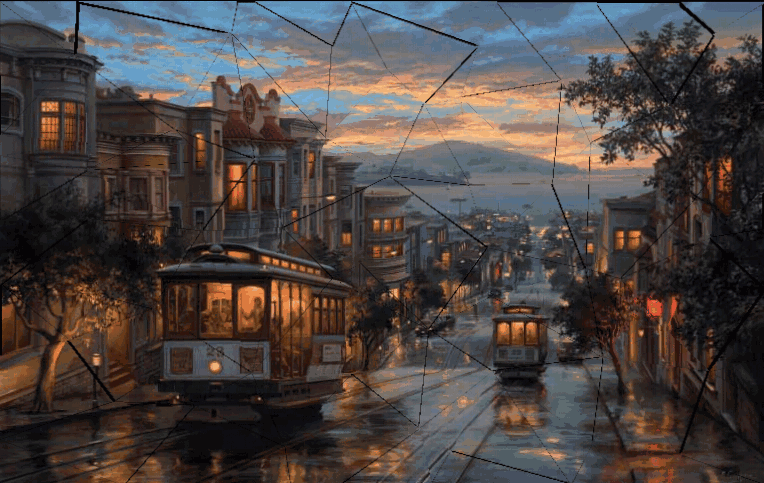
HTML 與相依套件
<img src="city_copy.jpg" id="src_img" class="hidden">
<div id="container" style="-webkit-perspective: 500px;">
<div>
<script src="delaunay.js"></script>
<script src="TweenMax.min.js"></script>
原圖藏在 DOM 裡當素材來源,真正顯示的是 canvas。容器的 perspective 是 3D 效果的基礎——沒有透視,翻轉只會看起來像平面縮放。
主流程
// canvas 設定
var imageWidth = 768, imageHeight = 485;
var vertices = [], indices, boxes = [];
var image, fragments = [],
container = document.getElementById('container');
window.onload = function () {
image = document.getElementById('src_img');
triangulate();
makeBoxes();
makeFragments();
};
三個步驟分工清楚:先分割、再算每片的包圍盒、最後產生動畫。
第一步:三角分割
function triangulate() {
var x, y,
dx = imageWidth / 8, dy = imageHeight / 8, offset = 0.5;
for (var i = 0; i <= imageWidth; i += dx) {
for (var j = 0; j <= imageHeight; j += dy) {
if (i && i !== imageWidth) x = i + randomRange(-dx * offset, dx * offset);
else x = i;
if (j && j !== imageHeight) y = j + randomRange(-dy * offset, dy * offset);
else y = j;
vertices.push([x, y]);
}
}
indices = Delaunay.triangulate(vertices);
}
先在網格上撒點,但 interior 的點會被隨機偏移半格(offset = 0.5),邊界上的點則保持整齊。這個「內部亂、邊緣齊」的處理是畫面像真碎裂而非棋盤的關鍵。接著交由 Delaunay 演算法把點連成三角形,回傳的是索引陣列,每三個一組代表一個三角形。
第二步:算包圍盒
function makeBoxes() {
var p0, p1, p2, xMin, xMax, yMin, yMax;
for (var i = 0; i < indices.length; i += 3) {
p0 = vertices[indices[i + 0]];
p1 = vertices[indices[i + 1]];
p2 = vertices[indices[i + 2]];
xMin = Math.min(p0[0], p1[0], p2[0]);
xMax = Math.max(p0[0], p1[0], p2[0]);
yMin = Math.min(p0[1], p1[1], p2[1]);
yMax = Math.max(p0[1], p1[1], p2[1]);
boxes.push({ x: xMin, y: yMin, w: xMax - xMin, h: yMax - yMin });
}
}
三角形是不規則的,但每片碎片需要一個矩形 canvas 當載體。包圍盒就是能裝下該三角形的最小矩形——多出的部分稍後會被裁掉。
第三步:碎片物件與動畫
Fragment = function (v0, v1, v2, box) {
this.v0 = v0; this.v1 = v1; this.v2 = v2; this.box = box;
this.canvas = document.createElement('canvas');
this.canvas.width = this.box.w;
this.canvas.height = this.box.h;
this.canvas.style.width = this.box.w + 'px';
this.canvas.style.height = this.box.h + 'px';
this.ctx = this.canvas.getContext('2d');
TweenMax.set(this.canvas, { x: this.box.x, y: this.box.y });
this.ctx.translate(-this.box.x, -this.box.y);
this.ctx.beginPath();
this.ctx.moveTo(this.v0[0], this.v0[1]);
this.ctx.lineTo(this.v1[0], this.v1[1]);
this.ctx.lineTo(this.v2[0], this.v2[1]);
this.ctx.closePath();
this.ctx.clip();
this.ctx.drawImage(image, 0, 0);
};
這段是整個特效的核心手法:把座標系平移到包圍盒原點,用三角形路徑做 clip() 裁剪,再把完整原圖畫進去。結果就是「只看得見三角形區域的圖片」,而 canvas 本身是矩形。每片碎片都重畫一次原圖,靠 clip 決定可見範圍。
時間軸:三段式墜落
function makeFragments() {
var p0, p1, p2, box, fragment;
TweenMax.set(container, { perspective: 500 });
var tl0 = new TimelineMax({ repeat: -1 });
for (var i = 0; i < indices.length; i += 3) {
p0 = vertices[indices[i + 0]];
p1 = vertices[indices[i + 1]];
p2 = vertices[indices[i + 2]];
box = boxes[i / 3];
fragment = new Fragment(p0, p1, p2, box);
var rx = randomRange(30, 60) * ((i % 2) ? 1 : -1);
var ry = randomRange(30, 60) * ((i % 2) ? -1 : 1);
var tl1 = new TimelineMax();
TweenMax.set(fragment.canvas, { y: box.y - 1000 });
tl1.to(fragment.canvas, randomRange(0.9, 1.1), {
y: box.y, ease: Back.easeOut
});
tl1.to(fragment.canvas, 0.5, {
z: -100, ease: Cubic.easeIn, delay: 0.4
});
tl1.to(fragment.canvas, randomRange(1, 1.2), {
rotationX: rx, rotationY: ry, z: 250, alpha: 0, ease: Cubic.easeOut
});
tl0.insert(tl1);
fragments.push(fragment);
container.appendChild(fragment.canvas);
}
}
三個細節造就了說服力:
· 時間隨機化:每段動畫的 duration 都用 randomRange 取值,因此碎片不會整齊同步,看起來才像真碎裂。
· rx / ry 依索引正負交錯:(i % 2) ? 1 : -1 讓相鄰碎片往相反方向翻,避免整片同向旋轉的機械感。
· 先退後進:動畫先讓碎片往 z: -100 退(遠離),再翻轉飛向 z: 250(靠近鏡頭)並淡出。先遠後近的距離變化,比單純淡出立體得多。
現代寫法上的調整
· GSAP 的 API 已更新:TimelineMax 改為 gsap.timeline(),tl0.insert(tl1) 改為 tl0.add(tl1),TweenMax.set 改為 gsap.set。
· ease: Back.easeOut 這類字串寫法,新版寫成 ease: "back.out(1.7)"。
· 每片碎片各自一個 canvas,數量多時記憶體負擔不小(DOM 節點與 canvas 各數百個)。可考慮改用單一 WebGL canvas 配合自訂 shader,或降低分割密度。
· 原範例的 repeat: -1 讓動畫無限重播,對部分使用者是負擔。建議只播一次,或加上 prefers-reduced-motion 判斷直接略過動畫顯示靜態圖。
· 純視覺特效請補 aria-hidden="true",並確保不使用 JS 時原圖仍可被看到——目前 class="hidden" 會讓它在無 JS 環境下消失。
- 上一篇文章: 用 Canvas 做一場漫天飛雪:粒子、密度與 recycle
- 下一篇文章: HTML5 影片事件實戰:取得總時長與即時播放進度