繪製橢圓
把現實世界中的物體模擬到電腦裡,一些簡單的物理實驗、碰撞旋轉等,難度還算可控;真正較具挑戰的,當屬流體模擬。
本文將在 Canvas 當中模擬一個 2D 平面上的水珠,涉及的知識點與技巧包括:Jscex 基礎知識、貝茲曲線的繪製,以及如何善用 CanvasRenderingContext2D 的 translate 與 rotate 等 API。
在模擬水滴之前,我們先來思考一下:該如何在 canvas 中繪製一個橢圓?
大家應該不難想到下面幾種方案:
1. 依據橢圓的笛卡兒座標系方程式繪製
2. 依據橢圓的極座標方程式繪製
3. 依據橢圓曲率變化繪製
4. 利用四條貝茲曲線繪製
其中第四種,也是效能最佳的一種,因為它能避免複雜的計算,並充分發揮 CanvasRenderingContext2D 的 API(這些 API 都經過嚴格測試,一般情況下相當可靠)。因此,我們採用第四種方式來繪製橢圓。
var canvas;
var ctx;
ctx = canvas.getContext(“2d”);
ctx.strokeStyle = “#fff”;
function drawEllipse(x, y, w, h) {
var k = 0.5522848;
var ox = (w / 2) * k;
var oy = (h / 2) * k;
var xe = x + w;
var ye = y + h;
var xm = x + w / 2;
var ym = y + h / 2;
ctx.beginPath();
ctx.moveTo(x, ym);
ctx.bezierCurveTo(x, ym – oy, xm – ox, y, xm, y);
ctx.bezierCurveTo(xm + ox, y, xe, ym – oy, xe, ym);
ctx.bezierCurveTo(xe, ym + oy, xm + ox, ye, xm, ye);
ctx.bezierCurveTo(xm – ox, ye, x, ym + oy, x, ym);
ctx.stroke();
ctx.clearRect(0,0,canvas.width,canvas.border=”1″ Height);
drawEllipse(10, 10, 40, 82);
(試著改動 drawEllipse 的四個參數看看)
旋轉橢圓
這裡的旋轉,並非繞著 drawEllipse 的前兩個參數 x、y 旋轉,而是繞橢圓的中心旋轉。因此,僅靠 CanvasRenderingContext2D.rotate 是不夠的,因為它是繞畫布左上角(0,0)旋轉的。所以我們得先用 CanvasRenderingContext2D.translate 把原點(0,0)移到橢圓的中心,接著再呼叫 drawEllipse(-a/2, –b/2, a, b)。
這一句,正是「繞中心旋轉」的核心所在。它還可以推廣到任意圖形或圖片(前提是事先約定好中心點)。如下圖:
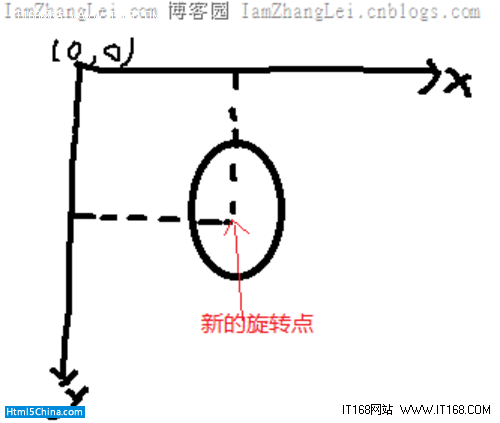
旋轉橢圓的完整實作
接著,我們就可以先畫出一個鳥巢出來:
html>
head>
script src=”https://files.cnblogs.com/iamzhanglei/jscex.jscexRequire.min.js” type=”text/javascript”>script>
head>
body>
style type=”text/css”>
input.css3btn
background: -moz-linear-gradient(270deg, #d2ebf8, #0c8ab5);
background: -webkit-linear-gradient(top, #d2ebf8, #0c8ab5);
background: -o-linear-gradient(top, #d2ebf8, #0c8ab5);
filter: progid:DXImageTransform.Microsoft.Gradient(GradientType=0, StartColorStr=”#000099CC”, EndColorStr=”#FF0087B4″);
border-top: 1px solid #38538c;
border-right: 1px solid #1f2d4d;
border-bottom: 1px solid #151e33;
border-left: 1px solid #1f2d4d;
border-radius: 4px;
box-shadow: inset 0 1px 10px 1px #5c8bee, 0px 1px 0 #1d2c4d, 0 2px 0px #1f3053, 0 4px 4px 1px #111111;
color: #f0f0f0;
font: bold 20px “helvetica neue” , helvetica, arial, sans-serif;
padding: 10px 0 10px 0;
text-align: center;
text-shadow: 0px -1px 1px #1e2d4d;
width: 150px;
background-clip: padding-box;
input.css3btn:hover
box-shadow: inset 0 0px 20px 1px #87adff, 0px 1px 0 #1d2c4d, 0 3px 0px #1f3053, 0 4px 4px 1px #111111;
cursor: pointer;
input.css3btn:active
box-shadow: inset 0 1px 10px 1px #5c8bee, 0 1px 0 #1d2c4d, 0 2px 0 #1f3053, 0 4px 3px 0 #111111;
style>
canvas width=”350″ border=”1″ height=”350″ style=”border: solid 15px #222; background-color: #111;
color: #CCC;”>
Your browser does not support the canvas element.
canvas>
script>
var canvas;
var ctx;
var px = 0;
var py = 0;
function init() {
ctx = canvas.getContext(“2d”);
ctx.strokeStyle = “#fff”;
ctx.translate(70, 70);
init();
var i = 0;
function drawEllipse(x, y, w, h) {
var k = 0.5522848;
var ox = (w / 2) * k;
var oy = (h / 2) * k;
var xe = x + w;
var ye = y + h;
var xm = x + w / 2;
var ym = y + h / 2;
ctx.beginPath();
ctx.moveTo(x, ym);
ctx.bezierCurveTo(x, ym – oy, xm – ox, y, xm, y);
ctx.bezierCurveTo(xm + ox, y, xe, ym – oy, xe, ym);
ctx.bezierCurveTo(xe, ym + oy, xm + ox, ye, xm, ye);
ctx.bezierCurveTo(xm – ox, ye, x, ym + oy, x, ym);
ctx.stroke();
ctx.translate(x + 70, y + 100);
px = -70;
py = -100;
ctx.rotate(10 * Math.PI * 2 / 360);
var ct;
var drawAsync = eval(Jscex.compile(“async”, function (ct) {
while (true) {
drawEllipse(px, py, 140, 200)
$await(Jscex.Async.sleep(200, ct));
}))
function Button1_onclick() {
ct.cancel();
function Button2_onclick() {
ct = new Jscex.Async.CancellationToken();
drawAsync(ct).start();
script>
br />
input type=”button” value=”run” onclick=”return Button2_onclick()” />
input type=”button” value=”stop” onclick=”return Button1_onclick()” />
body>
html>
繪製水滴
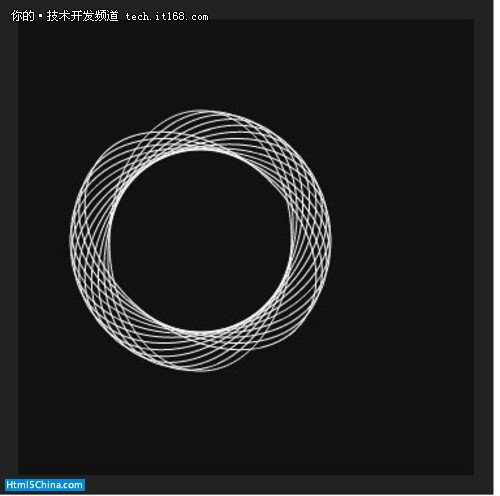
那麼,旋轉的橢圓和鳥巢,跟水滴又有什麼關係呢?
關鍵在於:我們透過調整橢圓的長軸與短軸,讓它極度接近正圓(只能接近,不能等於正圓),然後在每次旋轉後擦除畫布,就能得到你意想不到的效果!
這裡要特別注意,擦除畫布不再是簡單一句 ctx.clearRect(0,0,canvas.width,canvas.border=”1″ Height) 就能搞定,因為此時畫布已經旋轉、原點也已經 translate 過了,所以我們改用 ctx.clearRect(-canvas.width, -canvas.border=”1″ Height, 2 * canvas.width, 2 * canvas.border=”1″ Height) 來擦除畫布。
我們畫一個長軸 42、短軸 40 的橢圓,旋轉並擦除畫布:
function drawEllipse(x, y, w, h) {
ctx.clearRect(-canvas.width, -canvas.border=”1″ Height, 2 * canvas.width, 2 * canvas.border=”1″ Height);
var k = 0.5522848;
var ox = (w / 2) * k;
var oy = (h / 2) * k;
var xe = x + w;
var ye = y + h;
var xm = x + w / 2;
var ym = y + h / 2;
ctx.beginPath();
ctx.moveTo(x, ym);
ctx.bezierCurveTo(x, ym – oy, xm – ox, y, xm, y);
ctx.bezierCurveTo(xm + ox, y, xe, ym – oy, xe, ym);
ctx.bezierCurveTo(xe, ym + oy, xm + ox, ye, xm, ye);
ctx.bezierCurveTo(xm – ox, ye, x, ym + oy, x, ym);
ctx.stroke();
ctx.translate(x + 20, y + 21);
px = -20;
py = -21;
ctx.rotate(10 * Math.PI * 2 / 360);
var ct;
var drawAsync = eval(Jscex.compile(“async”, function (ct) {
while (true) {
drawEllipse(px, py, 40, 42)
$await(Jscex.Async.sleep(10, ct));
}))
會是什麼效果呢?不妨到線上 demo 一探究竟:
https://www.cnblogs.com/iamzhanglei/archive/2011/12/12/2284188.html
現在,大家應該能看到一顆搖曳晃動的水珠了。
- 上一篇文章: HTML5 標籤使用的常見誤區盤點
- 下一篇文章: HTML5 行動應用開發(一):結合地理定位 API 與 Web 服務