HTML5 賦予 document 物件一組相當實用的屬性,讓我們能讀取頁面的編碼、網域、載入狀態,甚至直接操作 cookie。這篇就按主題把它們一項項走過。
1. 讀取 Document Metadata
先看有哪些可用的屬性:
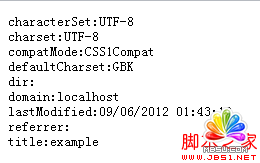
characterSet:取得目前文件的編碼方式,唯讀。charset:取得或設定文件編碼。compatMode:取得目前的相容模式。cookie:取得或設定 cookie。defaultCharset:瀏覽器預設的編碼方式。defaultView:取得文件所屬的 window 物件。dir:取得或設定文字對齊方向。domain:取得或設定網域。implementation:回報瀏覽器支援的 DOM 特性。lastModified:最後修改時間;若無紀錄則回傳當前時間。location:目前文件的 URL 資訊。readyState:文件目前的載入狀態,唯讀。referrer:連到目前頁面的來源網址。title:取得或設定文件標題。
實際跑一遍看看:
<!DOCTYPE Html>
<Html>
<head>
<title>example</title>
</head>
<body>
<script type="text/Javascript">
document.writeln('<pre>');
document.writeln('characterSet:' + document.characterSet);
document.writeln('charset:' + document.charset);
document.writeln('compatMode:' + document.compatMode);
document.writeln('defaultCharset:' + document.defaultCharset);
document.writeln('dir:' + document.dir);
document.writeln('domain:' + document.domain);
document.writeln('lastModified:' + document.lastModified);
document.writeln('referrer:' + document.referrer);
document.writeln('title:' + document.title);
document.writeln('</pre>');
</script>
</body>
</Html>
輸出結果如下(不同瀏覽器顯示的內容可能略有差異):
2. 看懂相容模式 compatMode
網路上有大量不合規範的 HTML,瀏覽器為了把這些老頁面顯示出來,會切換到不同的處理模式。compatMode 就是告訴你目前頁面正被怎麼對待,它只會回傳兩個值:
CSS1Compat:文件符合有效的 HTML 規範(不一定得是 HTML5,通過驗證的 HTML4 頁面同樣回傳這個值)。BackCompat:文件含有不合規範的寫法,觸發了「相容模式」,瀏覽器會盡量模仿早期瀏覽器的行為。
3. 使用 Location 物件
document.location 回傳一個 Location 物件,除了提供細粒度的網址資訊,也能用來導向其他頁面。常用成員如下:
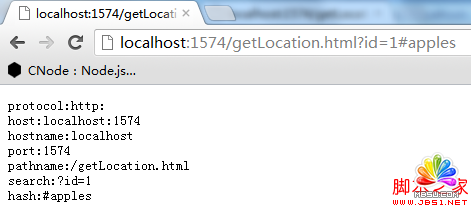
protocol:協定。host:主機與連接埠。hostname:主機名稱。port:連接埠。pathname:路徑。href:完整網址。search:查詢字串部分。hash: (#) 之後的錨點部分。assign(url):導向指定網址。replace(url):移除目前文件後導向指定網址(不會留下歷史紀錄)。reload():重新載入目前頁面。resolveURL(url):把相對路徑轉為絕對路徑。
搭配範例:
<!DOCTYPE html PUBLIC "-//W3C//DTD XHTML 1.0 Transitional//EN" "https://www.w3.org/TR/xhtml1/DTD/xhtml1-transitional.dtd">
<Html xmlns="https://www.w3.org/1999/xhtml">
<head>
<title></title>
</head>
<body>
<script type="text/Javascript">
document.writeln('<pre>');
document.writeln('protocol:' + document.location.protocol);
document.writeln('host:' + document.location.host);
document.writeln('hostname:' + document.location.hostname);
document.writeln('port:' + document.location.port);
document.writeln('pathname:' + document.location.pathname);
document.writeln('search:' + document.location.search);
document.writeln('hash:' + document.location.hash);
document.writeln('</pre>');
</script>
</body>
</Html>
結果:
4. 讀寫 Cookie
document.cookie 同時負責讀取與寫入,一次只能新增或修改一個 cookie,寫入時以「名稱=值」的形式指派即可:
<!DOCTYPE Html>
<Html>
<head>
<title>Example</title>
<meta name="author" content="Adam Freeman" />
<meta name="description" content="A simple example" />
</head>
<body>
<p id="cookieData"></p>
<button id="write">Add Cookie</button>
<button id="update">Update Cookie</button>
<button id="clear">Clear Cookie</button>
<script type="text/Javascript">
var cookieCount = 0;
document.getElementById('update').onclick = updateCookie;
document.getElementById('write').onclick = createCookie;
document.getElementById('clear').onclick = clearCookie;
readCookies();

function readCookies() {
  document.getElementById('cookieData').innerHTML = !document.cookie ? '' : document.cookie;
}

function updateCookie() {
  document.cookie = 'cookie_' + cookieCount + '=update_' + cookieCount;
  readCookies();
}

function createCookie() {
  cookieCount++;
  document.cookie = 'cookie_' + cookieCount + '=value_' + cookieCount;
  readCookies();
}

function clearCookie() {
  var exp = new Date();
  exp.setTime(exp.getTime() - 1);
  var arrStr = document.cookie.split("; ");
  for (var i = 0; i < arrStr.length; i++) {
    var temp = arrStr[i].split("=");
    if (temp[0]) {
      document.cookie = temp[0] + "=;expires=" + exp.toGMTString();
    }
  }
  cookieCount = 0;
  readCookies();
}
</script>
</body>
</Html>
這裡有兩個實務上必須知道的限制:一是瀏覽器不提供「刪除 cookie」的 API,只能把過期時間設成過去,讓它自然失效;二是 document.cookie 回傳的是所有 cookie 串接後的字串,沒有結構化介面,解析得自己做。
執行結果:

5. 理解 readyState
document.readyState 用來追蹤頁面在載入與解析過程中所處的階段。要注意的是,瀏覽器遇到 script 元素會立刻執行,除非你加上 defer 屬性把它延後。它有三個可能值:
loading:瀏覽器正在載入並執行文件。interactive:文件解析完成,但外部資源(媒體、圖片等)還在下載。complete:頁面解析結束,外部資源也全部載入完畢。
整個過程中,值會依序從 loading → interactive → complete 推進。搭配 readystatechange 事件(狀態改變時觸發)使用,就能做出可靠的「延遲初始化」:
<!DOCTYPE Html>
<Html>
<head>
<title>Example</title>
<script>
document.onreadystatechange = function () {
  if (document.readyState == "interactive") {
    document.getElementById("pressme").onclick = function () {
      document.getElementById("results").innerHTML = "Button Pressed";
    }
  }
}
</script>
</head>
<body>
<button id="pressme">Press Me</button>
<pre id="results"></pre>
</body>
</Html>
這段程式等到文件解析到 interactive 才替按鈕掛上 click 事件,確保目標元素已經存在,避免拿到 null 而拋出錯誤。今天更常見的寫法是直接把 script 放到 body 尾端,或用 DOMContentLoaded 監聽,但背後的原理是一樣的。
6. 偵測 DOM 特性支援情況
document.implementation 回傳一個 DOMImplementation 物件,其中的 hasFeature 方法可以查詢瀏覽器對某項 DOM 規格的支援等級:
<!DOCTYPE Html>
<Html>
<head>
<title>Example</title>
<meta name="author" content="Adam Freeman" />
<meta name="description" content="A simple example" />
</head>
<body>
<script>
var features = ["Core", "Html", "CSS", "Selectors-API"];
var levels = ["1.0", "2.0", "3.0"];
document.writeln("<pre>");
for (var i = 0; i < features.length; i++) {
  document.writeln("Checking for feature: " + features[i]);
  for (var j = 0; j < levels.length; j++) {
    document.write(features[i] + " Level " + levels[j] + ": ");
    document.writeln(document.implementation.hasFeature(features[i], levels[j]));
  }
}
document.write("</pre>")
</script>
</body>
</Html>
效果:
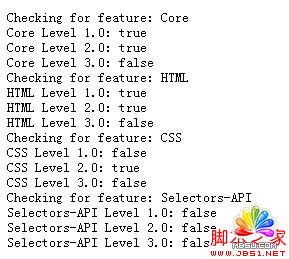
補充一點現況:hasFeature 已被規範標示為 deprecated,永遠回傳 true 的情況在現代瀏覽器中很常見。判斷 API 是否可用時,直接檢查物件與方法是否存在(例如 if (el.addEventListener))才是可靠做法。