HTML5 Web Storage 實作:localStorage 與 sessionStorage 本地資料儲存案例
編輯:HTML5詳解
本文示範如何以 HTML5 Web Storage 的 localStorage 與 sessionStorage,把網頁資料存到使用者本機,並在需要時讀回來顯示。
如下圖所示的頁面,可以將輸入的資料做本地儲存,也能讀取已儲存的內容並呈現在頁面上。
兩者的差別
localStorage(本地儲存):屬於長期保存,沒有時間限制。一天、一年、兩年甚至更久,只要沒有被程式或使用者主動清除,資料就一直可用。
sessionStorage(工作階段儲存):只在瀏覽器未關閉前有效。同一工作階段中開啟新頁面時仍可共用,但一旦關閉瀏覽器,資料隨之消失。
瀏覽器支援概況
有网友整理過各家的支援時程,大致如下:
Chrome 4+ 開始支援 localStorage
Firefox 3.5+ 支援 localStorage,Firefox 1.5+ 支援 globalStorage
IE8+ 支援 localStorage,IE7 相容模式亦可,IE5.5+ 支援 userdata
Safari 4+ 支援 localStorage
Opera 10.5+ 支援 localStorage
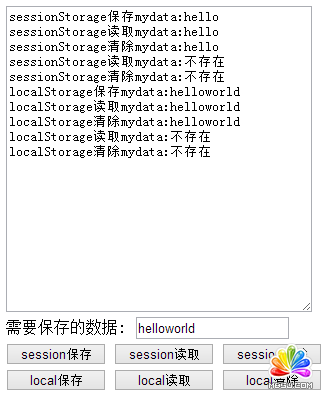
完整範例程式碼
<!DOCTYPE Html>
<Html XMLns="https://www.w3.org/1999/xHtml">
<head>
<meta http-equiv="Content-Type" content="text/Html; charset=utf-8" />
<title></title>
<style type="text/CSS">
textarea {
  width: 300px;
  height: 300px;
}
.button {
  width: 100px;
}
</style>
</head>
<body>
<script type="text/Javascript">
// 使用 HTML5 Web Storage 的 localStorage 與 sessionStorage 進行本地資料儲存
function saveSession() {
  var t1 = document.getElementById("t1");
  var t2 = document.getElementById("t2");
  var mydata = t2.value;
  var oStorage = window.sessionStorage;
  oStorage.mydata = mydata;
  t1.value += "sessionStorage 保存 mydata:" + mydata + "\n";
}
function readSession() {
  var t1 = document.getElementById("t1");
  var oStorage = window.sessionStorage;
  var mydata = "不存在";
  if (oStorage.mydata) {
    mydata = oStorage.mydata;
  }
  t1.value += "sessionStorage 讀取 mydata:" + mydata + "\n";
}
function cleanSession() {
  var t1 = document.getElementById("t1");
  var oStorage = window.sessionStorage;
  var mydata = "不存在";
  if (oStorage.mydata) {
    mydata = oStorage.mydata;
  }
  oStorage.removeItem("mydata");
  t1.value += "sessionStorage 清除 mydata:" + mydata + "\n";
}
function saveStorage() {
  var t1 = document.getElementById("t1");
  var t2 = document.getElementById("t2");
  var mydata = t2.value;
  var oStorage = window.localStorage;
  oStorage.mydata = mydata;
  t1.value += "localStorage 保存 mydata:" + mydata + "\n";
}
function readStorage() {
  var t1 = document.getElementById("t1");
  var oStorage = window.localStorage;
  var mydata = "不存在";
  if (oStorage.mydata) {
    mydata = oStorage.mydata;
  }
  t1.value += "localStorage 讀取 mydata:" + mydata + "\n";
}
function cleanStorage() {
  var t1 = document.getElementById("t1");
  var oStorage = window.localStorage;
  var mydata = "不存在";
  if (oStorage.mydata) {
    mydata = oStorage.mydata;
  }
  oStorage.removeItem("mydata");
  t1.value += "localStorage 清除 mydata:" + mydata + "\n";
}
</script>
<div>
<textarea id="t1"></textarea>
<label>需要保存的數據: </label>
<input type="text" id="t2" />
<input type="button" class="button" onclick="saveSession()" name="b1" value="session保存" />
<input type="button" class="button" onclick="readSession()" value="session讀取" />
<input type="button" class="button" onclick="cleanSession()" value="session清除" />
<input type="button" class="button" onclick="saveStorage()" value="local保存" />
<input type="button" class="button" onclick="readStorage()" value="local讀取" />
<input type="button" class="button" onclick="cleanStorage()" value="local清除" />
</div>
</body>
</Html>
選用建議
判斷標準其實很單純:需要跨工作階段保留的資料(例如使用者偏好、草稿內容)放 localStorage;只在當前操作流程中有意義的暫存狀態(例如多步驟表單的中間值)放 sessionStorage。另外要提醒,Web Storage 以純文字形式存放在使用者本機,不應承載敏感資訊,也不該把它當成正式資料庫使用。
- 上一篇文章: Bootstrap 學習分享:一小時上手的前端框架入門筆記
- 下一篇文章: HTML5 安全入門:內容安全策略 CSP 完整解析