HTML5 Canvas 平移、縮放與旋轉實作示例
編輯:HTML5詳解
Canvas 的 2D context 提供了 translate、scale、rotate 三個變形 API。理解它們的關鍵在於:這些方法改變的是座標系統本身,而不是個別圖形的位置。
一、平移 translate(x, y)
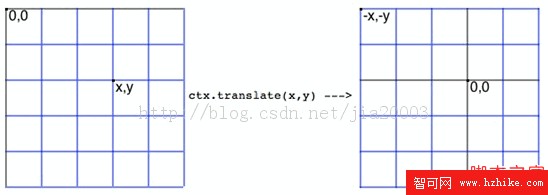
translate(x, y) 的效果是把原點 (0, 0) 搬到 (x, y)。反過來說,原本 (0, 0) 那個位置在新座標系裡變成了 (-x, -y)。因此任何原本座標為 p(ox, oy) 的點,平移後的實際位置會是 p(ox - x, oy - y)。
// 把原點移到畫布中心,畫完再移回左上角
function renderText(width, height, context) {
  context.translate(width / 2, height / 2);   // 此時 (0, 0) 位於中心
  context.font = '18px Arial';
  context.fillStyle = 'blue';
  context.fillText('Please Press <Esc> to Exit Game', 5, 50);

  context.translate(-width / 2, -height / 2); // 平移回左上角
  context.fillText("I'm Back to Top", 5, 50);
}
二、縮放 scale(a, b)
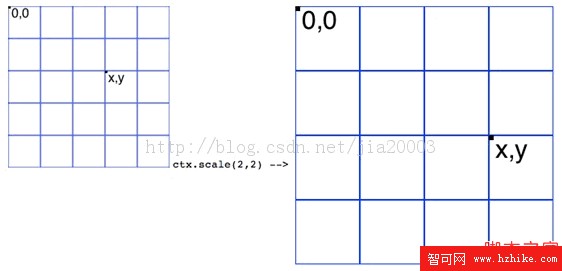
scale(a, b) 會把後續繪製的內容沿 X 軸放大 a 倍、沿 Y 軸放大 b 倍。注意線寬也會一起被放大,這點常常讓人意外。
function drawPath(context) {
  context.translate(200, 200);
  context.scale(2, 2);        // 放大為原本兩倍
  context.strokeStyle = 'green';
  context.beginPath();
  context.moveTo(0, 40);
  context.lineTo(80, 40);
  context.lineTo(40, 80);
  context.closePath();
  context.stroke();
}
三、旋轉 rotate(angle)
rotate 的參數是弧度而非角度,90 度要寫成 Math.PI / 2,Canvas 中旋轉的預設方向為順時針。旋轉前後的座標換算如下:
Rx = x * Math.cos(angle) - y * Math.sin(angle);
Ry = y * Math.cos(angle) + x * Math.sin(angle);
以 90 度為例,因為 cos(90°) = 0、sin(90°) = 1,公式可以簡化為:
Rx = -y;
Ry =  x;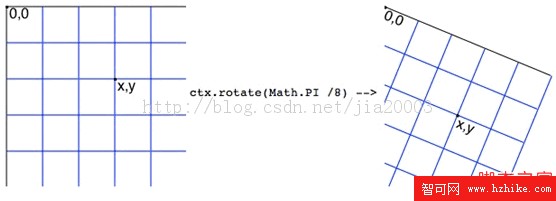
function renderRotateText(context) {
  context.font = '24px Arial';
  context.fillStyle = 'red';
  context.fillText("i'm here!!!", 5, 50);

  // 順時針旋轉 90 度
  context.rotate(Math.PI / 2);
  context.fillStyle = 'blue';
  context.fillText("i'm here!!!", 350, -420);

  // 旋轉後再畫四條橫線,套用 90 度的簡化公式
  context.fillStyle = 'green';
  for (var i = 0; i < 4; i++) {
    var x = (i + 1) * 20;
    var y = (i + 1) * 60;
    context.fillRect(y, -x, 200, 6);
  }
}
四、實務上的標準組合:先平移再旋轉
如果直接對一個位於 (100, 200) 的物件呼叫 rotate,它會繞著畫布原點轉,而不是繞著自己轉,結果就是物件被甩出畫面。正確做法通常是先把原點搬到物件中心,再旋轉,最後用 save / restore 把狀態還原,避免影響後續繪製:
function saveAndRestoreContext(context) {
  context.save();
  context.translate(200, 200);
  context.rotate(Math.PI / 2);
  context.fillStyle = 'black';
  context.fillText('2D Context Rotate And Translate', 10, 10);
  context.restore();   // 回到呼叫前的狀態

  // 這行會畫在未旋轉、未平移的正常座標系上
  context.fillText('2D Context Rotate And Translate', 10, 10);
}
save() 會把目前的完整狀態(含變形矩陣、樣式設定)壓入堆疊,restore() 則把最近一次存下的狀態彈出還原。這比手動用反向 translate、反向 rotate 抵銷要可靠得多,組合多層變形時尤其明顯。
五、完整 JavaScript 代碼
var tempContext = null;   // 全域 2D context

window.onload = function () {
  var canvas = document.getElementById('target');
  canvas.width  = 450;
  canvas.height = 450;

  if (!canvas.getContext) {
    console.log('此瀏覽器不支援 Canvas,請改用 HTML5 相容的瀏覽器。');
    return;
  }

  tempContext = canvas.getContext('2d');
  // renderText(canvas.width, canvas.height, tempContext);
  // drawPath(tempContext);
  saveAndRestoreContext(tempContext);
};

// 平移:把原點移到中心再移回左上角
function renderText(width, height, context) {
  context.translate(width / 2, height / 2);
  context.font = '18px Arial';
  context.fillStyle = 'blue';
  context.fillText('Please Press <Esc> to Exit Game', 5, 50);
  context.translate(-width / 2, -height / 2);
  context.fillText("I'm Back to Top", 5, 50);
}

// 平移後縮放並描邊
function drawPath(context) {
  context.translate(200, 200);
  context.scale(2, 2);
  context.strokeStyle = 'green';
  context.beginPath();
  context.moveTo(0, 40);
  context.lineTo(80, 40);
  context.lineTo(40, 80);
  context.closePath();
  context.stroke();
}

// 旋轉
function renderRotateText(context) {
  context.font = '24px Arial';
  context.fillStyle = 'red';
  context.fillText("i'm here!!!", 5, 50);

  context.rotate(Math.PI / 2);
  context.fillStyle = 'blue';
  context.fillText("i'm here!!!", 350, -420);

  context.fillStyle = 'green';
  for (var i = 0; i < 4; i++) {
    var x = (i + 1) * 20;
    var y = (i + 1) * 60;
    context.fillRect(y, -x, 200, 6);
  }
}

// 平移 + 旋轉 + 狀態還原
function saveAndRestoreContext(context) {
  context.save();
  context.translate(200, 200);
  context.rotate(Math.PI / 2);
  context.fillStyle = 'black';
  context.fillText('2D Context Rotate And Translate', 10, 10);
  context.restore();
  context.fillText('2D Context Rotate And Translate', 10, 10);
}- 上一篇文章: HTML5 Canvas 滑鼠與鍵盤事件實戰示例
- 下一篇文章: HTML5 input 標籤常用屬性示例整理