HTML5 地理定位實作:取得位置並標記在 Google 地圖上
編輯:HTML5詳解
這個範例示範如何運用 HTML5 的 Geolocation 功能來實現地理定位:取得本機的位置資訊,判斷所在座標,並將它標記顯示於 Google 地圖之上。
實例效果圖:
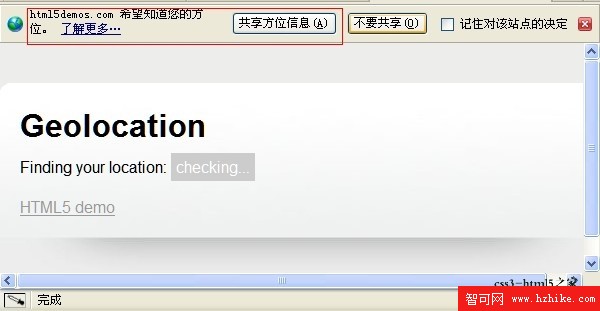
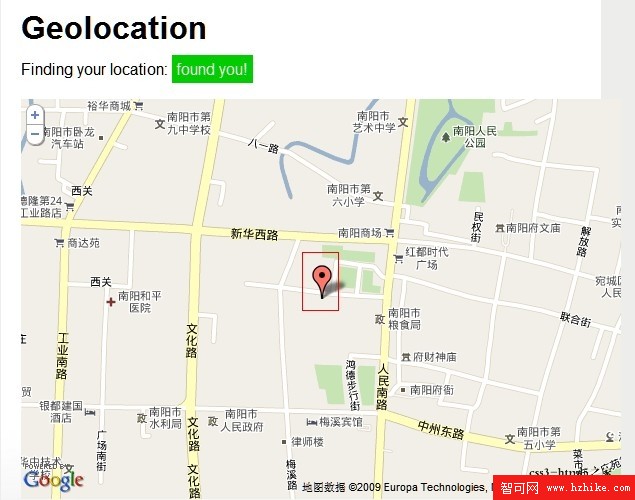
該實例預覽網址:https://html5demos.com/geo
實例程式碼:
<!DOCTYPE html>
<html lang="en" xmlns="https://www.w3.org/1999/xhtml">
<head>
<meta http-equiv="Content-Type" content="text/html;charset=utf-8" />
<meta name="viewport" content="width=620" />
<title>HTML5 Demo: geolocation</title>
<style>
body {
   font: normal 16px/20px Helvetica, sans-serif;
   background: rgb(237, 237, 236);
   margin: 0;
   margin-top: 40px;
   padding: 0;
}

section, header, footer {
   display: block;
}

#wrapper {
   width: 600px;
   margin: 0 auto;
   background: #fff url(images/shade.jpg) repeat-x center bottom;
   -moz-border-radius: 10px;
   -webkit-border-radius: 10px;
   border-top: 1px solid #fff;
   padding-bottom: 76px;
}

h1 {
   padding-top: 10px;
}

h2 {
   font-size: 100%;
   font-style: italic;
}

header,
article > *,
footer > * {
   margin: 20px;
}

footer > * {
   margin: 20px;
   color: #999;
}

#status {
   padding: 5px;
   color: #fff;
   background: #ccc;
}

#status.fail {
   background: #c00;
}

#status.success {
   background: #0c0;
}

</style>
<script src="h5utils.js"></script>
<script type="text/javascript" src="https://maps.google.com/maps/api/js?sensor=false"></script>
</head>
<body>
<section id="wrapper">
   <header>
   <h1>Geolocation</h1>
   </header>
   <article>
   <p>Finding your location: <span id="status">checking...</span></p>
   </article>
   <footer><a href="/">HTML5 demo</a></footer>
</section>

<script>
function success(position) {
 var s = document.querySelector('#status');

 if (s.className == 'success') {
  // 在 Firefox 中可能被觸發兩次,推測與快取結果有關
  return;
 }

 s.innerHTML = "found you!";
 s.className = 'success';

 var mapcanvas = document.createElement('div');
 mapcanvas.id = 'mapcanvas';
 mapcanvas.style.height = '400px';
 mapcanvas.style.width = '100%';

 document.querySelector('article').appendChild(mapcanvas);

 var latlng = new google.maps.LatLng(position.coords.latitude, position.coords.longitude);
 var myOptions = {
  zoom: 15,
  center: latlng,
  mapTypeControl: false,
  navigationControlOptions: {style: google.maps.NavigationControlStyle.SMALL},
  mapTypeId: google.maps.MapTypeId.ROADMAP
 };
 var map = new google.maps.Map(document.getElementById("mapcanvas"), myOptions);

 var marker = new google.maps.Marker({
  position: latlng,
  map: map,
  title: "You are here!"
 });
}

function error(msg) {
 var s = document.querySelector('#status');
 s.innerHTML = typeof msg == 'string' ? msg : "failed";
 s.className = 'fail';
}

if (navigator.geolocation) {
 navigator.geolocation.getCurrentPosition(success, error);
} else {
 error('not supported');
}
</script>
</body>
</html>
這段程式碼的核心在於 navigator.geolocation.getCurrentPosition():當瀏覽器成功取得座標後便呼叫 success 函式,將位置以標記(Marker)呈現在 Google 地圖上;若失敗或瀏覽器不支援,則由 error 函式回報狀態。
- 上一篇文章: 15 個值得收藏的 HTML5 優質資源
- 下一篇文章: HTML5 新標準重點解析:從語意結構到現代網頁設計