本文詳細介紹AngularJS中的依賴注入機制,它對JavaScript各組件的使用起到非常重要的作用,需要的朋友可以參考。
依賴注入是一種軟件設計模式,它把組件內硬編碼的依賴關係改為外部提供。這樣能減輕組件定位依賴、配置依賴的負擔,有助於使組件可復用、易維護、易測試。
AngularJS提供了一套完善的依賴注入機制,可以讓以下核心組件互相注入:值、工廠、服務、提供者、常值。
值
值是簡單的JavaScript對象,用來在配置階段向控制器傳遞值。
// 定義模塊
var mainApp = angular.module("mainApp", []);
// 創建一個值對象"defaultInput"並傳入數據
mainApp.value("defaultInput", 5);
// 透過名稱"defaultInput"把值注入控制器
mainApp.controller('CalcController', function($scope, CalcService, defaultInput) {
$scope.number = defaultInput;
$scope.result = CalcService.square($scope.number);
$scope.square = function() { $scope.result = CalcService.square($scope.number); }
});
工廠
工廠用於返回函數的值,它根據需求創造值,每當一個服務或控制器需要時。它通常使用一個工廠函數來計算並返回對應值。
// 定義模塊
var mainApp = angular.module("mainApp", []);
// 創建一個工廠"MathService",提供multiply方法返回兩數相乘
mainApp.factory('MathService', function() {
var factory = {};
factory.multiply = function(a, b) { return a * b }
return factory;
});
// 把工廠"MathService"注入到服務中使用multiply方法
mainApp.service('CalcService', function(MathService){
this.square = function(a) { return MathService.multiply(a,a); }
});
服務
服務是一個單一的JavaScript對象,包含一組函數來執行某些任務。服務使用service()函數定義,然後注入到控制器中。
// 定義模塊
var mainApp = angular.module("mainApp", []);
// 創建一個服務,定義square方法返回一個數的平方
mainApp.service('CalcService', function(MathService){
this.square = function(a) { return MathService.multiply(a,a); }
});
// 把服務"CalcService"注入到控制器
mainApp.controller('CalcController', function($scope, CalcService, defaultInput) {
$scope.number = defaultInput;
$scope.result = CalcService.square($scope.number);
$scope.square = function() { $scope.result = CalcService.square($scope.number); }\br />});
提供者
提供者用於AngularJS內部創建過程中的配置階段(即AngularJS引導自身期間)創建服務、工廠等。提供者是一個特殊的工廠方法,帶有get()方法用來返回值/服務/工廠。
// 定義模塊
var mainApp = angular.module("mainApp", []);
// 用provider創建一個服務,定義square方法返回一個數的平方
mainApp.config(function($provide) {
$provide.provider('MathService', function() {
this.$get = function() {
var factory = {};
factory.multiply = function(a, b) { return a * b; }
return factory;
};
});
});
常數
常數用於在配置階段傳遞值,因為值無法在配置階段被傳遞。
mainApp.constant("configParam", "constant value");
例子
下面的例子展示了上述所有內容。
testAngularJS.html
<html>
<head>
<title>AngularJS Dependency Injection</title>
</head>
<body>
<h2>AngularJS Sample Application</h2>
<div ng-app="mainApp" ng-controller="CalcController">
<p>Enter a number: <input type="number" ng-model="number" /> <button ng-click="square()">X<sup>2</sup></button>
<p>Result: {{result}}</p>
</div>
<script src="https://ajax.googleapis.com/ajax/libs/angularjs/1.2.15/angular.min.js"></script>
<script>
var mainApp = angular.module("mainApp", []);
mainApp.value("defaultInput", 5);
mainApp.factory('MathService', function() {
var factory = {};
factory.multiply = function(a, b) { return a * b; }
return factory;
});
mainApp.service('CalcService', function(MathService){
this.square = function(a) { return MathService.multiply(a,a); }
});
mainApp.controller('CalcController', function($scope, CalcService, defaultInput) {
$scope.number = defaultInput;
$scope.result = CalcService.square($scope.number);
$scope.square = function() { $scope.result = CalcService.square($scope.number); }\br /> });
</script>
</body>
</html>
結果
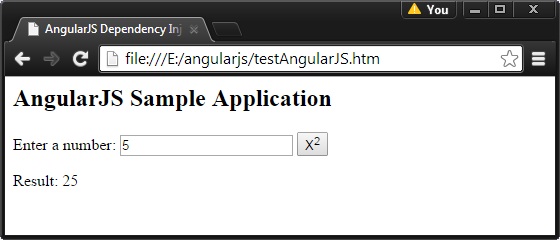
在Web瀏覽器中打開textAngularJS.html,看到的結果如下:
- 上一篇文章: AngularJS中使用factory和service的方法介紹
- 下一篇文章: 詳解AngularJS自定義指令的使用